
• Shopping Cart Shopping Cart
    0Shopping Cart
Clixio
  • Features
  • Pricing
  • FAQ
  • Blog
  • Log in
  • Free Trial
  • Menu Menu

Social Planner: Linkedin Carousel Post and Post PDF as photos

October 23, 2024/in What's New? Social Planner

Social Planner now offers a powerful new feature: users can upload photos and post them as PDFs on LinkedIn. Additionally, users can import PDFs and convert each page into separate images for posting on LinkedIn and other social platforms.

The LinkedIn PDF Carousel has become one of the most popular formats for sharing information, providing a unique way to engage your audience and showcase expertise.

According to the 4th Annual Algorithm Research by Richard van der Blom and BlissPoint Consulting, LinkedIn PDF Carousels receive 2.2X to 3.4X more reach than text and image posts.

How to create a LinkedIn Carousel Post/Document Post?

  • Navigate to Marketing > Social Planner
  • Connect your LinkedIn account (either a page or profile)
  • Click “New Post” and use the post composer to create a new LinkedIn carousel or document post
  • Select the socials from the dropdown and add your post content
  • Click on the file upload icon (located between the image and video upload icons)
  • Upload one or more PDFs for LinkedIn carousel or import photos to post as a PDF on LinkedIn
  • You can change the name of the PDF, add a watermark as needed
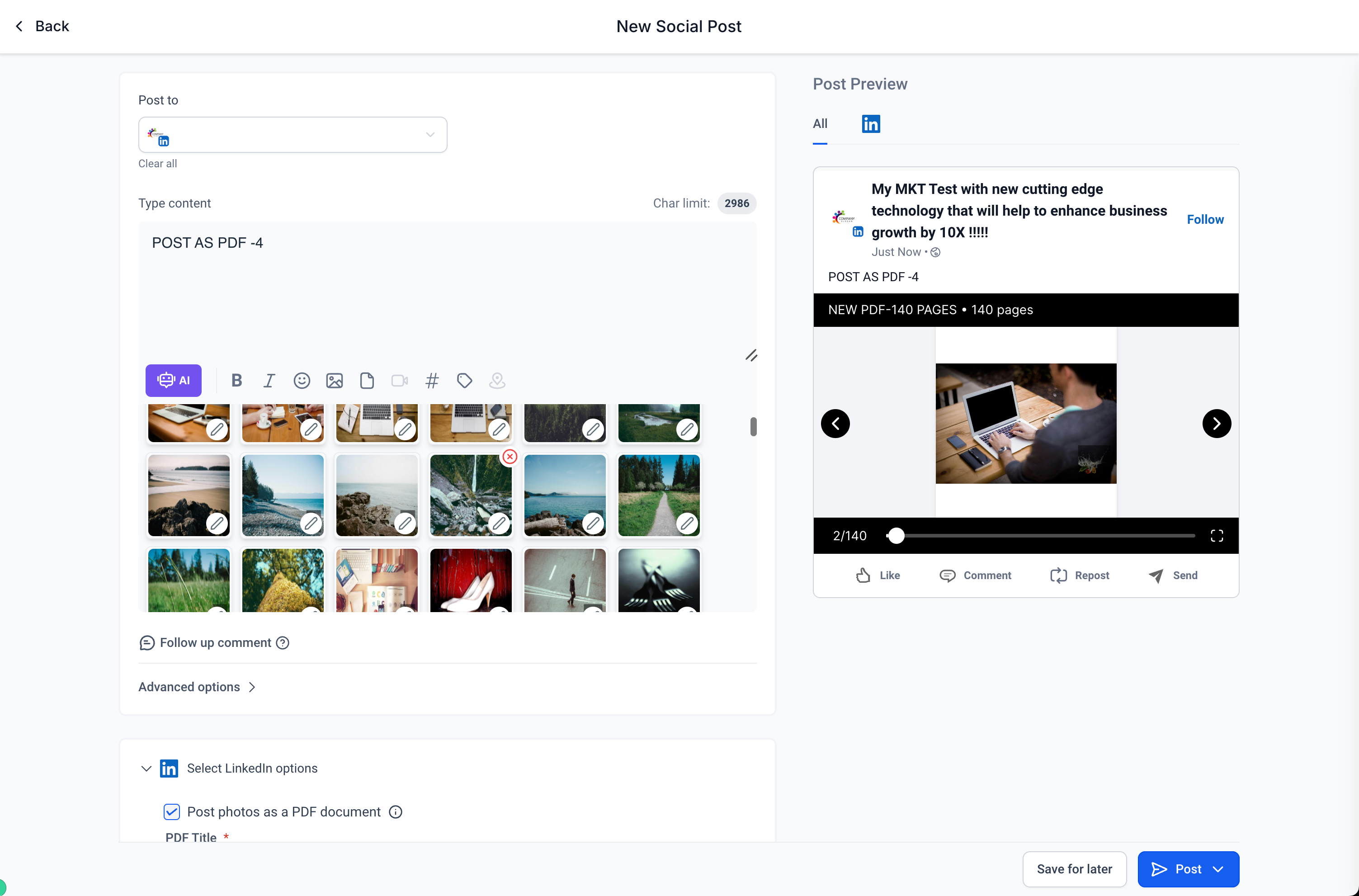
image (3)

Note:

  • LinkedIn allows up to 300 pages and a 100 MB limit per document.
  • PDFs are converted into images when imported in social planner, and if Instagram is selected, the images are automatically cropped to adhere to Instagram’s aspect ratio constraints.
  • Users can now delete media by clicking the ‘X’ that appears when hovering over the media preview.
  • When user selects post as a PDF option, all the images are converted into a PDF and posted to LinkedIn.
https://clixio.io/wp-content/uploads/2024/10/28cc03cbafae76e22d92e778fe5e4c64.png 1982 3006 Clixio.io https://clixio.io/wp-content/uploads/2023/08/clixio-logo-dark.png Clixio.io2024-10-23 11:45:002024-10-23 11:45:00Social Planner: Linkedin Carousel Post and Post PDF as photos

RSS Latest Feature Updates

  • Store Deletion Behavior Update | Clixio Changelog April 23, 2026
  • Terms & Conditions Consent at Store Checkout April 23, 2026
  • Social Planner: Community now in Comment Management April 23, 2026
  • Opportunity Smart Lists | Clixio Changelog April 22, 2026
  • WhatsApp Calling (Closed Beta) | Clixio Changelog April 22, 2026
  • Printful Auto Shipping Profile & Live Rates at Checkout April 22, 2026
  • AI Pages — Customization & Content Enhancements April 21, 2026
  • Delete Schema Markup Feature | Clixio Changelog April 21, 2026
  • Custom Date Reminder: Now for Custom Objects, Opportunities and Companies April 21, 2026
  • Conversation AI – Services Calendar V2 Enhancements April 21, 2026
Book a demo
See Clixio working
for your business, live.

30 minute call with our team. Personalised to your industry, no hard sell.

Book your free demo
14 day free trial · Cancel anytime
Clixio - Marketing and sales automation

Marketing & sales automation built for Australian service businesses. One platform, one flat rate, genuinely easy to use.

Product
Features Pricing How it works Latest updates
Company
Blog FAQ Get support Account transfers
Legal
Privacy Policy Terms & Conditions
© Clixio. All rights reserved. Made with ♡ in Australia.
Scroll to top Scroll to top Scroll to top