
Social Planner – Custom Date Range & Comparative View in Statistics
⭐ **What’s New**
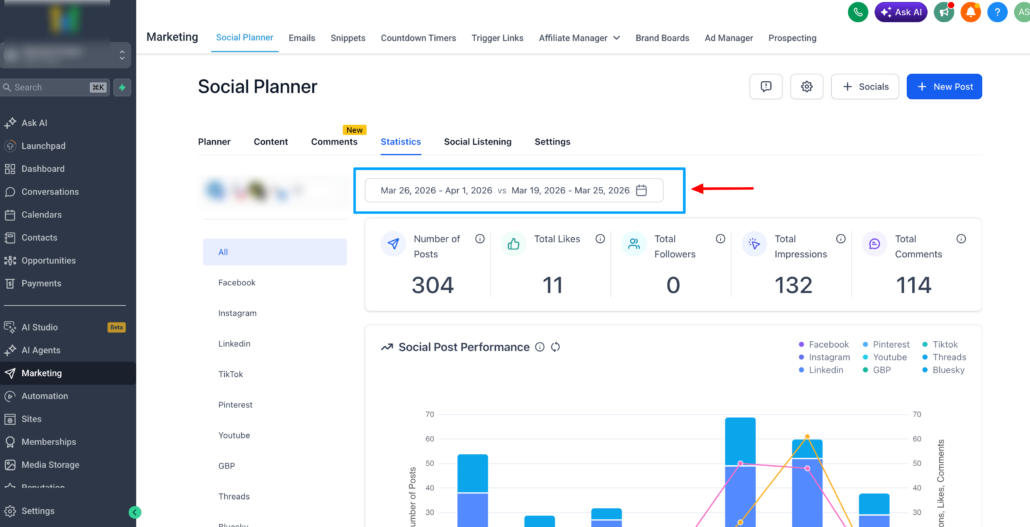
Social Planner Statistics now support custom date ranges and a comparative view, enabling users to analyse performance over any timeframe and compare it with a previous equivalent period.
This update replaces the previous fixed 7-day analytics view, offering more flexible, self-service insights for campaigns, trends, and growth analysis.
<p>🛠️ **How It Works**</p>
<ul>
  <li>**Custom Date Range Selector**</li>
</ul>
<div class="line">
  <img alt="image" loading="lazy" src="https://canny-assets.io/images/52d3a51e1e1d239896d21c9cab8d70b2.png" class="tappable"/>
</div>
<ul>
  <li>Select any start and end date using a calendar picker</li>
  <li>Quick presets available: 7 days, 14 days, 30 days, Custom</li>
</ul>
<div class="line">
  <img alt="image" loading="lazy" src="https://canny-assets.io/images/8e89c37b15efc0135d03f4c4dd8a5815.png" class="tappable"/>
</div>
<div class="line">
  <img alt="Screenshot 2026-04-02 at 7" loading="lazy" src="https://canny-assets.io/images/110c0fed097888362ce87830c806ce20.png" class="tappable"/>
</div>
<ul>
  <li>KPIs, totals, and charts update instantly based on the selected range</li>
  <li>**Compare With Previous Period**</li>
  <li>Compare the selected date range with the previous equivalent window</li>
  <li>Presets include: Previous Period, Previous 7 days, Previous 30 days, Custom</li>
</ul>
<div class="line">
  <img alt="image" loading="lazy" src="https://canny-assets.io/images/68ba53f6e2f16230b2aa9e966af34528.png" class="tappable"/>
</div>
<p>Percentage change indicators are displayed across:</p>
<ul>
  <li>Total Posts</li>
  <li>Likes</li>
  <li>Followers</li>
  <li>Impressions</li>
  <li>Comments</li>
  <li>**Smarter Graph Scaling**</li>
  <li>Short ranges show daily data points</li>
</ul>
<div class="line">
  <img alt="image" loading="lazy" src="https://canny-assets.io/images/7f01303f842e7577af1cd8627669e80a.png" class="tappable"/>
</div>
<p>Longer ranges automatically use aggregated views for improved readability.</p>

<p>💡 **Why It Matters**</p>
<ul>
  <li>This enhancement allows users to:</li>
  <li>Analyse performance across specific campaign windows</li>
  <li>Compare growth trends without needing to export data</li>
  <li>Generate clearer insights and client-ready reports</li>
  <li>Reduce reliance on external analytics tools</li>
</ul>