💳 Services (v2): Payment Enhancements
We are excited to introduce a range of enhancements to the Services payment experience. These improvements aim to provide customers with a more flexible checkout option and enhance the accuracy of deposit calculations.
Choose Between Deposit or Full Payment
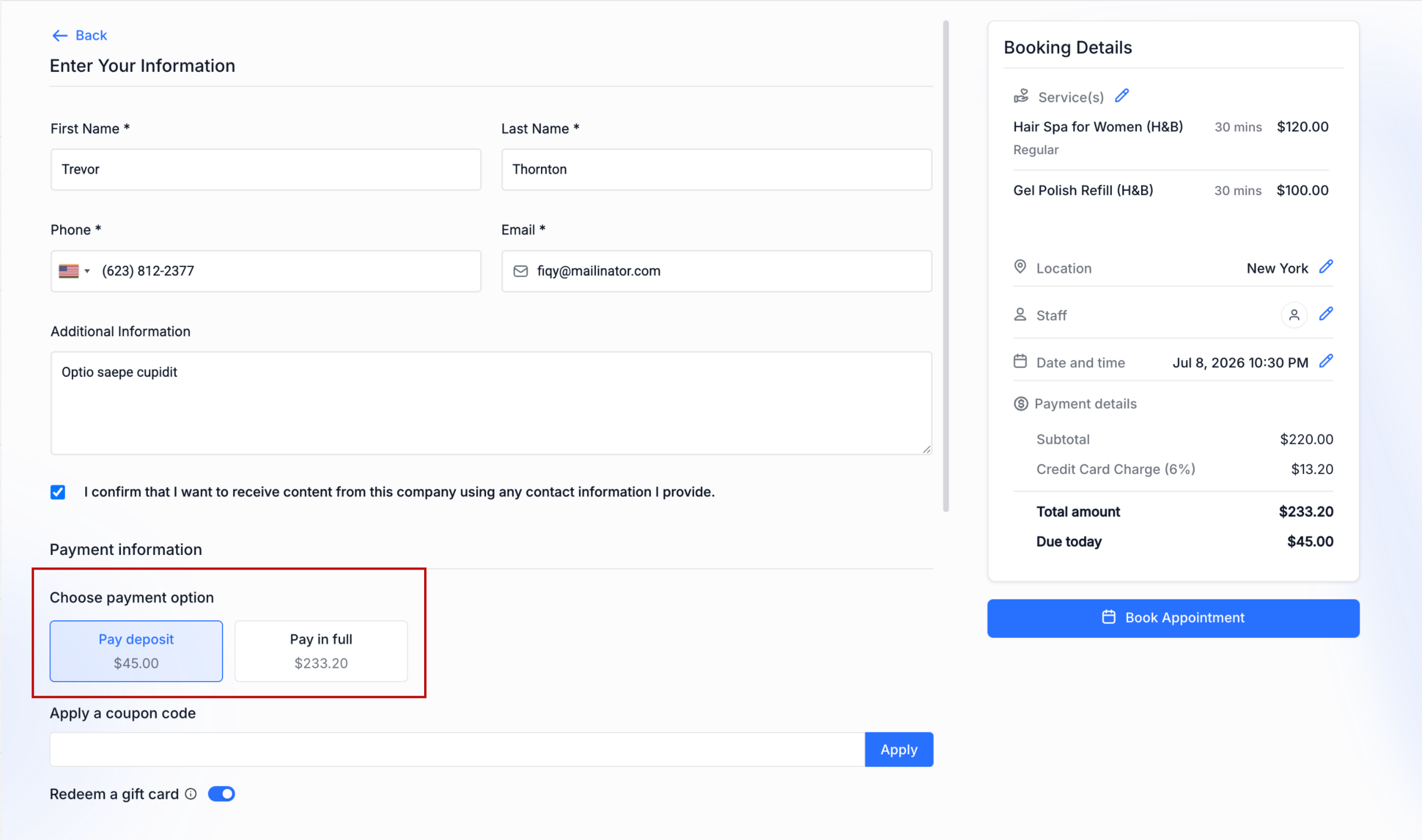
- Businesses can now enable a new setting, allowing customers to choose their payment method at checkout.
- If enabled, for services with a deposit configured, customers will see two payment options:
Pay Deposit
and
Pay Full Amount
.
- This option is available only when
Online Payments
are enabled and the service has a deposit set up.
- If this setting is disabled, customers will continue with the existing deposit-only checkout experience.
Improved Support for BNPL
- Customers who prefer to finance their purchases can now opt to pay the
full service amount
. This allows supported Buy Now, Pay Later (BNPL) providers to finance the complete booking instead of just the deposit.
- This creates a smoother checkout experience and offers customers greater flexibility in their payment options.
Smarter Deposit Calculations
- Navigate to
Services → Global Settings → Payment Settings
.
- Set the payment mode to
Online Payment
.
- Enable
Allow Deposit or Full Payment Choice
.
- Save your changes.
Once enabled, customers booking services with deposits will have the option to pay either the deposit or the full amount during checkout.