
• Shopping Cart Shopping Cart
    0Shopping Cart
Clixio
  • Features
  • Pricing
  • FAQ
  • Blog
  • Log in
  • Free Trial
  • Menu Menu

Required fields in Chat Widget contact form

January 29, 2026/in What's New? Automations, Chat Widget

👀 What’s New?

You can now mark any contact form field as required in the Chat Widget, including custom fields and dropdown fields. This ensures that visitors must provide essential information before starting or continuing a conversation.

👷 How It Works:

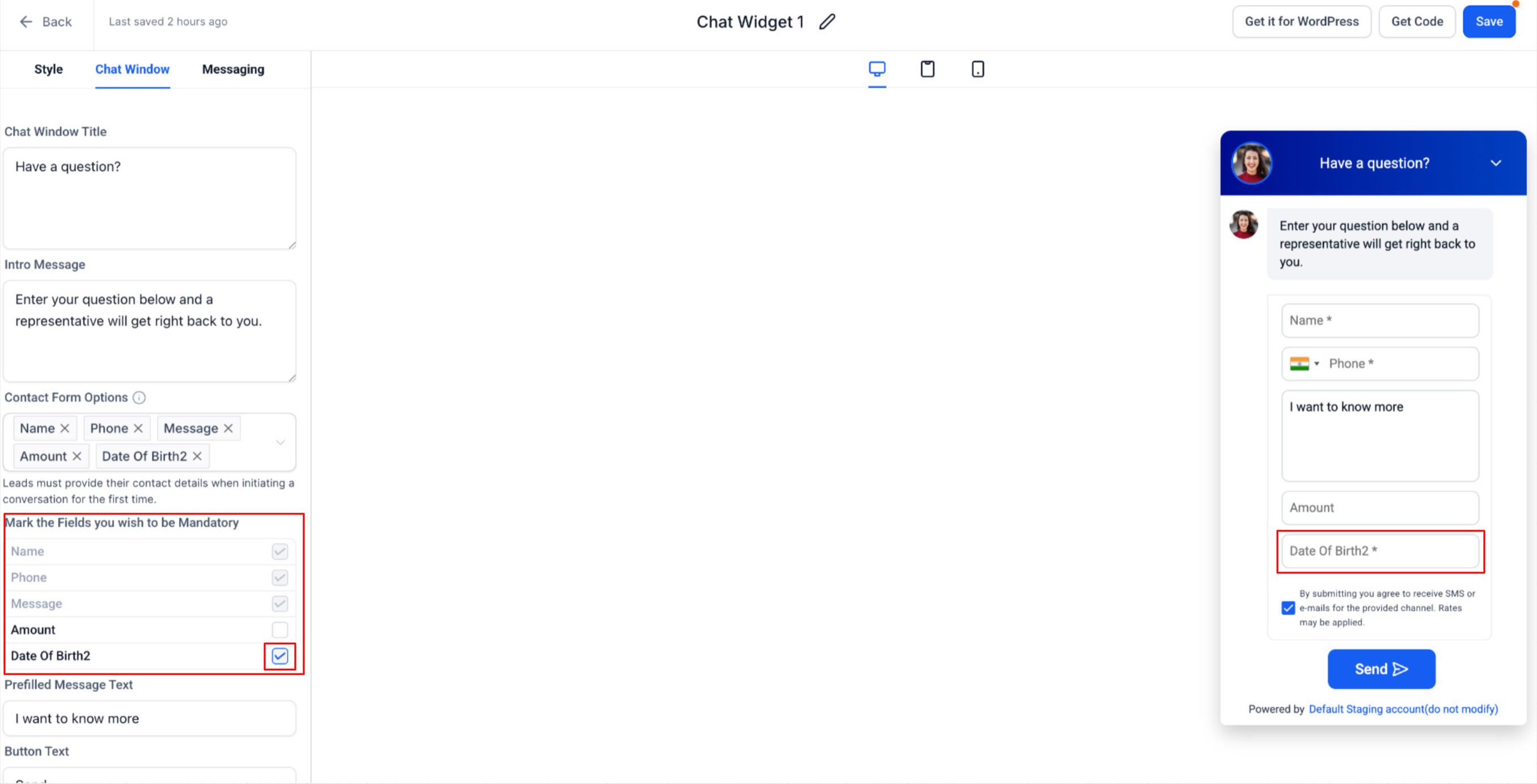
Navigate to Chat Widget Builder > Chat Window > and add fields under Contact Form Options (default or custom) –

  • Use the “Mark the fields you wish to be mandatory” section to choose which fields should be required.
image

  • Required fields are clearly indicated with an asterisk (*) in the widget.
  • Visitors won’t be able to submit the form unless all mandatory fields are completed.
  • When an agent requests contact details from the Conversation Panel (at the sub-account level), visitors are still required to fill in all fields marked as mandatory before proceeding.

⭐ Why It Matters:

  • Prevents incomplete submissions where users overlook important fields.
  • Ensures that workflows, automations, and routing logic always receive the necessary data.
  • Maintains consistent data capture, whether details are collected upfront or requested later by an agent.

📝 Notes:

  1. Applies to both default and custom contact fields.
  2. Mandatory field enforcement applies when:
  • A visitor initiates a conversation via the widget.
  • Contact details are requested by an agent during an active conversation.
  1. Existing widgets remain unchanged unless fields are explicitly marked as mandatory.
  2. Screenshots show both states: required vs optional fields.
https://clixio.io/wp-content/uploads/2026/01/9a14611dcacfff4a3540d065836ff6aa-scaled.png 1306 2560 Clixio.io https://clixio.io/wp-content/uploads/2023/08/clixio-logo-dark.png Clixio.io2026-01-29 23:04:002026-01-29 23:04:00Required fields in Chat Widget contact form

RSS Latest Feature Updates

  • 📈 Rebuilt Course Progress Analytics July 22, 2026
  • Inline Validation Errors for Schema Markup JSON View July 22, 2026
  • Refreshed Placeholder Images in Store Builder July 21, 2026
  • Introducing New Templates | Clixio Changelog July 11, 2026
  • Targeted Edits in AI Builder July 10, 2026
  • New Channel Management Conversation AI July 10, 2026
  • 🚀 Prospect AI gets an activity center & pipeline integration July 10, 2026
  • Todoist: Workflow actions & triggers July 10, 2026
  • Jira: Workflow actions and triggers July 10, 2026
  • ✏️ Fully Edit Service Bookings—Even After Payment July 9, 2026
Book a demo
See Clixio working
for your business, live.

30 minute call with our team. Personalised to your industry, no hard sell.

Book your free demo
14 day free trial · Cancel anytime
Clixio - Marketing and sales automation

Marketing & sales automation built for Australian service businesses. One platform, one flat rate, genuinely easy to use.

Product
Features Pricing How it works Latest updates
Company
Blog FAQ Get support Account transfers
Legal
Privacy Policy Terms & Conditions
© Clixio. All rights reserved. Made with ♡ in Australia.