
• Shopping Cart Shopping Cart
    0Shopping Cart
Clixio
  • Features
  • Pricing
  • FAQ
  • Blog
  • Log in
  • Free Trial
  • Menu Menu

Multiple Knowledge Bases in Conversation AI

April 30, 2025/in What's New? Automations, Conversation AI

What’s New?

We’ve introduced the Multiple Knowledge Base feature, allowing users to create and manage separate knowledge bases for each Conversation AI bot. Unlike the previous system, where all bots shared a single knowledge base, you now have complete flexibility to tailor knowledge sources for each bot.

Use Case:

Let’s say you have the following setup:

  • Knowledge Bases: A, B, and C
  • AI Agents: Jane and Parker

With this feature:

  • You can assign Knowledge Bases A and B to Jane—she will only be trained on those.
  • Meanwhile, Parker can be trained exclusively on Knowledge Base C, allowing each bot to serve different use cases or clients independently.

How It Works?

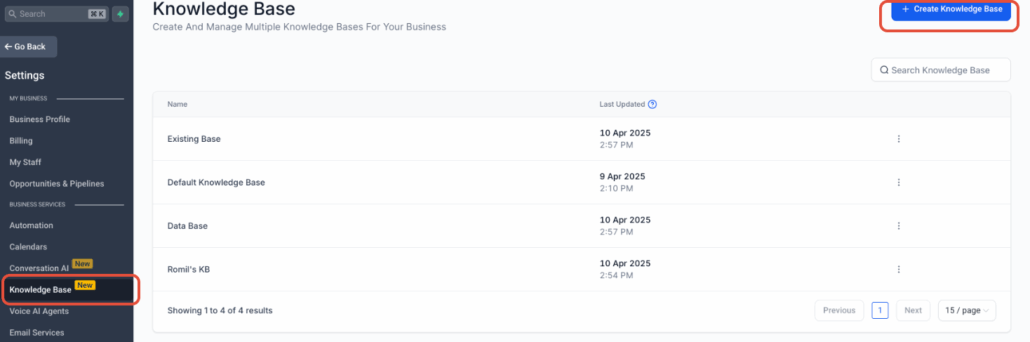
Access the Knowledge Base Section:

  • A new “Knowledge Base” menu item has been added to the left navigation panel.
  • This serves as your central hub for creating and managing all knowledge bases.

Create a New Knowledge Base:

  • Click “Create Knowledge Base.”
  • Enter a name for reference and click “Save & Continue.”
  • You can create up to 15 knowledge bases.

Train a Knowledge Base:

  • Add training data via URLs and FAQs.
  • Note: File upload support is coming soon!

Attach KBs to a Bot:

  • Go to any Conversation AI Bot training.
  • Use the Knowledge Base dropdown to select up to 7 knowledge bases to train the bot.
  • Each bot can be trained on different knowledge bases, offering tailored responses for each use case.

View & Manage Assigned KBs:

  • Assigned knowledge bases appear as tabs in the bot trainings.
  • Click “Create New” within the bot view to create a KB on the fly.

The existing knowledge base that you have cannot be deleted, as it is by default used by the workflow bots. Multiple knowledge base support for workflow bots will be released soon.

image
image
image
image
image
image
image
image
https://clixio.io/wp-content/uploads/2025/04/bad3d7066999f1ec03b3dfec6fe7b848.png 487 1468 Clixio.io https://clixio.io/wp-content/uploads/2023/08/clixio-logo-dark.png Clixio.io2025-04-30 23:05:002025-04-30 23:05:00Multiple Knowledge Bases in Conversation AI

RSS feed: Latest Feature Updates Latest Feature Updates

  • Improved: Dynamic Value Chips with Improved error segmentation September 4, 2026
  • 📞 More Reliable Missed Call Text Back with Smarter Number Selection September 4, 2026
  • 🔐 Client Portal: “User login” Workflow Trigger Now Supports the New Client Portal Experience September 3, 2026
  • 📢 Carrier Fee Pricing Update – Effective October 1, 2026 September 3, 2026
  • Privacy Policy + T&C URLs on Toll-Free Verification September 2, 2026
  • Workflow Builder: Pick an Email Sender Domain for Each Workflow! August 28, 2026
  • Certificate AI Beta is now live August 27, 2026
  • 📅 Date Range Setting Can Now Count Only the Days You Actually Work August 27, 2026
  • Schedule Availability with Custom Open & Expiry Experiences – Form, Survey & Quiz August 27, 2026
  • WhatsApp messaging limits: now shown at the portfolio level August 27, 2026
Book a demo
See Clixio working
for your business, live.

30 minute call with our team. Personalised to your industry, no hard sell.

Book your free demo
14 day free trial · Cancel anytime
Clixio - Marketing and sales automation

Marketing & sales automation built for Australian service businesses. One platform, one flat rate, genuinely easy to use.

Product
Features Pricing How it works Latest updates
Company
Blog FAQ Get support Account transfers
Legal
Privacy Policy Terms & Conditions
© Clixio. All rights reserved. Made with ♡ in Australia.
Scroll to top Scroll to top Scroll to top