
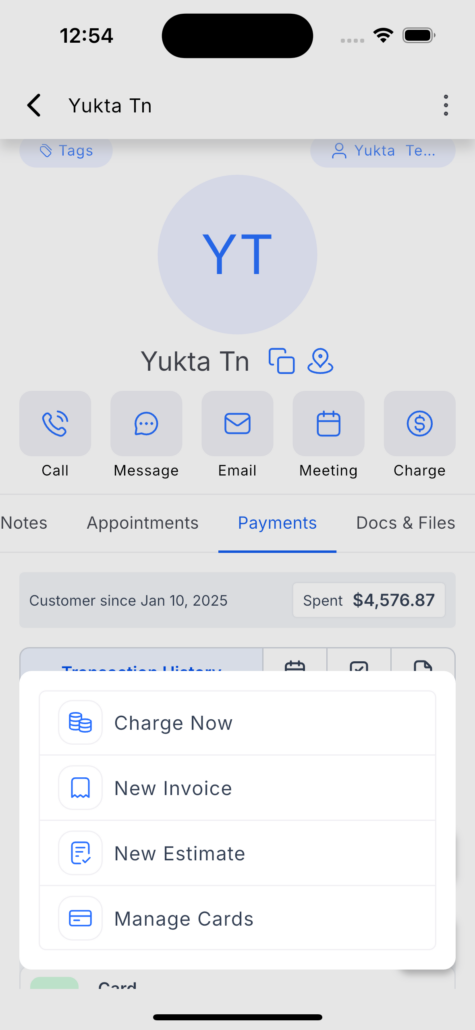
Mobile Payments: Manage Cards on File for a Contact
We’re excited to introduce **Cards on File for Contacts** 💳 on the mobile app. You can now securely save and manage customer cards directly from a contact’s Payments section.
<div class="line">👷♂️ <p><strong>How to use this feature</strong></p></div>
<ol start="1">
<li>Open the mobile app and navigate to the Contacts section.</li>
<li>Select a Contact.</li>
<li>Go to the Transactions tab.</li>
<li>Tap the floating action button (+).</li>
<li>Select **Manage Cards on File**.</li>
<li>Enter the card details and save the card to the contact.</li>
</ol>
<div class="line"><p><strong>Use a saved card for payment</strong></p></div>
<ul>
<li>When creating a transaction, invoice, estimate, or in-person charge linked to the contact, the saved cards will appear as available payment methods.</li>
</ul>
<ol start="1">
<li>Open **Manage Cards on File** for the contact.</li>
<li>Swipe left on the card you wish to remove.</li>
<li>Tap **Remove**.</li>
<li>Confirm the action when prompted.</li>
</ol>
<div class="line">✨ <p><strong>How this helps your business</strong></p></div>
<div class="line">
<img alt="image" loading="lazy" src="https://canny-assets.io/images/d134fc5ce03c4e8c902b751053277ec6.png" class="tappable"/>
</div>
<div class="line">
<img alt="image (1)" loading="lazy" src="https://canny-assets.io/images/eeb6597640e1c7a1f95e4cdd7808cfa7.png" class="tappable"/>
</div>
<div class="line">
<img alt="image (2)" loading="lazy" src="https://canny-assets.io/images/55c8fc0b71bdc3e1650a1257371ddadd.png" class="tappable"/>
</div>
<div class="line">
<img alt="image (3)" loading="lazy" src="https://canny-assets.io/images/7500ee23658aab3d8ea726f9b99a0a5e.png" class="tappable"/>
</div>