
• Shopping Cart Shopping Cart
    0Shopping Cart
Clixio
  • Features
  • Pricing
  • FAQ
  • Blog
  • Log in
  • Free Trial
  • Menu Menu

Interactive WhatsApp Templates | Clixio Changelog

July 12, 2024/in What's New?

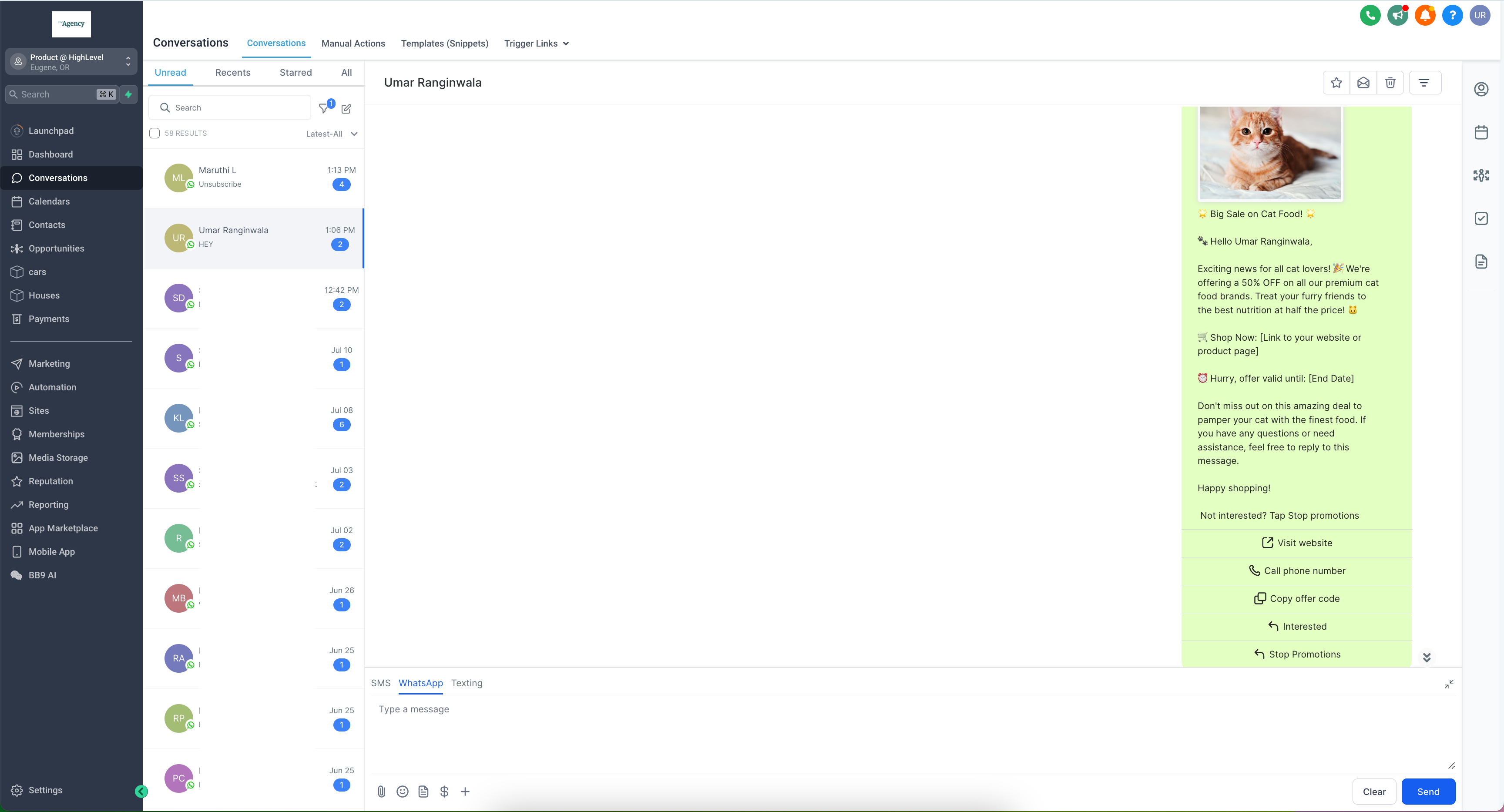
We are thrilled to announce the launch of a highly requested feature: Interactive CTA (Call-To-Action) buttons. This powerful feature enables you to create more interactive, engaging, and visually appealing messages, providing a seamless experience for your users.
Screenshot 2024-07-11 at 8
  • Allow users to respond quickly with predefined options, enhancing the conversation flow and user engagement. This allows customers to reply without typing.
  • Direct users to your website with a single click, increasing traffic and improving conversion rates.

Personalised Website Links:

  • Utilise dynamic “Visit Website” buttons to customise links for each customer, offering a personalised experience and boosting engagement.
  • Adding a variable creates a personalised link for the customer to view their info. Only one variable can be added to the end of a URL.
  • Provide an option for users to call a specified phone number directly from the message, facilitating immediate communication and support.
Screenshot_20240711-190714
  • Enable users to easily copy promotional codes or offer details, making it convenient for them to redeem offers.
  • Give users the option to opt out of marketing messages effortlessly, ensuring compliance with WhatsApp regulations and improving user trust.
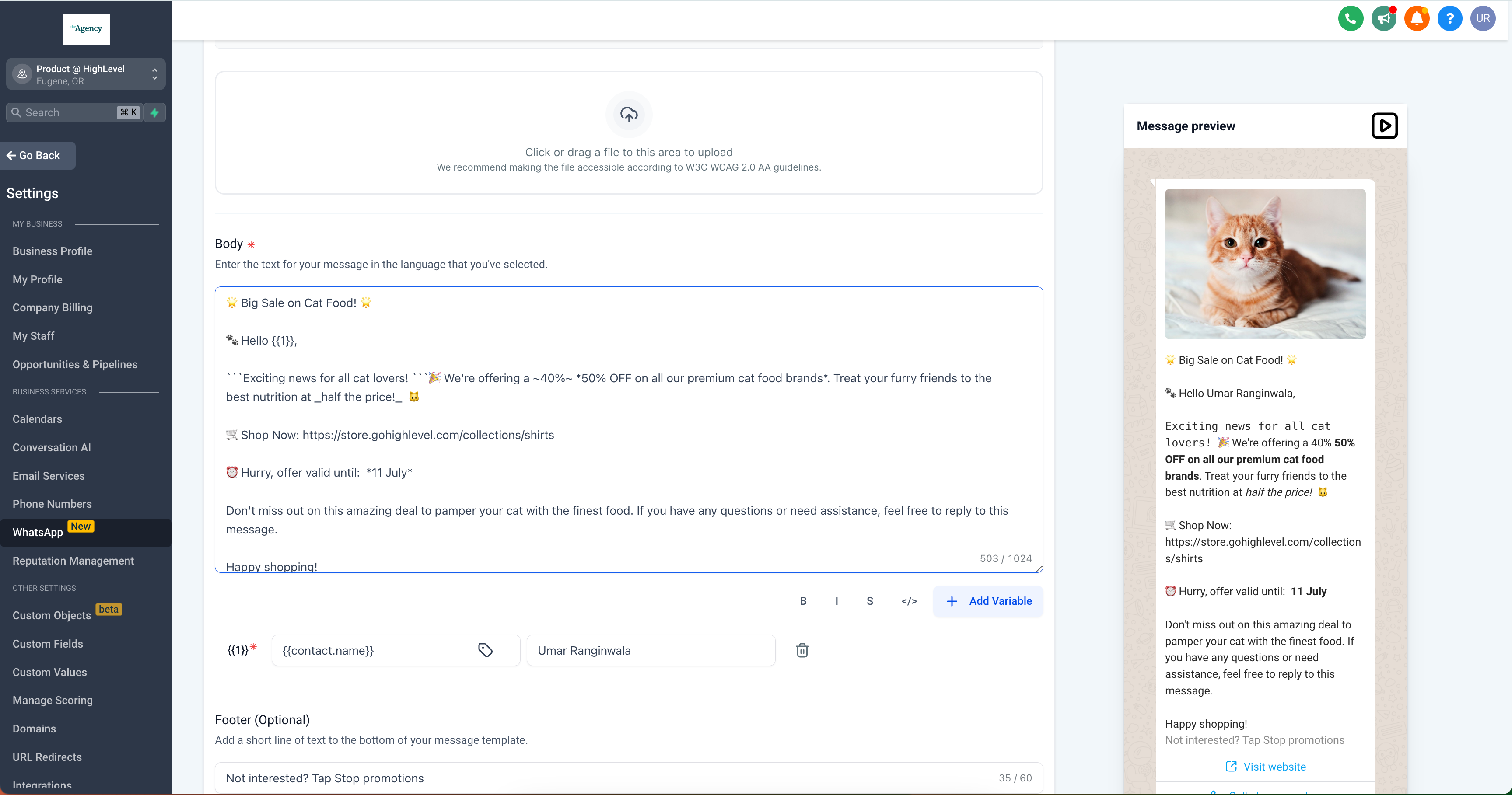
  • Bold: Emphasise important information by making text bold.
  • Italics: Highlight key points using italicised text.
  • Strikethrough: Show edits or changes by striking through text.
  • Monospace: Format code snippets or other text in a fixed-width font.
Screenshot 2024-07-11 at 7

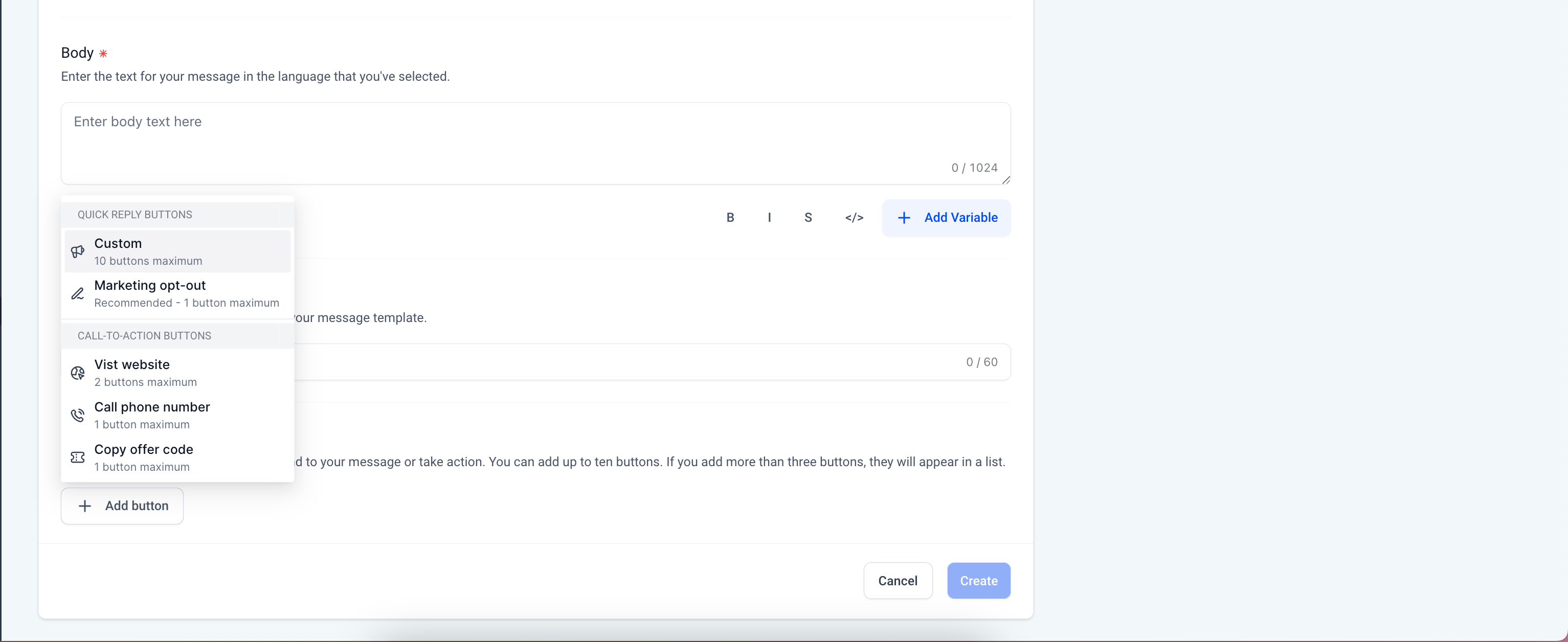
👷 How to Configure CTA Buttons and Text Formatting:

  1. Go to

    Settings

    >

    WhatsApp

    >

    Templates

  2. Create Template

    >

    Add Button

  3. Select the type of CTA button you wish to add: Quick Reply, Visit Website, Personalised Website Link, Call Phone Number, Copy Offer Code, or Marketing Opt-Out.
Screenshot 2024-07-11 at 8
https://clixio.io/wp-content/uploads/2024/07/9e5be4a71be8de911655cef586bbfd2e.png 1866 3456 Clixio.io https://clixio.io/wp-content/uploads/2023/08/clixio-logo-dark.png Clixio.io2024-07-12 01:07:352024-07-12 01:07:35Interactive WhatsApp Templates | Clixio Changelog

RSS Latest Feature Updates

  • Store Deletion Behavior Update | Clixio Changelog April 23, 2026
  • Terms & Conditions Consent at Store Checkout April 23, 2026
  • Social Planner: Community now in Comment Management April 23, 2026
  • Opportunity Smart Lists | Clixio Changelog April 22, 2026
  • WhatsApp Calling (Closed Beta) | Clixio Changelog April 22, 2026
  • Printful Auto Shipping Profile & Live Rates at Checkout April 22, 2026
  • AI Pages — Customization & Content Enhancements April 21, 2026
  • Delete Schema Markup Feature | Clixio Changelog April 21, 2026
  • Custom Date Reminder: Now for Custom Objects, Opportunities and Companies April 21, 2026
  • Conversation AI – Services Calendar V2 Enhancements April 21, 2026
Book a demo
See Clixio working
for your business, live.

30 minute call with our team. Personalised to your industry, no hard sell.

Book your free demo
14 day free trial · Cancel anytime
Clixio - Marketing and sales automation

Marketing & sales automation built for Australian service businesses. One platform, one flat rate, genuinely easy to use.

Product
Features Pricing How it works Latest updates
Company
Blog FAQ Get support Account transfers
Legal
Privacy Policy Terms & Conditions
© Clixio. All rights reserved. Made with ♡ in Australia.
Scroll to top Scroll to top Scroll to top