Improved: Dynamic Value Chips with Improved error segmentation
Dynamic Value Chips Update
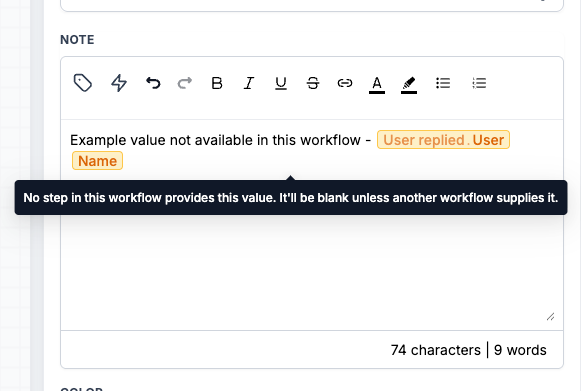
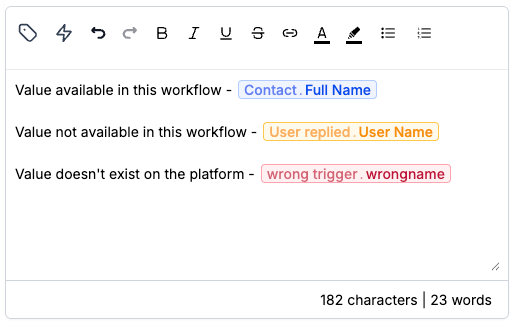
Dynamic value chips now have three states instead of two. Previously, a dynamic value chip could only be valid or invalid. If the builder couldn’t resolve something, it would show as red with “value not recognized”. The new middle state is a yellow chip, indicating values that are valid on the platform but have no source in the current workflow. This provides a clear differentiation between values that may render blank and values that won’t render at all.
Each chip can now be in one of three states:
- Blue: value available in this workflow. It can be filled from the contact record, a system value like the current date, or an earlier step.
- Yellow: value not available in this workflow. It exists on the platform, but nothing in this workflow provides it. For example, {{sheet.10.rowNumber}} in a workflow without a Google Sheets step will render blank unless passed in from another workflow through Add to Workflow with pass input trigger parameters.
- Red: value doesn’t exist on the platform. There is no match for it, for example {{applesheet.10.rowNumber}}, so no workflow can render it.
Spacing inside the handlebars no longer affects the recognition of values. For instance, the platform stores Attribution Url as {{ attribution.first.url }} with spaces. Typing {{attribution.first.url}} without spaces used to show as red, but now both forms are recognised.
Previously, all fields that wouldn’t render displayed as red chips. However, you could place {{invoice.url}} into an Add Notes action in a workflow without an invoice trigger, or pass a value from one workflow to another through Add to Workflow.
The red chips used to label these values as unrecognized and direct you to the picker, making intentional configurations appear as mistakes. By splitting the states, red now indicates an incorrect value, while yellow prompts you to check if another source provides it.
- Yellow is a warning, not a block. Save and publish the workflow as usual.
- Red still identifies typos, such as {{contact.frist_name}}.
- This change only affects the UI. Values still resolve at execution time as they did before, so any previously running processes remain unaffected.