Gift Cards – Granular User Permissions
Businesses can now control exactly which team members can access and perform different actions across Gift Cards. Instead of providing the same level of Gift Card access to every user, admins can assign permissions based on each team member’s responsibilities – helping protect Gift Card balances, customer information, and sensitive actions such as issuing or deactivating cards.
The new Gift Card permissions provide granular control over:
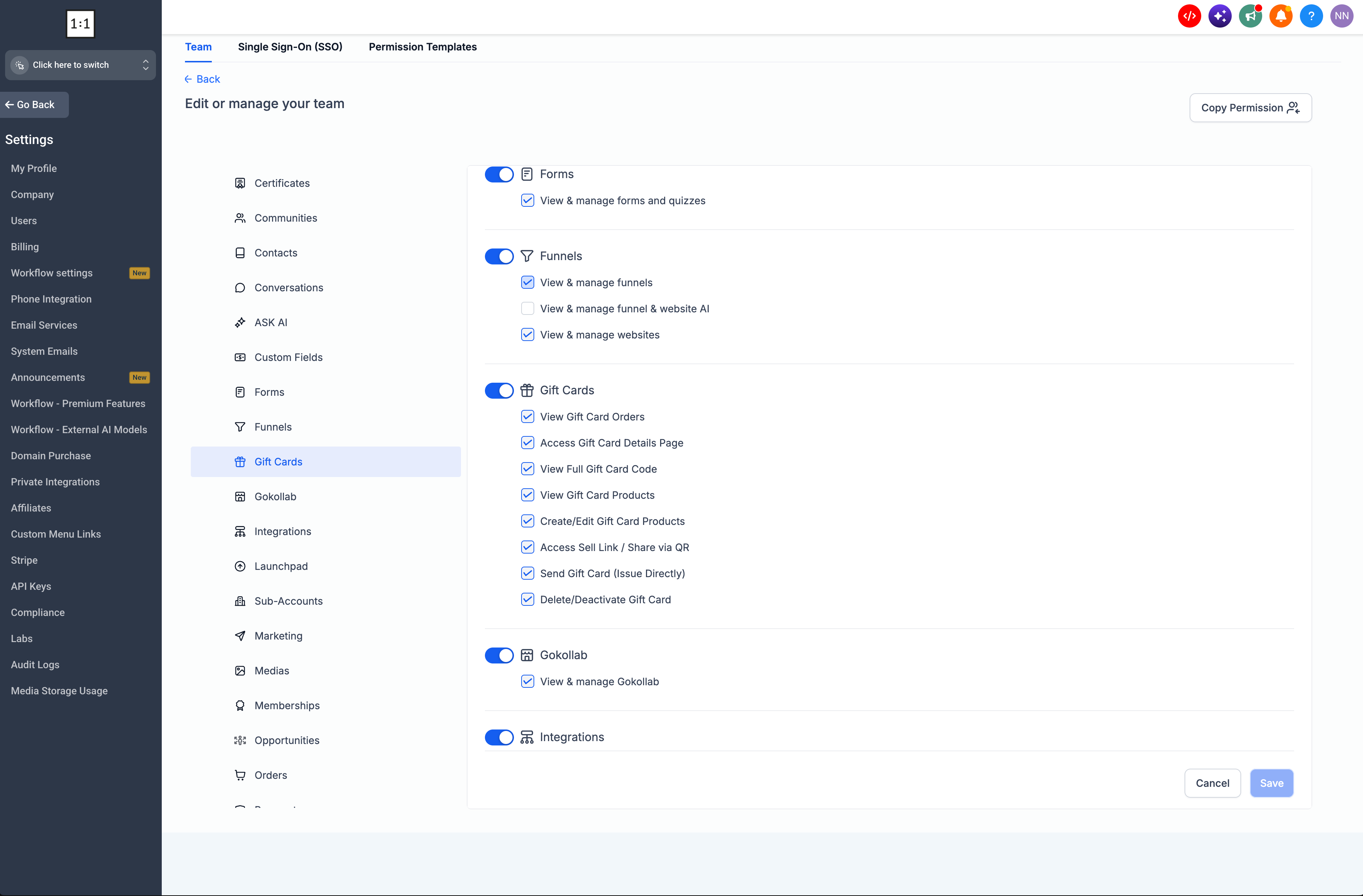
- View Gift Card Orders – View the list of issued Gift Cards and their Gift Card Order information.
- View Gift Card Products – Access Gift Card Products and view their configurations.
- Create/Edit Gift Card Products – Create new Gift Card Products or modify existing ones.
- Access Sell Link / Share via QR – Access and share the dedicated Sell link or QR code for a Gift Card Product.
- Send Gift Cards – Directly issue Gift Cards to customers through the Send flow.
- View Full Gift Card Code – Control who can reveal the complete Gift Card code from the details page.
- Access Gift Card Details Page – Open and view detailed information for individual Gift Card Orders.
- Delete/Deactivate Gift Cards – Control access to deletion or deactivation actions.
Additionally:
- Gift card permissions also support ‘assigned data’ level granularity where in case of ‘Users’, there is an option to show only assigned data to these users instead of all data even if they have the page access.
- Permissions are enforced across both the interface and the underlying actions. For example, a support team member can be given access to view Gift Card Orders without being allowed to send Gift Cards, change Gift Card Products, or reveal the complete Gift Card code.
- The full Gift Card code is also protected separately, so users without the appropriate permission cannot access the sensitive code from the Gift Card Order details page.
- Go to: Settings → My Staff → Select Staff Member → Edit Icon → Roles & Permissions → Gift Cards
- From the Gift Cards section, admins can select the permissions appropriate for each user.
- Admins retain full access by default, while other roles can be configured with only the Gift Card capabilities they need.
We’ll continue expanding access controls around Gift Cards as the ecosystem grows, including ensuring new Gift Card capabilities have appropriate permissions as they are introduced.