
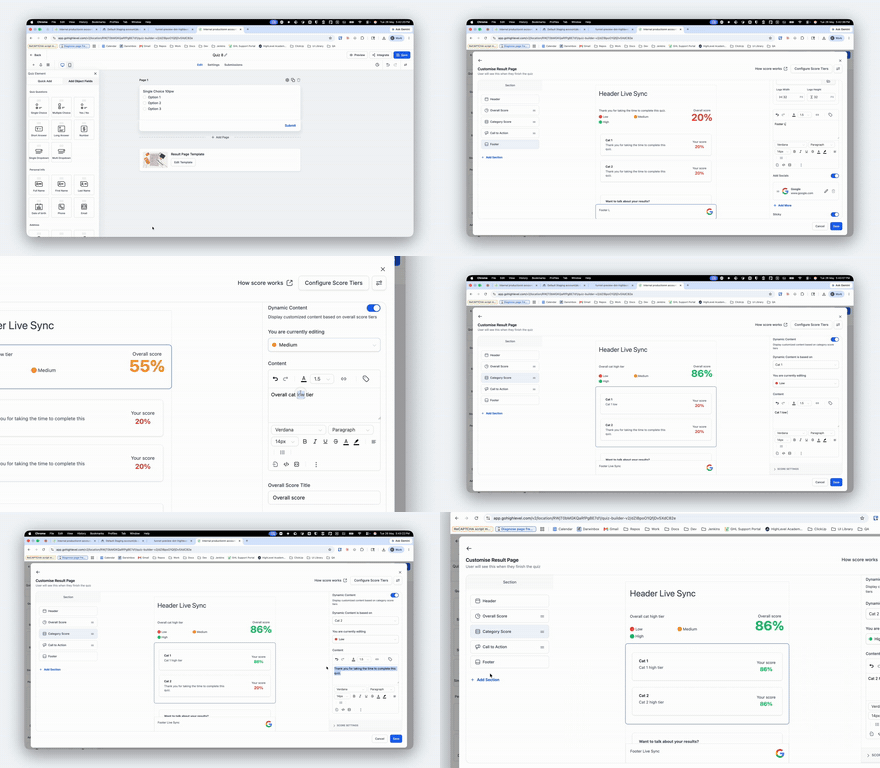
Expanded Quiz Results Page Default Value Enhancements
We’ve expanded our smart default value functionality across multiple sections of the Quiz Results Page to make setup significantly faster and more intuitive.
Previously available only in the Call to Action section, this enhancement now also applies to:
- Individual Category Section
- Category Score Section
- Overall Score Section
This update is designed to streamline result page configuration, reduce repetitive manual work, and minimise setup-related support requests.
Smart Default Value Propagation: When configuring the first tier (Low / Medium / High) within a category, values entered will now automatically populate as default values for the remaining tiers in the same category. Users will also be able to view the changes they are making in real time in the preview for all tiers, which was previously fixed to a particular tier.
Faster Result Page Setup: Users no longer need to repeatedly configure the same information across multiple tiers and sections, drastically reducing setup time. ⏱️
Cleaner User Experience: Existing conditional display behaviour remains intact — if required CTA fields like Name or Link are left blank, the CTA button will remain hidden while still displaying the configured content.
Reduced Support Overhead: By simplifying the configuration experience and minimising repetitive setup actions, we expect a significant reduction in setup-related support tickets. 📉
Improved Data Structure for Score Configuration: Earlier, Overall Score and Category Score configurations were stored using the tier label. We now use Category ID and Tier ID for configuration mapping instead. This ensures that tier values with the same name no longer overlap, resulting in more reliable and scalable configurations. 🛠️
⚙️ How It Works
- Configure the first tier within a section (e.g., Low).
- Relevant values automatically populate across the remaining tiers of that category.
- Customise individual tiers only where needed.
- Save the quiz to apply changes.
- These enhancements apply automatically to all new quizzes.
- For existing quizzes, users must re-save the quiz for the updated behaviour to take effect.
- The goal of this enhancement is to create a smoother, faster, and more scalable quiz setup experience for all users. 🚀