
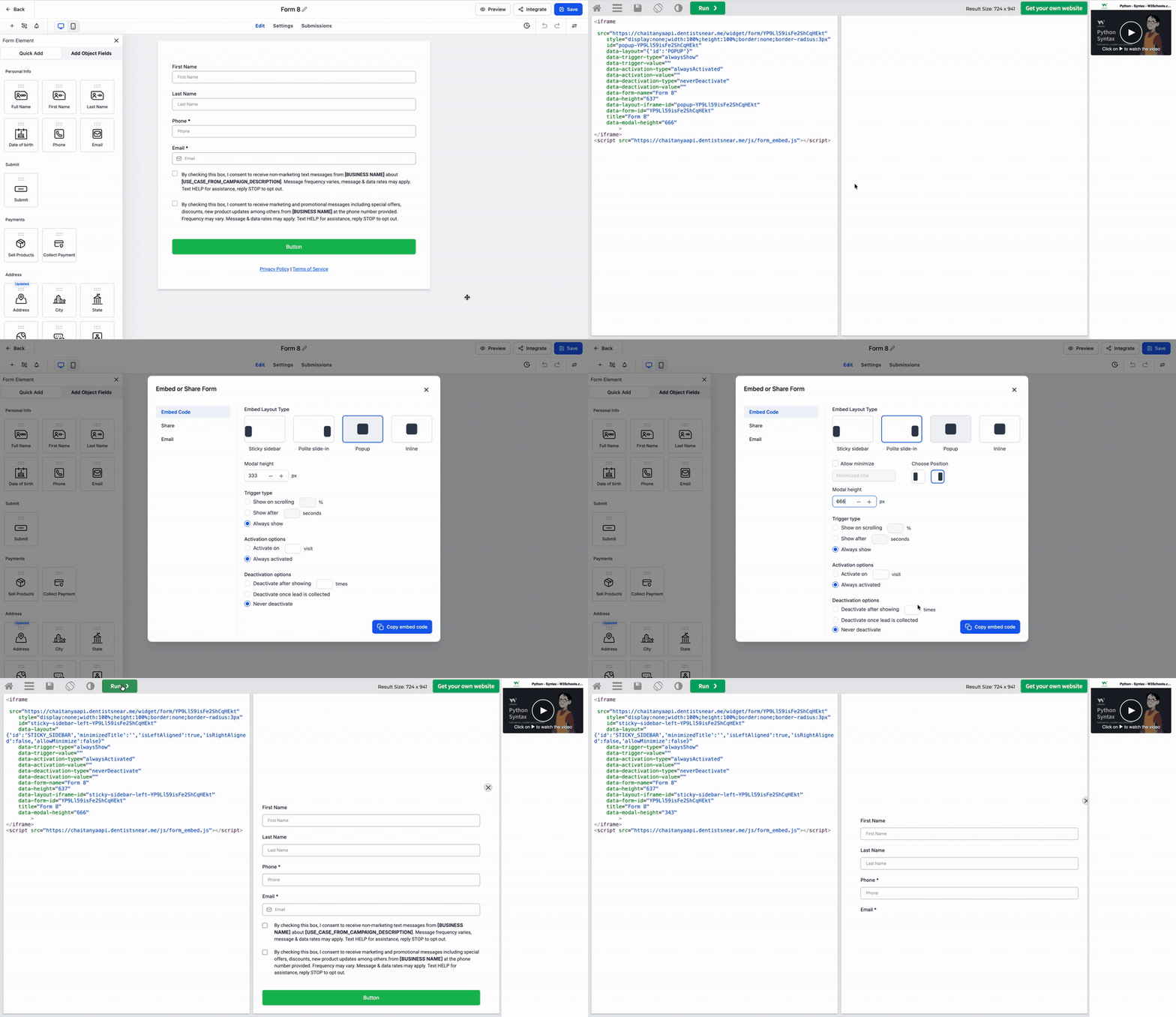
Custom Modal Height for Embedded Forms, Surveys, and Quizzes
Improved Embed Experience for forms, surveys, and quizzes has been enhanced by providing greater control over modal sizing and ensuring key builder actions are reliable while a form is loading.
- You can now set a custom modal height for Popup, Polite Slide-in, and Sticky Sidebar embeds.
- This adjustment allows embedded forms to fit better on host pages, preventing them from appearing too tall or too small.
- The options for Preview, Integrate, and Save are now disabled until the builder has fully loaded, avoiding clicks that yield no results.
- Existing embeds will continue to function as before unless a modal height is specified.
- Open a Form, Survey, or Quiz in the builder.
- Click Integrate once the builder has finished loading.
- Select Embed Code and choose either Popup, Polite Slide-in, or Sticky Sidebar.
- Enter a value in the modal height field, then copy and use the embed code.
- This update provides you with more control over the appearance of embedded forms on your site.
- It helps to avoid awkward modal sizing on various pages and screens.
- This change prevents confusion caused by attempting to click builder actions before the form is fully ready.
- Older embeds remain fully backward compatible.