
• Shopping Cart Shopping Cart
    0Shopping Cart
Clixio
  • Features
  • Pricing
  • FAQ
  • Blog
  • Log in
  • Free Trial
  • Menu Menu

🔐 Client Portal: “User login” Workflow Trigger Now Supports the New Client Portal Experience

September 3, 2026/in What's New? Automations, Client Portal, Memberships

The User Login Workflow Trigger

The User login workflow trigger now fires for logins from the new Client Portal experience — not just legacy membership logins. We’ve also added a dedicated Client Portal category in the workflow trigger picker, so all Client Portal triggers live in one place.

🔑 New Client Portal logins now fire the “User login” trigger Successful logins from the new Client Portal experience now emit the same workflow trigger event as legacy membership logins. Any workflow already using the User login trigger will start running on these logins automatically — no reconfiguration required.

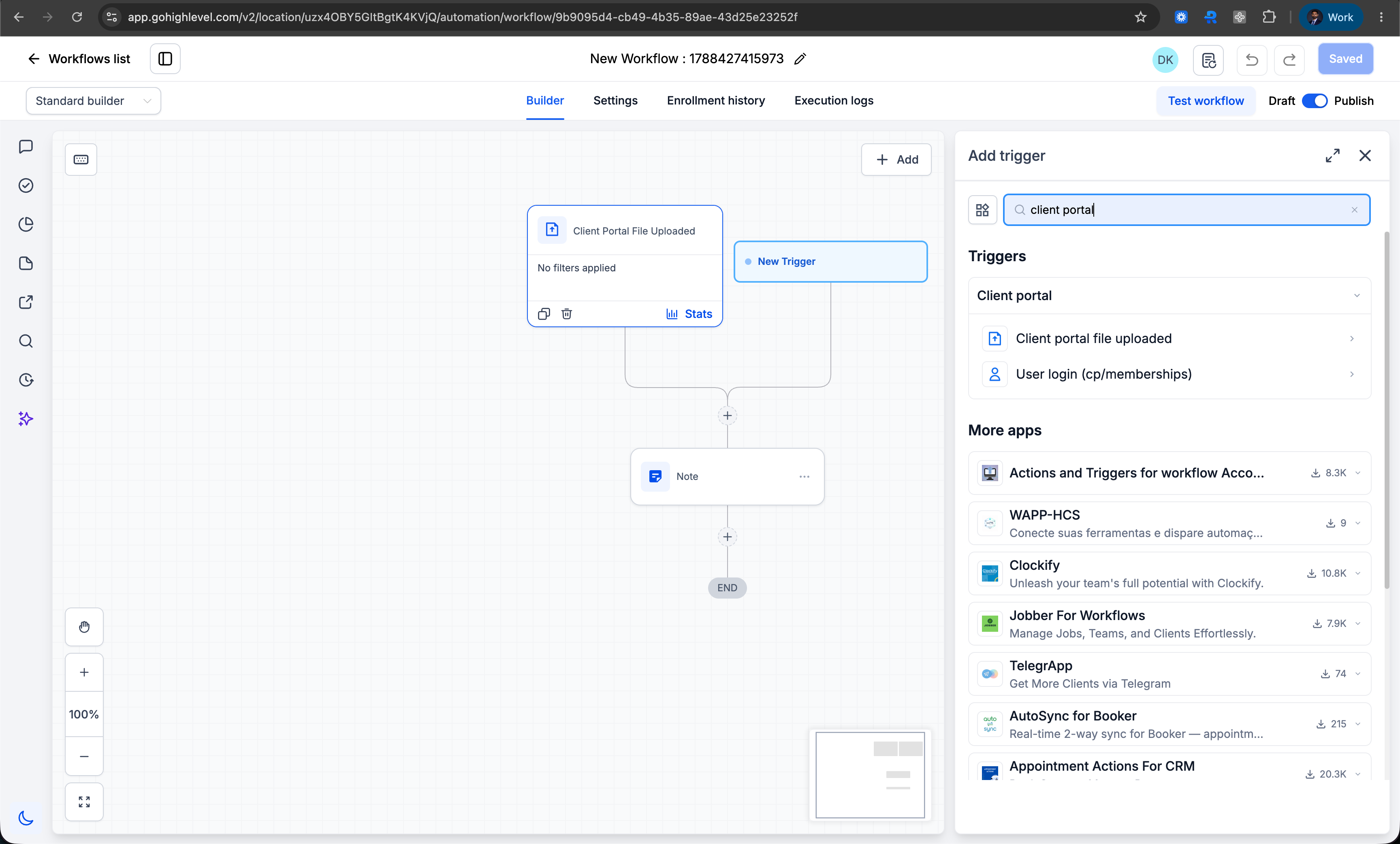
🗂️ New “Client Portal” category in the trigger picker

A dedicated Client Portal category now groups all Client Portal triggers together:

User login — moved from Courses

Client portal file uploaded — moved from Membership

💬 Clearer helper text

The User login trigger now spells out that it covers both legacy membership logins and logins from the new Client Portal experience — removing the confusion caused by its old placement under Courses.
image

Automate on Client Portal member login

  • Open the Workflow Builder.
  • Click Add trigger and search for User login.
  • Select it under the new Client Portal category (previously found under Courses).
  • Save your workflow — it will now fire on both legacy membership logins and logins from the new Client Portal experience.

Already using this trigger?

No action needed. Existing workflows continue to run as-is and will automatically pick up login events from the new Client Portal experience.

Agencies on the new Client Portal experience previously had no way to automate off a member login, because the trigger only covered legacy memberships. Trigger placement was inconsistent too — login sat under Courses while file upload sat under Membership — making it unclear what each trigger actually covered. This update closes the gap and puts both triggers where you’d expect to find them.

https://clixio.io/wp-content/uploads/2026/09/660c8a7daf00af9009d0b1ed6d859c61-scaled.png 1544 2560 Clixio.io https://clixio.io/wp-content/uploads/2023/08/clixio-logo-dark.png Clixio.io2026-09-03 21:14:002026-09-03 21:14:00🔐 Client Portal: “User login” Workflow Trigger Now Supports the New Client Portal Experience

RSS feed: Latest Feature Updates Latest Feature Updates

  • Improved: Dynamic Value Chips with Improved error segmentation September 4, 2026
  • 📞 More Reliable Missed Call Text Back with Smarter Number Selection September 4, 2026
  • 🔐 Client Portal: “User login” Workflow Trigger Now Supports the New Client Portal Experience September 3, 2026
  • 📢 Carrier Fee Pricing Update – Effective October 1, 2026 September 3, 2026
  • Privacy Policy + T&C URLs on Toll-Free Verification September 2, 2026
  • Workflow Builder: Pick an Email Sender Domain for Each Workflow! August 28, 2026
  • Certificate AI Beta is now live August 27, 2026
  • 📅 Date Range Setting Can Now Count Only the Days You Actually Work August 27, 2026
  • Schedule Availability with Custom Open & Expiry Experiences – Form, Survey & Quiz August 27, 2026
  • WhatsApp messaging limits: now shown at the portfolio level August 27, 2026
Book a demo
See Clixio working
for your business, live.

30 minute call with our team. Personalised to your industry, no hard sell.

Book your free demo
14 day free trial · Cancel anytime
Clixio - Marketing and sales automation

Marketing & sales automation built for Australian service businesses. One platform, one flat rate, genuinely easy to use.

Product
Features Pricing How it works Latest updates
Company
Blog FAQ Get support Account transfers
Legal
Privacy Policy Terms & Conditions
© Clixio. All rights reserved. Made with ♡ in Australia.
Scroll to top Scroll to top Scroll to top