⛔ Blocked Slots for Rental Listings
Introducing Blocked Slots in Rentals
We have introduced the ability to create Blocked Slots in Rentals, giving you increased control over your inventory without the need for a customer booking.
Block Time for Listings
You can now block time for listings to accommodate maintenance, internal use, or offline commitments, ensuring that availability remains accurate across your calendar and booking processes.
Setting the Event Type
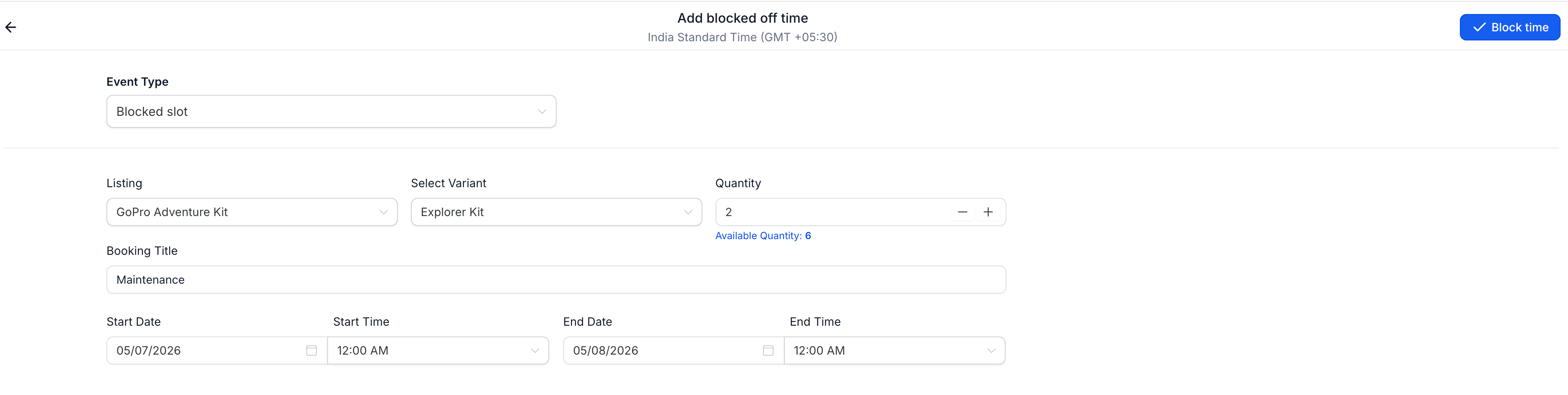
Set the Event type as “Blocked slot” when creating a new booking.
Create a blocked slot by selecting:
- Listing
- Date & time range
- Optional variant and quantity (if applicable)
Once created:
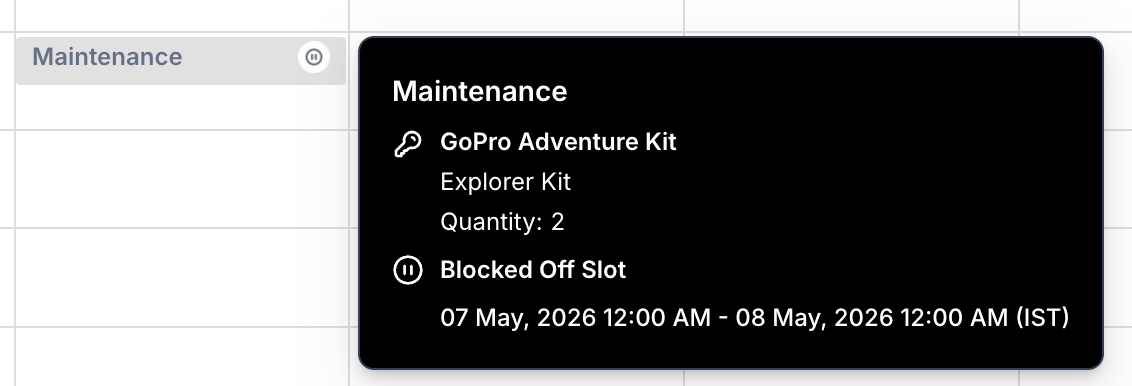
- The listing becomes unavailable for the selected duration.
- Availability is updated across all booking processes.
You can:
- View details of the blocked slot.
- Edit it using the same form.
- Delete it to instantly release availability.
- Helps manage inventory beyond customer bookings.
- Ensures accurate availability across all booking channels.
- Supports real-world scenarios like maintenance, holds, or internal usage.
- Gives you more flexibility and control over rental operations.