
AI Agent Action in Workflows
Introducing the AI Agent Action in Workflow AI
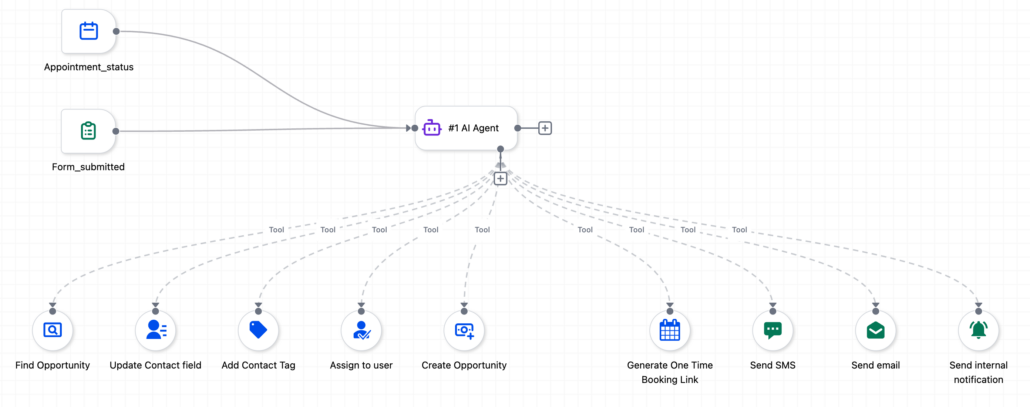
We have launched the AI Agent action in Workflow AI, introducing autonomous reasoning and decision-making into workflows. Until now, workflows were purely deterministic: every decision had to be predefined as a branch, every condition anticipated, and every field manually mapped. The AI Agent changes that. Simply describe your goal, grant the agent access to tools, and it will plan the sequence, decide the inputs, handle edge cases, and execute everything within a single workflow step.
The agent automatically searches and pulls context from across the entire CRM — including contact details, pipeline data, calendar availability, opportunity history, and custom fields. There’s no need for manual variable mapping or lookup steps.
Natural Language Instructions
Forget rigid dropdowns and field-by-field configuration. You can now write instructions in your own words — for example, “assign the deal to Sarah,” and the agent will identify “Sarah” as the actual CRM user. Just reference “the Enterprise pipeline,” and it will pinpoint the correct one. Instructions can vary from a quick paragraph to a comprehensive multi-page playbook.
You can write rough, casual instructions and then click “Enhance Prompt.” The AI will restructure your input into a well-organised prompt with numbered steps, edge case handling, and messaging guidelines — transforming a one-line note into a production-ready prompt.
Pre-Built Agent Configurations
We provide pre-built agent configurations for the highest-impact use cases, each pre-filled with instructions and tools. With just one click, you can add the required trigger, and another to apply — all while ensuring everything remains fully editable:
- Form Lead Follow Up: Qualify and book appointments from form submissions
- No Show Appointment Recovery: Send personalised SMS and email with a rebooking link
- Facebook Lead Nurturing: Engage inbound Facebook leads with personalised outreach
- Stale Deal Nudge Agent: Re-engage stale pipeline opportunities with context-aware messaging
- Lead Research & Enrichment: Research and enrich new contacts automatically
- Call Transcript Summary & Action Items: Summarise calls, extract action items, and notify your team
- Instagram / Facebook Comment to DM: Send personalised DMs based on comment context
- Lead Pipeline Tracker: Track leads through stages with periodic check-ins, powered by Conversation Memory
- New Appointment: Enrich & Confirm: Enrich contacts, confirm new appointments, and generate pre-meeting briefs for representatives
- Quiz Lead Scoring & Routing: Segment quiz leads into hot, warm, or cold tiers and notify the team internally
- Task Creation from Won Deals: Auto-create fulfilment and onboarding tasks in ClickUp or Asana when deals are won
Each tool includes a toggle for “Let AI decide all field values.” You can turn this on for full autonomy at runtime or off to lock specific fields (e.g., always assign to a particular user) while allowing the agent to decide on the rest. Individual fields can also be toggled independently, giving you a full spectrum ranging from fully autonomous to semi-autonomous configurations.
When enabled, the agent keeps a rolling summary of past executions for the same contact. For instance, the Lead Pipeline Tracker remembers what it sent last week and adjusts its messaging accordingly, evolving from a one-off decision-maker into an ongoing relationship manager.
The agent can return results as Text or JSON with a user-defined schema (String, Number, Boolean properties). The output feeds directly into If/Else branches, field updates, or downstream workflow steps. For example, the agent can qualify a lead and return {“qualified”: true, “score”: 85} for the workflow to branch on.
Full Execution Transparency
Every run generates a detailed trace in the Execution Logs, illuminating every LLM reasoning step, every tool call (with exact inputs and outputs), timestamps, token counts, and success/failure status. You can toggle between table view and raw JSON to create a tight feedback loop for prompt refinement.
Choose between GPT-5.2 (Low/Medium/High thinking), GPT-5.1 (Low/Medium/High thinking), and GPT-5 Nano (Fastest). GPT-5.2 Low thinking is recommended as the default for most use cases.
Getting Started
Open your workflow and click + Add Action. Search for “Agent” or scroll to the Workflow AI category. Select AI Agent. Choose a template or select “Build Your Own” to start from scratch. Write your instructions detailing what the agent should do, add the tools the agent can use (up to 10 per agent), and configure advanced options such as Conversation Memory and Output Format as needed. Save and publish.
AI Agent Pricing
AI Agent pricing is transparent and based on usage. Each execution costs:
- LLM Tokens: Total tokens consumed across all the agent’s reasoning and tool calls, multiplied by the rate of the selected model. Lighter models like GPT-5 Nano cost less per token, while higher-reasoning models like GPT-5.2 High thinking cost more.
- Premium Tool Executions: If the agent uses premium app integrations like ClickUp, Airtable, or Notion, those are charged at the same per-execution rate they already have as standalone workflow actions.
- Standard CRM Tools: Standard tools (e.g., Send SMS, Update Contact, Add Tag, etc.) do not incur any premium charge.
The AI Agent transforms workflows from a deterministic automation platform into one where a true CRM agent can assess context, make judgement calls, and execute actions autonomously — all within the workflow system you already use. Instead of mapping every branch and condition manually, describe the outcome you want and let the agent handle the reasoning, freeing you to build smarter automations in a fraction of the time.