
• Shopping Cart Shopping Cart
    0Shopping Cart
Clixio
  • Features
  • Pricing
  • FAQ
  • Blog
  • Log in
  • Free Trial
  • Menu Menu

Account Affiliate Manager: Enable or Disable Customers

February 25, 2025/in What's New? Affiliate Manager

Managing your affiliate programme just got more flexible! Admins can now enable or disable customers under any affiliate, allowing for better control over customer records and commission tracking.

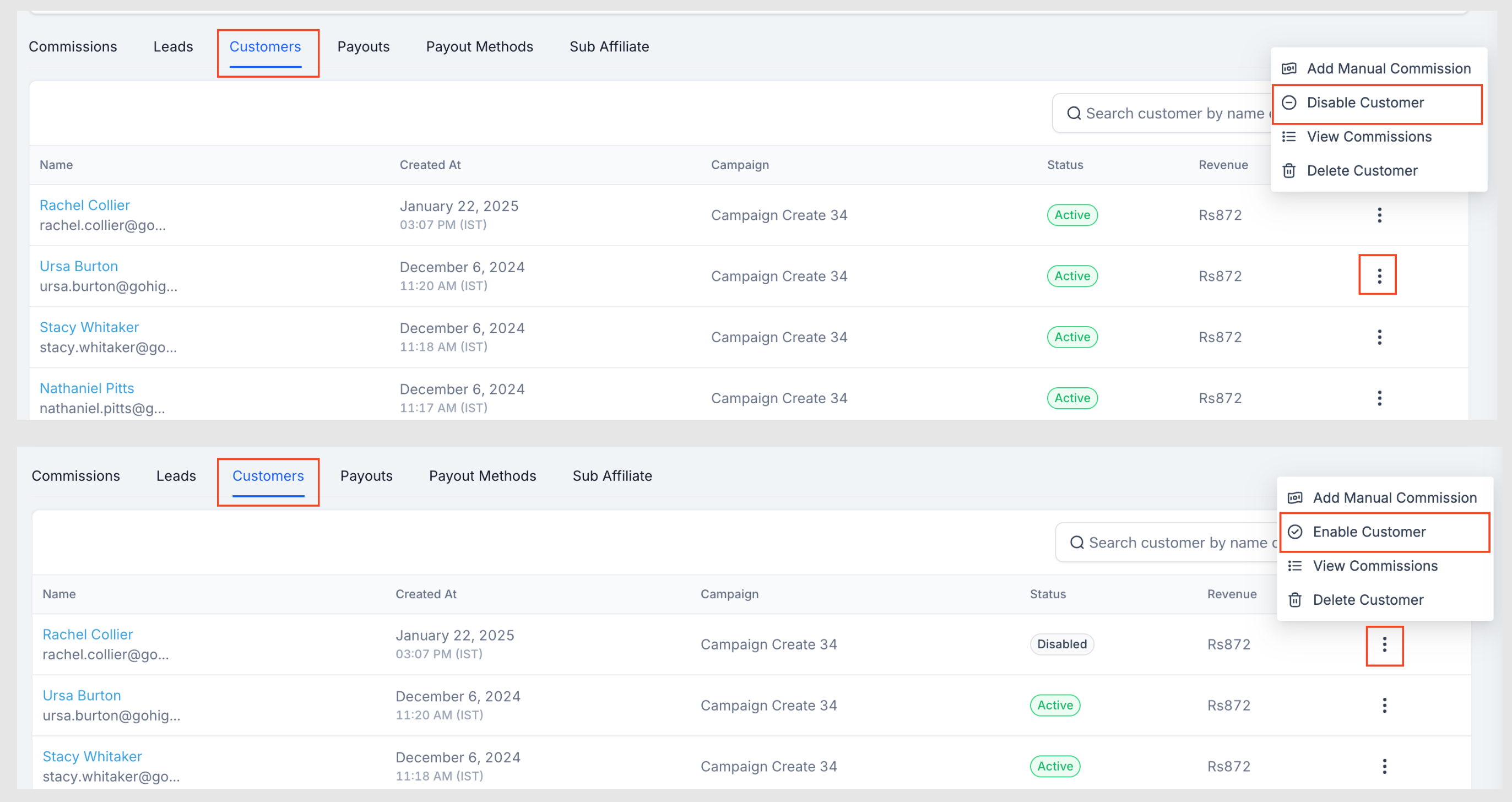
  • Disable a Customer:

    This sets their status to “Disabled,” meaning no further sales will be tracked, and they will no longer generate commissions. This is helpful for handling fraudulent sign-ups or preventing commission assignments in specific cases.

  • Enable a Customer:

    If a previously disabled customer needs to be reinstated, they can be enabled again to resume normal tracking and commission assignments.

  1. Open the Affiliate Profile where the customer is listed.
  2. Navigate to the Customers tab.
  3. Click the three-dot menu next to the customer.
  4. Select Disable or Enable as required
  • Better Programme Management:

    Keep your affiliate data clean and prevent unwanted commission tracking.

  • Fraud Prevention & Compliance:

    Disable customers linked to fraudulent activity or policy violations.

  • Flexible Commission Handling:

    Even when a customer is disabled, manual commissions can still be assigned when necessary.

⚠️

Important:

Disabling the Customer means they won’t generate any commission in the future. However, you can still assign manual commissions for this customer.
image
https://clixio.io/wp-content/uploads/2025/02/c83827ac8c503532405eed4858461f91.png 1456 2745 Clixio.io https://clixio.io/wp-content/uploads/2023/08/clixio-logo-dark.png Clixio.io2025-02-25 20:31:002025-02-25 20:31:00Account Affiliate Manager: Enable or Disable Customers

RSS Latest Feature Updates

  • Store Deletion Behavior Update | Clixio Changelog April 23, 2026
  • Terms & Conditions Consent at Store Checkout April 23, 2026
  • Social Planner: Community now in Comment Management April 23, 2026
  • Opportunity Smart Lists | Clixio Changelog April 22, 2026
  • WhatsApp Calling (Closed Beta) | Clixio Changelog April 22, 2026
  • Printful Auto Shipping Profile & Live Rates at Checkout April 22, 2026
  • AI Pages — Customization & Content Enhancements April 21, 2026
  • Delete Schema Markup Feature | Clixio Changelog April 21, 2026
  • Custom Date Reminder: Now for Custom Objects, Opportunities and Companies April 21, 2026
  • Conversation AI – Services Calendar V2 Enhancements April 21, 2026
Book a demo
See Clixio working
for your business, live.

30 minute call with our team. Personalised to your industry, no hard sell.

Book your free demo
14 day free trial · Cancel anytime
Clixio - Marketing and sales automation

Marketing & sales automation built for Australian service businesses. One platform, one flat rate, genuinely easy to use.

Product
Features Pricing How it works Latest updates
Company
Blog FAQ Get support Account transfers
Legal
Privacy Policy Terms & Conditions
© Clixio. All rights reserved. Made with ♡ in Australia.
Scroll to top Scroll to top Scroll to top