
• Shopping Cart Shopping Cart
    0Shopping Cart
Clixio
  • Features
  • Pricing
  • FAQ
  • Blog
  • Log in
  • Free Trial
  • Menu Menu

Workflow Switcher: Jump Between Workflows Instantly

October 15, 2025/in What's New?

Introducing the Workflow Switcher: Designed for users managing multiple automations, the Workflow Switcher allows you to effortlessly navigate between workflows without leaving the builder. You can easily compare, edit, or reuse steps across workflows.

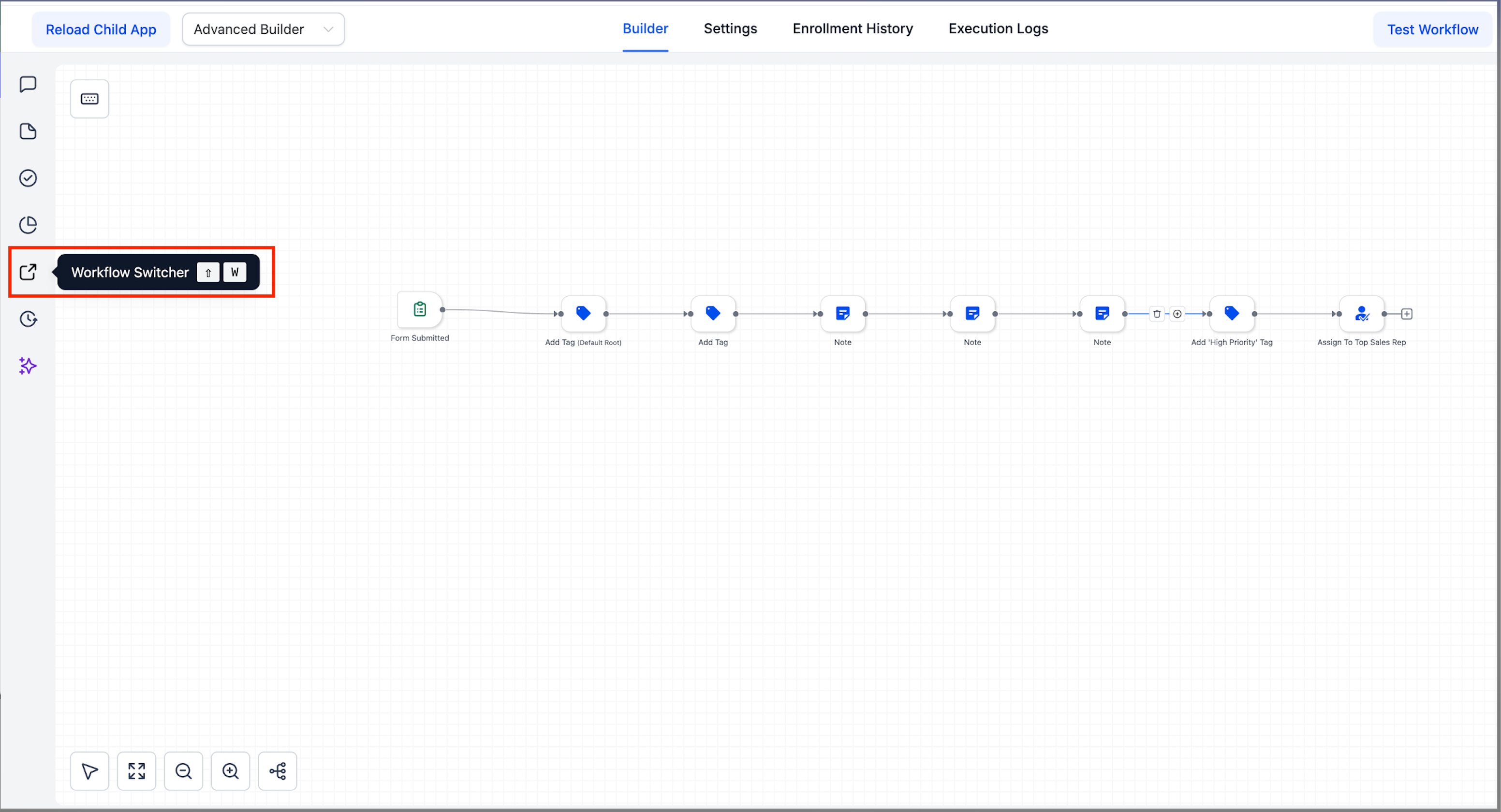
In the Advanced Builder, simply click the Workflow Switcher button located in the left sidebar (or use Shift + W).

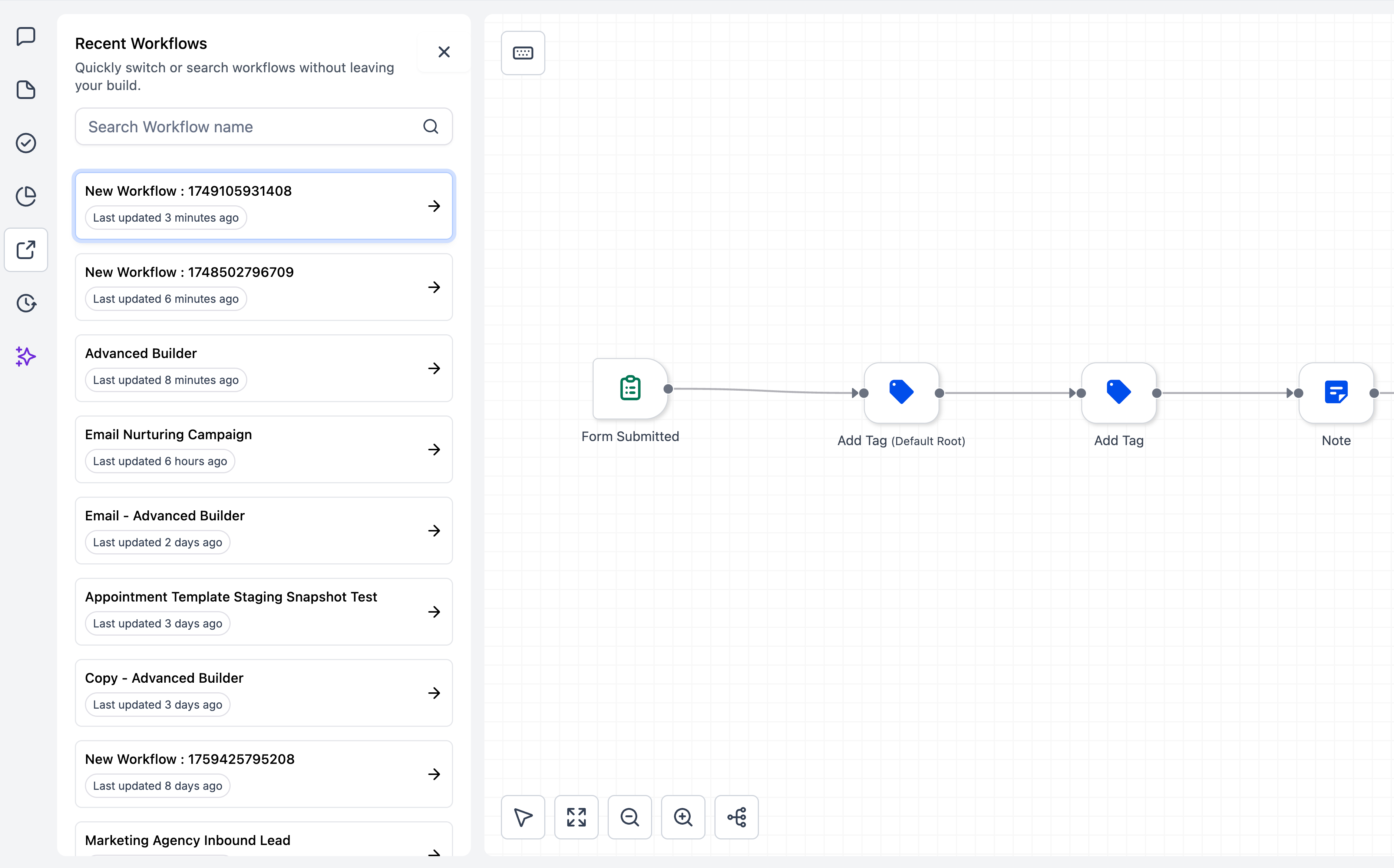
A side panel will open, displaying your most recent workflows along with a search feature.
image

Quick Search:

You can search by workflow name, with recent items listed for quick access.

Selecting a workflow will open it in a new browser tab, ensuring your current canvas remains intact.
image

Tip: Combine the Workflow Switcher with copy/paste across workflows to reuse branches and expedite your build time.

  • In the Advanced Builder, click the Workflow Switcher button in the left sidebar.
  • You can either search or scroll to select another workflow.
  • Switch instantly—edits are saved automatically.
  • Advanced Builder only:

    The Workflow Switcher is available in the Advanced Builder sidebar at launch. This feature will be introduced in the standard builder soon.

  • Tab Behaviour:

    Each selection opens a new tab, while your current builder remains open.

Previously, switching between workflows meant exiting the builder, locating the next one, and waiting for it to reload. Now, you can navigate seamlessly between automations with just one click, saving you time and helping you stay focused.

https://clixio.io/wp-content/uploads/2023/08/clixio-logo-dark.png 0 0 Clixio.io https://clixio.io/wp-content/uploads/2023/08/clixio-logo-dark.png Clixio.io2025-10-15 20:08:002025-10-15 20:08:00Workflow Switcher: Jump Between Workflows Instantly

RSS feed: Latest Feature Updates Latest Feature Updates

  • AI Image Generation Action in Workflows September 7, 2026
  • AI Analyze Image: New Workflow Action September 7, 2026
  • Improved: Dynamic Value Chips with Improved error segmentation September 4, 2026
  • 📞 More Reliable Missed Call Text Back with Smarter Number Selection September 4, 2026
  • 🔐 Client Portal: “User login” Workflow Trigger Now Supports the New Client Portal Experience September 3, 2026
  • 📢 Carrier Fee Pricing Update – Effective October 1, 2026 September 3, 2026
  • Privacy Policy + T&C URLs on Toll-Free Verification September 2, 2026
  • Workflow Builder: Pick an Email Sender Domain for Each Workflow! August 28, 2026
  • Certificate AI Beta is now live August 27, 2026
  • 📅 Date Range Setting Can Now Count Only the Days You Actually Work August 27, 2026
Book a demo
See Clixio working
for your business, live.

30 minute call with our team. Personalised to your industry, no hard sell.

Book your free demo
14 day free trial · Cancel anytime
Clixio - Marketing and sales automation

Marketing & sales automation built for Australian service businesses. One platform, one flat rate, genuinely easy to use.

Product
Features Pricing How it works Latest updates
Company
Blog FAQ Get support Account transfers
Legal
Privacy Policy Terms & Conditions
© Clixio. All rights reserved. Made with ♡ in Australia.
Scroll to top Scroll to top Scroll to top