
Workflow Builder: Right-click actions (fewer clicks, faster edits)
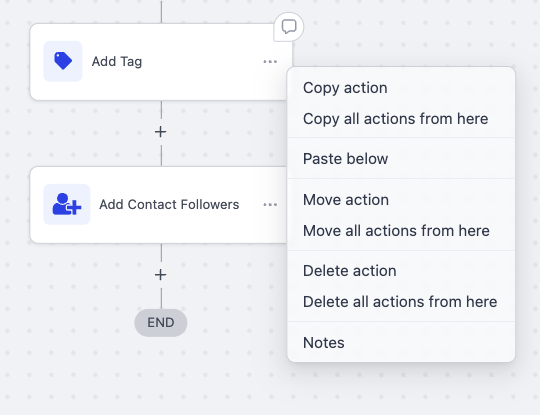
You can now right-click any action in the Workflow Builder to access a quick action menu, providing your essential tools right at your cursor (copy, move, delete, notes) without the need to search for the three-dot menu. This enhances navigation and accelerates your common edits.
Steps to Use the Quick Action Menu:
- Right-click on any action block.
- Select from the quick action menu:
Available Actions:
- Copy action / Copy all actions from here (or ‘Paste below’ if applicable)
- Move action / Move all actions from here
- Delete action / Delete all actions from here
- Notes
Continue Building:
- No extra navigation required.
Benefits of the Quick Action Menu:
- Fewer clicks and less searching through menus—actions are conveniently located under your cursor.
- Quicker edits that align with the familiar behaviour of desktop applications.