
• Shopping Cart Shopping Cart
    0Shopping Cart
Clixio
  • Features
  • Pricing
  • FAQ
  • Blog
  • Log in
  • Free Trial
  • Menu Menu

Webhook Logs Dashboard in Developer Portal

November 13, 2025/in What's New?

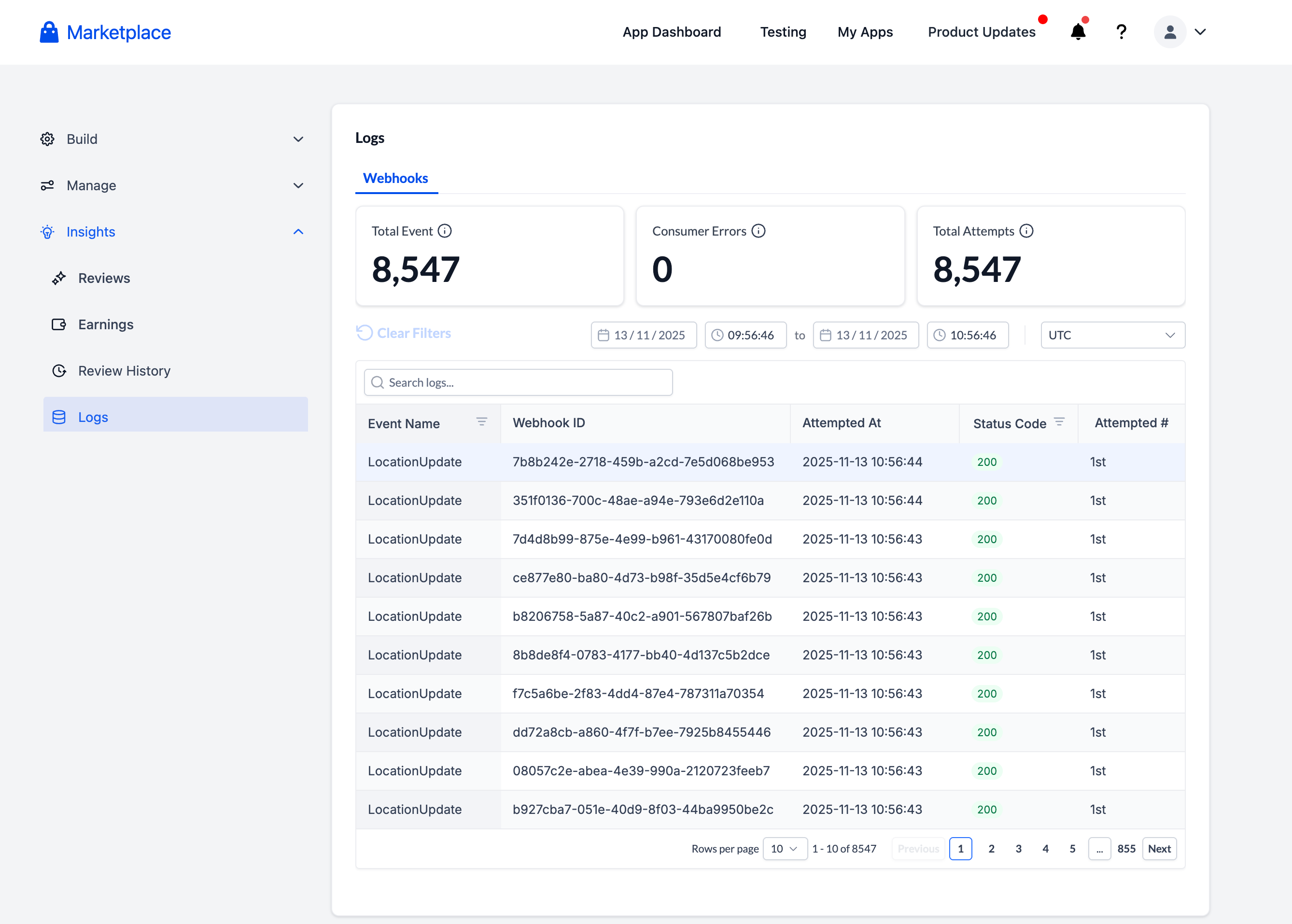
We’ve introduced a Webhook Logs dashboard in the Developer Portal (Insights → Logs) to enhance the debugging process for webhook issues—making it quick, transparent, and self-service.

Previously, developers and support teams had to submit support tickets to confirm whether Clixio had delivered a webhook. We often found that the issue was not on Clixio’s side.

This new dashboard provides developers with complete visibility into webhook deliveries, retries, and responses—no support ticket necessary.

  • A new “Webhook Logs” tab under Developer Portal → Insights → Logs
  • Optimised developer experience for debugging: Search by any substring in the payload
  • 30-day retention period
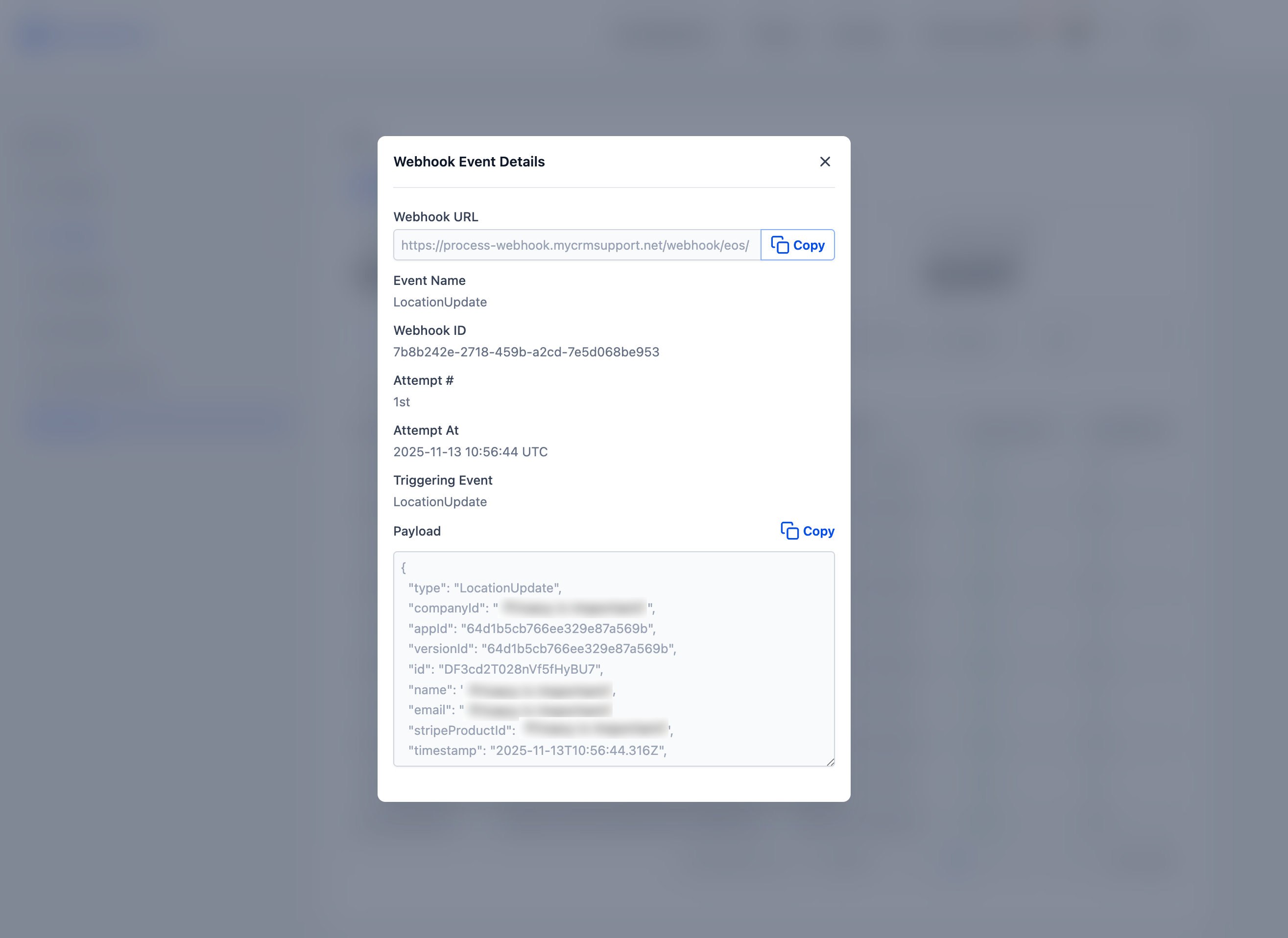
  • Detail Panel: Click on any event row to view Webhook ID, Attempt #, Event Name, Timestamps, and Full Payload (including a “Copy” button)
  • Timezone-aware views that default to Central Time, with overrides saved for future sessions

💻 **How to Use it as a Developer**

  1. Navigate to Developer Portal → Insights → Logs → Webhook Logs
  2. Filter or search by webhook ID, event type, or timestamp
  3. Click any row to open the detail panel and review payloads, response statuses, and retry history
  4. Easily copy payloads for debugging
  5. Set your timezone once—it’ll be remembered for future visits

💡 **Why This is Important**

This feature empowers developers with direct visibility into webhooks—reducing the number of support tickets, accelerating issue resolution, and enhancing trust in Clixio’s delivery infrastructure.
image
image
https://clixio.io/wp-content/uploads/2023/08/clixio-logo-dark.png 0 0 Clixio.io https://clixio.io/wp-content/uploads/2023/08/clixio-logo-dark.png Clixio.io2025-11-13 21:17:002025-11-13 21:17:00Webhook Logs Dashboard in Developer Portal

RSS feed: Latest Feature Updates Latest Feature Updates

  • AI Image Generation Action in Workflows September 7, 2026
  • AI Analyze Image: New Workflow Action September 7, 2026
  • Improved: Dynamic Value Chips with Improved error segmentation September 4, 2026
  • 📞 More Reliable Missed Call Text Back with Smarter Number Selection September 4, 2026
  • 🔐 Client Portal: “User login” Workflow Trigger Now Supports the New Client Portal Experience September 3, 2026
  • 📢 Carrier Fee Pricing Update – Effective October 1, 2026 September 3, 2026
  • Privacy Policy + T&C URLs on Toll-Free Verification September 2, 2026
  • Workflow Builder: Pick an Email Sender Domain for Each Workflow! August 28, 2026
  • Certificate AI Beta is now live August 27, 2026
  • 📅 Date Range Setting Can Now Count Only the Days You Actually Work August 27, 2026
Book a demo
See Clixio working
for your business, live.

30 minute call with our team. Personalised to your industry, no hard sell.

Book your free demo
14 day free trial · Cancel anytime
Clixio - Marketing and sales automation

Marketing & sales automation built for Australian service businesses. One platform, one flat rate, genuinely easy to use.

Product
Features Pricing How it works Latest updates
Company
Blog FAQ Get support Account transfers
Legal
Privacy Policy Terms & Conditions
© Clixio. All rights reserved. Made with ♡ in Australia.
Scroll to top Scroll to top Scroll to top