
• Shopping Cart Shopping Cart
    0Shopping Cart
Clixio
  • Features
  • Pricing
  • FAQ
  • Blog
  • Log in
  • Free Trial
  • Menu Menu

New Goal Events: Invoice Paid + Review Request Clicked

March 10, 2026/in What's New? Automations

Workflows Update

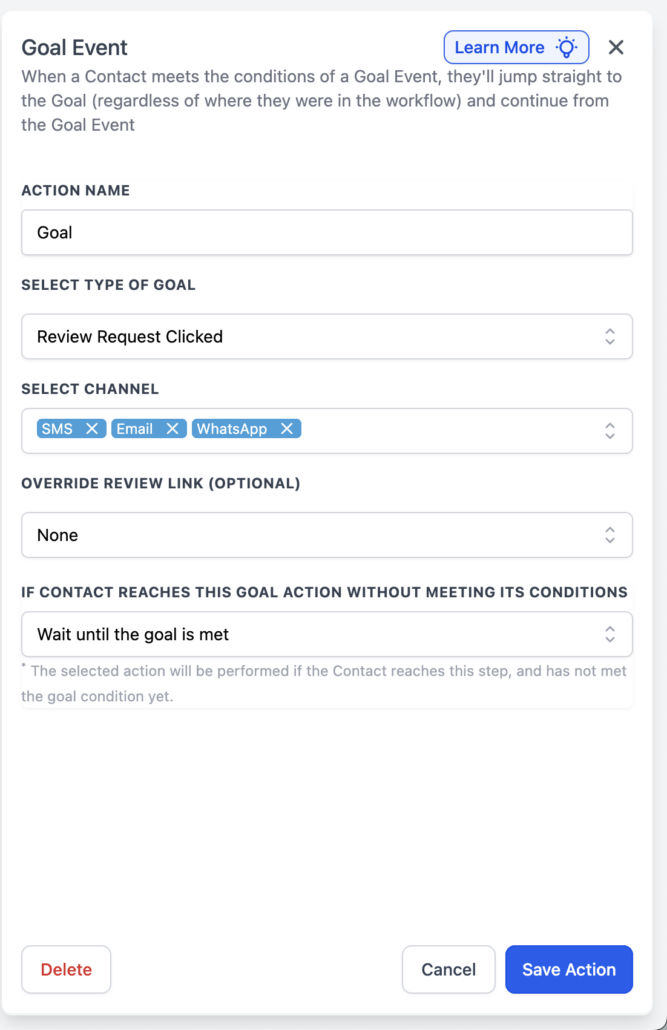
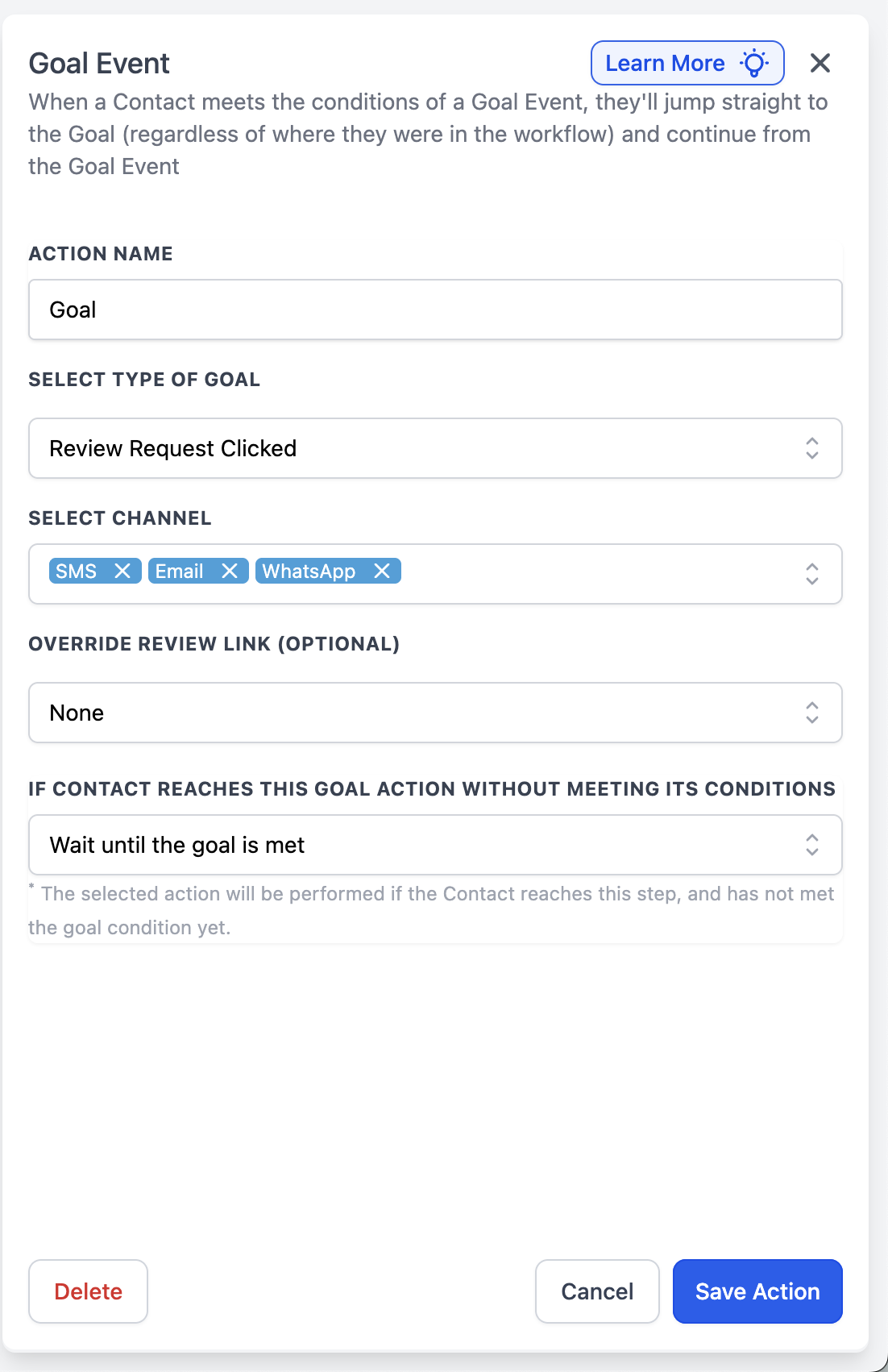
Workflows now accommodate two new Goal Event types: Invoice Paid and Review Request Clicked. These can be used to automatically advance a contact to a Goal step when an invoice reaches the appropriate payment status or when the contact clicks on a review request link (with optional filtering by channel and/or link).

  • Invoice Paid:

    The goal is completed when a contact has an invoice marked as Paid or Partially Paid—either any invoice for that contact or only the one associated with your selected Send Invoice step (if applicable).

  • Review Request Clicked:

    The goal is completed when a contact clicks a review request link across any channel or within the selected channel(s) and/or a specific review link (if any filters are applied).

  • Add a Goal Event step in your workflow.
  • Select Invoice Paid or Review Request Clicked, then apply your filters.
  • Determine the action that occurs if the contact reaches the Goal step before the event takes place, then click Save.

These goals enable you to advance contacts based on genuine outcomes—payment received or expressed interest in a review—without requiring additional branches or manual checks.

  • For Invoice Paid: After a “Send Invoice” action, the contact pays (status Paid or Partially Paid), and the Invoice Paid goal advances them to “Send receipt + next steps.”
  • For Review Request Clicked: You send a review request via SMS, and when the contact clicks the link, the Review Request Clicked goal moves them to “Thanks + referral ask.”
  • If you do not link an Invoice Paid goal to a specific invoice action, any qualifying paid invoice for that contact can fulfil the goal.
  • For Review Request Clicked, leaving Channel and Override Review Link blank allows for broader matching, whereas adding filters limits the goal to those specific clicks in the chosen channels/Links.
image
image
https://clixio.io/wp-content/uploads/2026/03/7d2683e4b8cf36e2bf1de8e6dd23eb14.png 1702 1102 Clixio.io https://clixio.io/wp-content/uploads/2023/08/clixio-logo-dark.png Clixio.io2026-03-10 00:43:002026-03-10 00:43:00New Goal Events: Invoice Paid + Review Request Clicked

RSS feed: Latest Feature Updates Latest Feature Updates

  • Improved: Dynamic Value Chips with Improved error segmentation September 4, 2026
  • 📞 More Reliable Missed Call Text Back with Smarter Number Selection September 4, 2026
  • 🔐 Client Portal: “User login” Workflow Trigger Now Supports the New Client Portal Experience September 3, 2026
  • 📢 Carrier Fee Pricing Update – Effective October 1, 2026 September 3, 2026
  • Privacy Policy + T&C URLs on Toll-Free Verification September 2, 2026
  • Workflow Builder: Pick an Email Sender Domain for Each Workflow! August 28, 2026
  • Certificate AI Beta is now live August 27, 2026
  • 📅 Date Range Setting Can Now Count Only the Days You Actually Work August 27, 2026
  • Schedule Availability with Custom Open & Expiry Experiences – Form, Survey & Quiz August 27, 2026
  • WhatsApp messaging limits: now shown at the portfolio level August 27, 2026
Book a demo
See Clixio working
for your business, live.

30 minute call with our team. Personalised to your industry, no hard sell.

Book your free demo
14 day free trial · Cancel anytime
Clixio - Marketing and sales automation

Marketing & sales automation built for Australian service businesses. One platform, one flat rate, genuinely easy to use.

Product
Features Pricing How it works Latest updates
Company
Blog FAQ Get support Account transfers
Legal
Privacy Policy Terms & Conditions
© Clixio. All rights reserved. Made with ♡ in Australia.
Scroll to top Scroll to top Scroll to top