
• Shopping Cart Shopping Cart
    0Shopping Cart
Clixio
  • Features
  • Pricing
  • FAQ
  • Blog
  • Log in
  • Free Trial
  • Menu Menu

Invoices: Link opportunities and view them in the Payments tab

May 22, 2025/in What's New?

Seamless Auto-Linking:

Every invoice you create from an Opportunity’s Payments tab (or via workflow) is instantly and automatically linked back to that Opportunity—ensuring you always know which deal it belongs to.

On-Screen Linking Option in Payments:

In the Payments tab, switch to Invoices and click on Create Invoice. Simply check the Link Opportunity box and select the deal before sending.

Fully Automated via Workflows:

Incorporate a Send Invoice action into any Opportunity-triggered workflow (e.g. Status or Stage change). The system will automatically create, send, and link the invoice to that Opportunity.

  • Open an Opportunity → select Payments → Actions menu → Create Invoice
Screenshot 2025-05-22 at 13
  • You’ll land on the invoice screen with the Opportunity already linked.
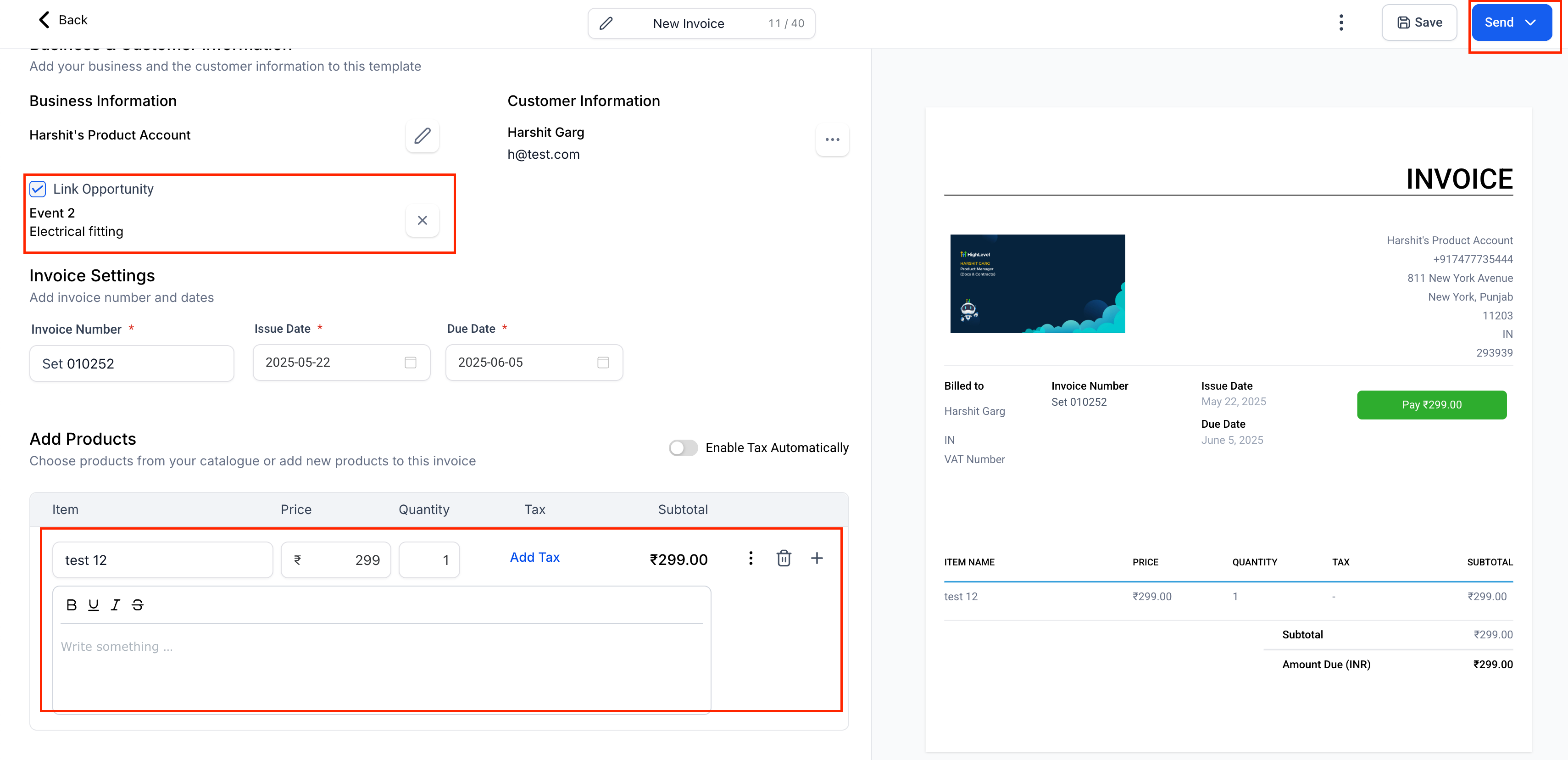
Screenshot 2025-05-22 at 13
  • Inside the Payments tab, choose Invoices from the dropdown → Create Invoice.
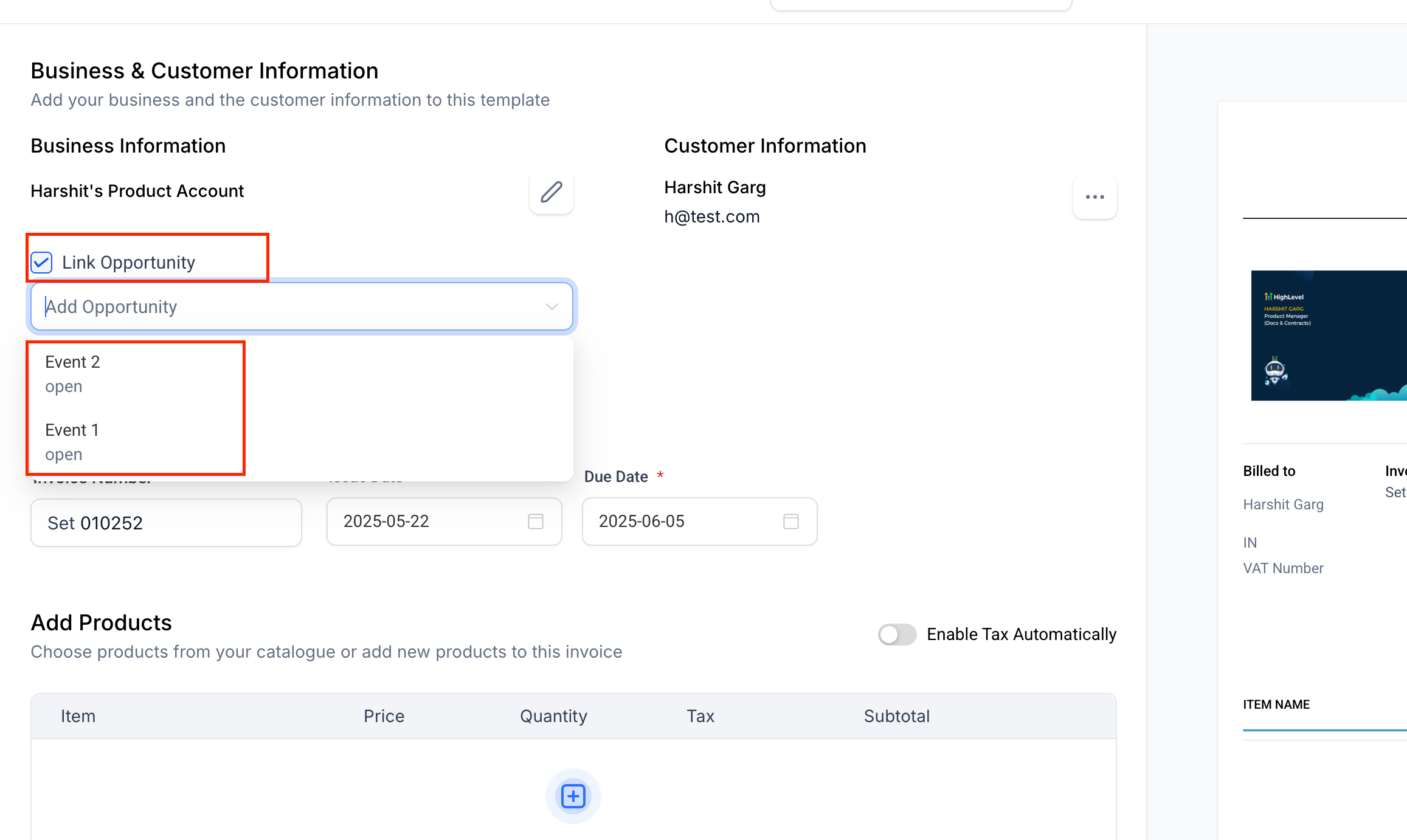
Screenshot 2025-05-22 at 13
  • In the invoice builder, check the Link Opportunity box, select the deal, then Save or Send.
  • Build a workflow triggered by an Opportunity event (e.g. Status Changed, Stage Changed).
  • Add the Send Invoice action.
  • When the workflow runs, the invoice is created, sent, and linked—no extra steps needed.

View your invoices in the Opportunity’s Payments tab.

Screenshot 2025-05-22 at 13
  • Streamline billing right alongside your deals—issue, view, and track all your invoices using opportunities.
https://clixio.io/wp-content/uploads/2023/08/clixio-logo-dark.png 0 0 Clixio.io https://clixio.io/wp-content/uploads/2023/08/clixio-logo-dark.png Clixio.io2025-05-22 18:54:002025-05-22 18:54:00Invoices: Link opportunities and view them in the Payments tab

RSS feed: Latest Feature Updates Latest Feature Updates

  • Working Hours for Conversation AI Agents September 7, 2026
  • AI Image Generation Action in Workflows September 7, 2026
  • AI Analyze Image: New Workflow Action September 7, 2026
  • Improved: Dynamic Value Chips with Improved error segmentation September 4, 2026
  • 📞 More Reliable Missed Call Text Back with Smarter Number Selection September 4, 2026
  • 🔐 Client Portal: “User login” Workflow Trigger Now Supports the New Client Portal Experience September 3, 2026
  • 📢 Carrier Fee Pricing Update – Effective October 1, 2026 September 3, 2026
  • Privacy Policy + T&C URLs on Toll-Free Verification September 2, 2026
  • Workflow Builder: Pick an Email Sender Domain for Each Workflow! August 28, 2026
  • Certificate AI Beta is now live August 27, 2026
Book a demo
See Clixio working
for your business, live.

30 minute call with our team. Personalised to your industry, no hard sell.

Book your free demo
14 day free trial · Cancel anytime
Clixio - Marketing and sales automation

Marketing & sales automation built for Australian service businesses. One platform, one flat rate, genuinely easy to use.

Product
Features Pricing How it works Latest updates
Company
Blog FAQ Get support Account transfers
Legal
Privacy Policy Terms & Conditions
© Clixio. All rights reserved. Made with ♡ in Australia.
Scroll to top Scroll to top Scroll to top