🔄 Enhanced Calendly Reschedule Handling in Clixio Calendars
Improvements to Calendly Appointment Reschedules
We’ve enhanced how Calendly appointment reschedules are managed within Clixio to provide a more consistent scheduling and automation experience.
With this update, Calendly reschedules now function the same way as native Clixio appointment reschedules. This ensures that reschedule-based workflows, tags, and tracking operate seamlessly across the platform.
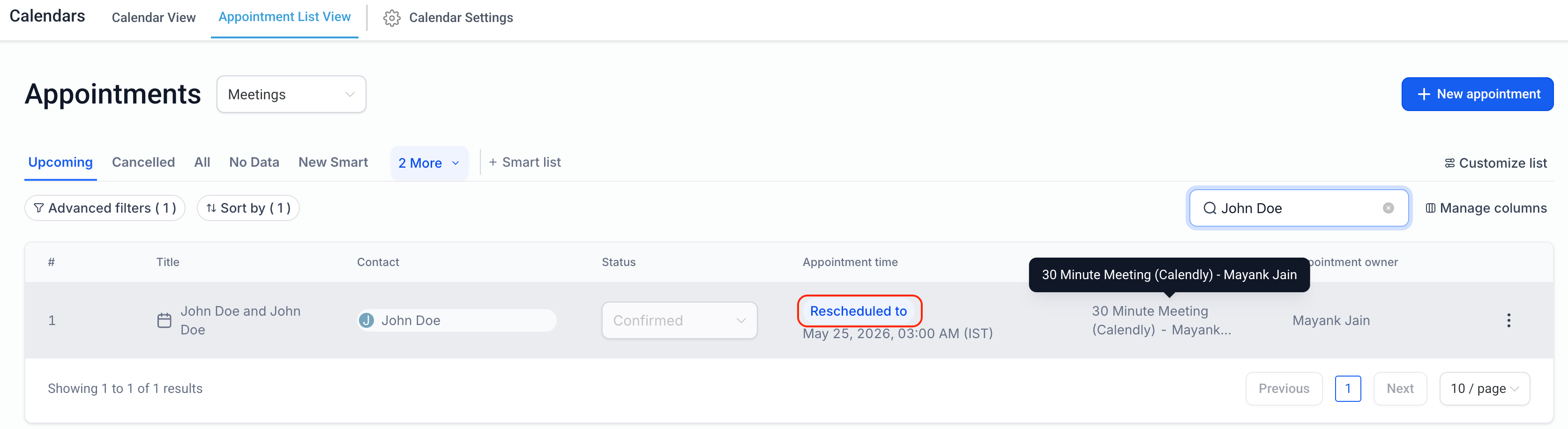
When an appointment is rescheduled in Calendly:
- The existing Clixio appointment is updated with the new date/time.
- The appointment is marked as Rescheduled.
- The previous appointment date/time is preserved for tracking purposes.
- Rescheduled tags and workflow conditions are applied correctly.
Workflows using the Rescheduled = True filter will now also apply to Calendly reschedules.
- This creates a more consistent scheduling experience across Calendly and Clixio.
- It improves the reliability of reschedule-based workflows and automations.
- It enhances appointment tracking and accuracy.