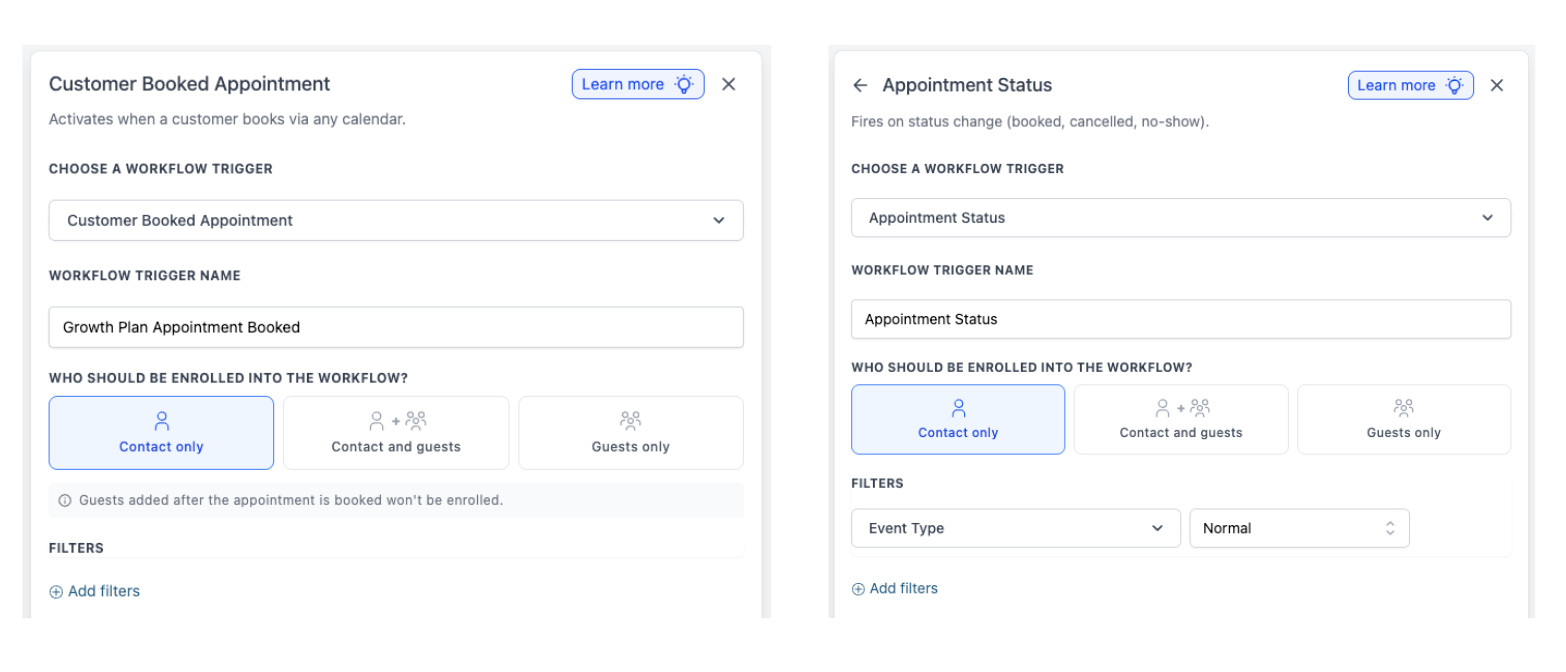
Appointment Triggers now supports appointment guests!
We have enhanced both the Customer Booked Appointment and Appointment Status workflow triggers to support guest contacts. You can now select who gets enrolled when an appointment-based trigger activates: Contact only, Contact and Guests, or Guests only.
When the trigger is executed, the system checks who is associated with the appointment at that time and enrolls records based on your selected option. If you choose Contact and Guests, the workflow runs once for the primary contact and once for each guest. If you select Guests only, the primary contact will be skipped.
- Add a Customer Booked Appointment or Appointment Status trigger to your workflow.
- In ‘Who should be enrolled into the workflow?’ choose Contact only, Contact and Guests, or Guests only.
- Save the trigger and publish your workflow.
Previously, appointment workflows were limited to the primary contact, making it challenging to automate reminders, confirmations, and follow-ups for appointments involving multiple participants. This update addresses that issue, allowing you to communicate with the appropriate individuals automatically.
- Applies to Customer Booked Appointment and Appointment Status triggers.
- None of your existing trigger configurations will be affected; the default behaviour remains Contact only for backward compatibility.
- For the appointment booked trigger, guests added after the appointment is booked will not be enrolled by that earlier trigger event.