
• Shopping Cart Shopping Cart
    0Shopping Cart
Clixio
  • Features
  • Pricing
  • FAQ
  • Blog
  • Log in
  • Free Trial
  • Menu Menu

WhatsApp Templates: Trigger Link Buttons

August 4, 2025/in What's New? Automations

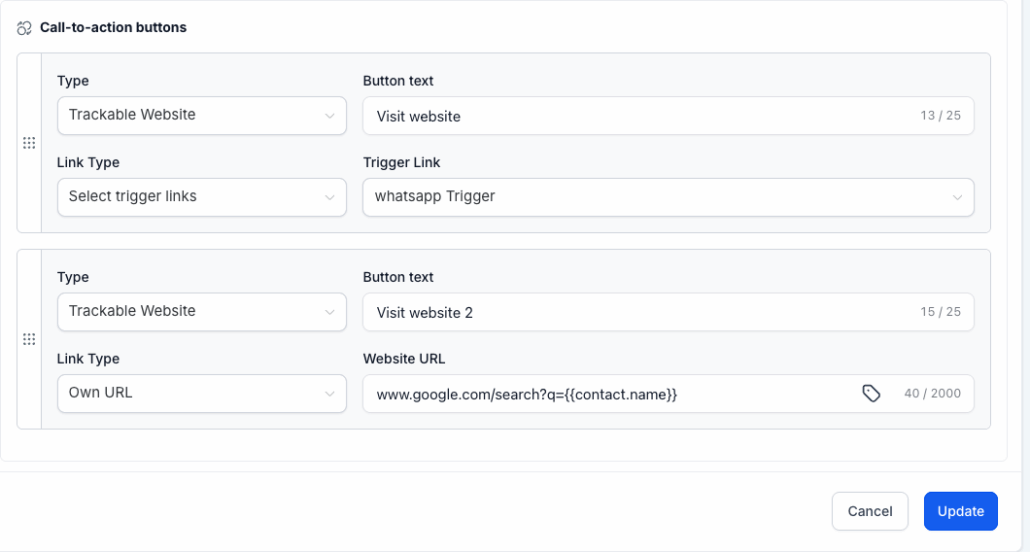
Your WhatsApp V2 templates have become smarter. You can now embed Trigger Links as buttons, track every click, and automatically branch workflows—just like you do with email or SMS links.
image

Trigger Link Buttons – Add trackable links to any WhatsApp V2 template button.

Click Tracking – See exactly which button a contact taps; clicks are recorded in reports and workflow logs.

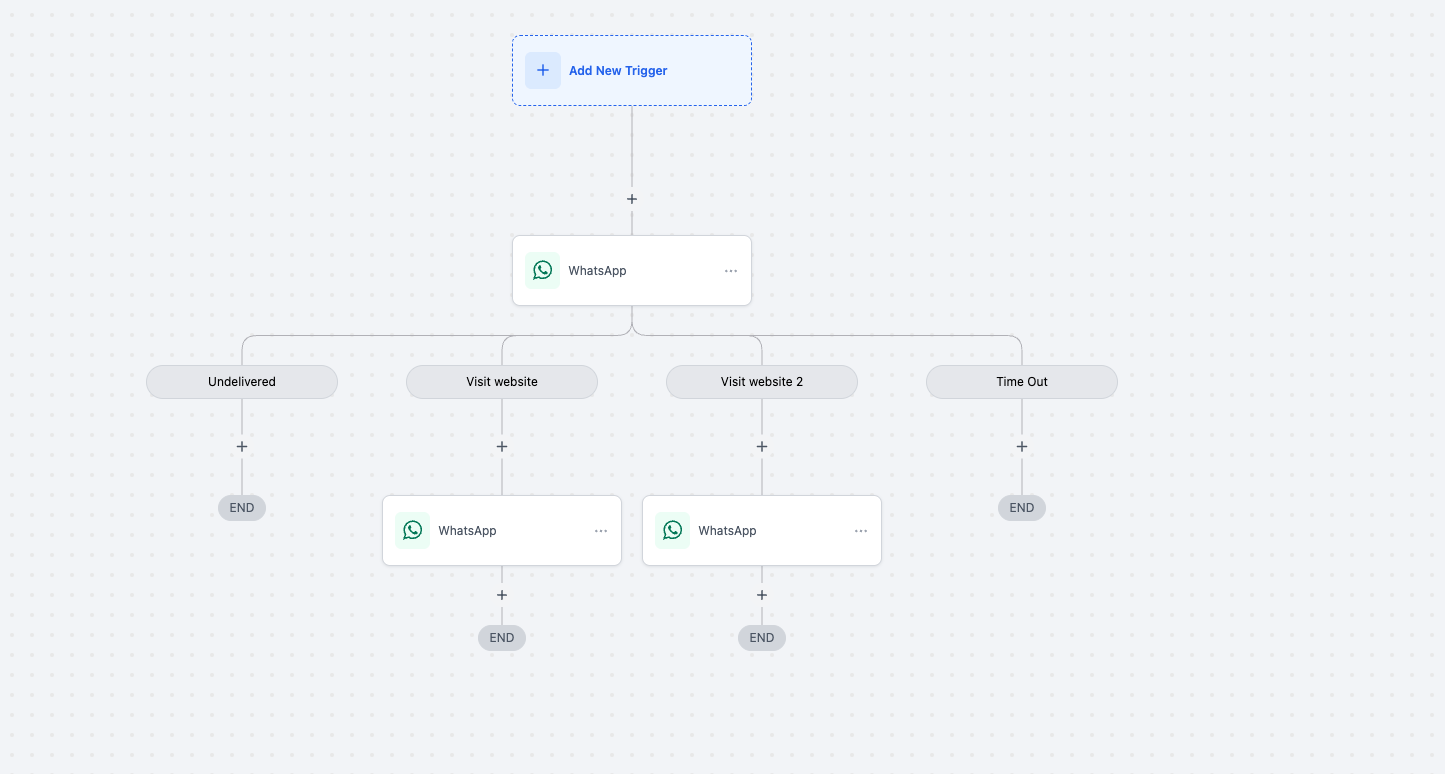
Workflow Branching – Use the Button Click condition to guide contacts down different paths based on the link they choose.

Measure Engagement – Identify which offer, product, or call-to-action captures attention on WhatsApp.

Book a demo
See Clixio working
for your business, live.

30 minute call with our team. Personalised to your industry, no hard sell.

Book your free demo
14 day free trial · Cancel anytime

Smarter Automation – Trigger follow-ups, tags, or personalised messages the moment a link is clicked.

Unified Analytics – Track WhatsApp clicks alongside email and SMS for a comprehensive view of engagement.
image

Edit or Create a WhatsApp Template.

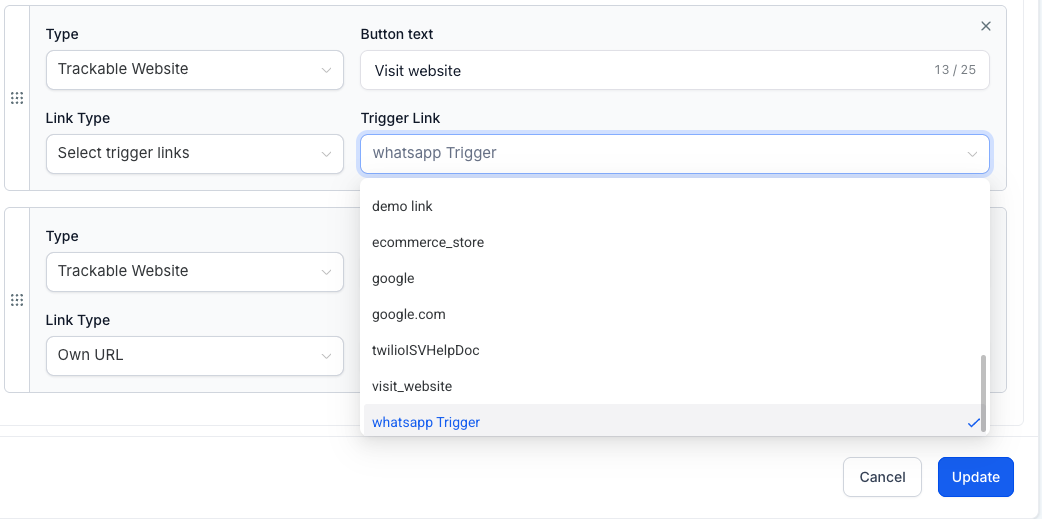
Add a button, select Trigger Link, and choose your link from the dropdown menu.

Save and submit the template for approval.

In Workflows, use the Button Click condition to branch actions based on the clicked trigger link.
image

Total Buttons Per Message remain capped at two.

Example Combinations:

Two Trigger Link buttons

One Trigger Link button + one quick-reply button

You cannot exceed the two-button limit with any combination of button types.

Start adding Trigger Links to your WhatsApp templates today and create laser-targeted, clickable experiences—directly within the chat.

https://clixio.io/wp-content/uploads/2025/08/d4282e5569ef77d3969d4686e36e151a.png 568 1060 Clixio.io https://clixio.io/wp-content/uploads/2023/08/clixio-logo-dark.png Clixio.io2025-08-04 22:54:002025-08-04 22:54:00WhatsApp Templates: Trigger Link Buttons

RSS Latest Feature Updates

  • Export email marketing data 🚀 March 6, 2026
  • Fixed: ‘Assign to User’ Now Skips Inactive Users March 6, 2026
  • Standard Builder: Now with Sticky Notes 2.0 March 6, 2026
  • AI Builder: Post Generation To Do List March 6, 2026
  • Ad Manager – Meta lead gen: Website & hybrid conversion locations March 6, 2026
  • 🔕 No External Update Emails for “Showed” & “No Show” Status Changes March 6, 2026
  • AI Powered Field Tooltips | Clixio Changelog March 3, 2026
  • Assign User Action: Now Assign to IVR Responder March 3, 2026
  • Assign User Action: Now Assign to IVR Responder with Custom Variables March 3, 2026
  • Connect Call (IVR) Action: Now Supports Call Whisper March 3, 2026
Clixio - Marketing and sales automation

Marketing & sales automation built for Australian service businesses. One platform, one flat rate, genuinely easy to use.

Product
Features Pricing How it works Latest updates
Company
Blog FAQ Get support Account transfers
Legal
Privacy Policy Terms & Conditions
© Clixio. All rights reserved. Made with ♡ in Australia.
Scroll to top Scroll to top Scroll to top