
WhatsApp: Interactive Message for Chatbot flow
We’re excited to announce **Interactive Message Types** for WhatsApp within Automations!
This release enables richer message formats, branching capabilities, and compliance with WhatsApp’s latest conversation rules, helping businesses create guided and engaging customer experiences.
<p>**Supported Interactive Messages**</p>
<p>You can now send the following Interactive WhatsApp Messages in Automations:</p>
<p>**Quick Reply Buttons** – Configure header, body, footer, button titles, and timeout settings.</p>
<p>**Location** – Share a map card with Location Name, Address, Latitude, and Longitude.</p>
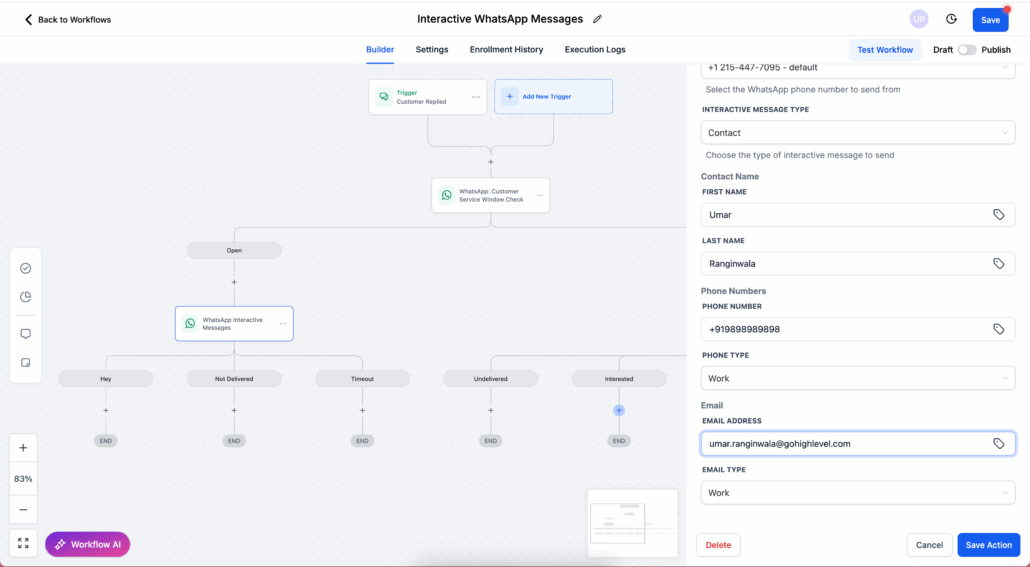
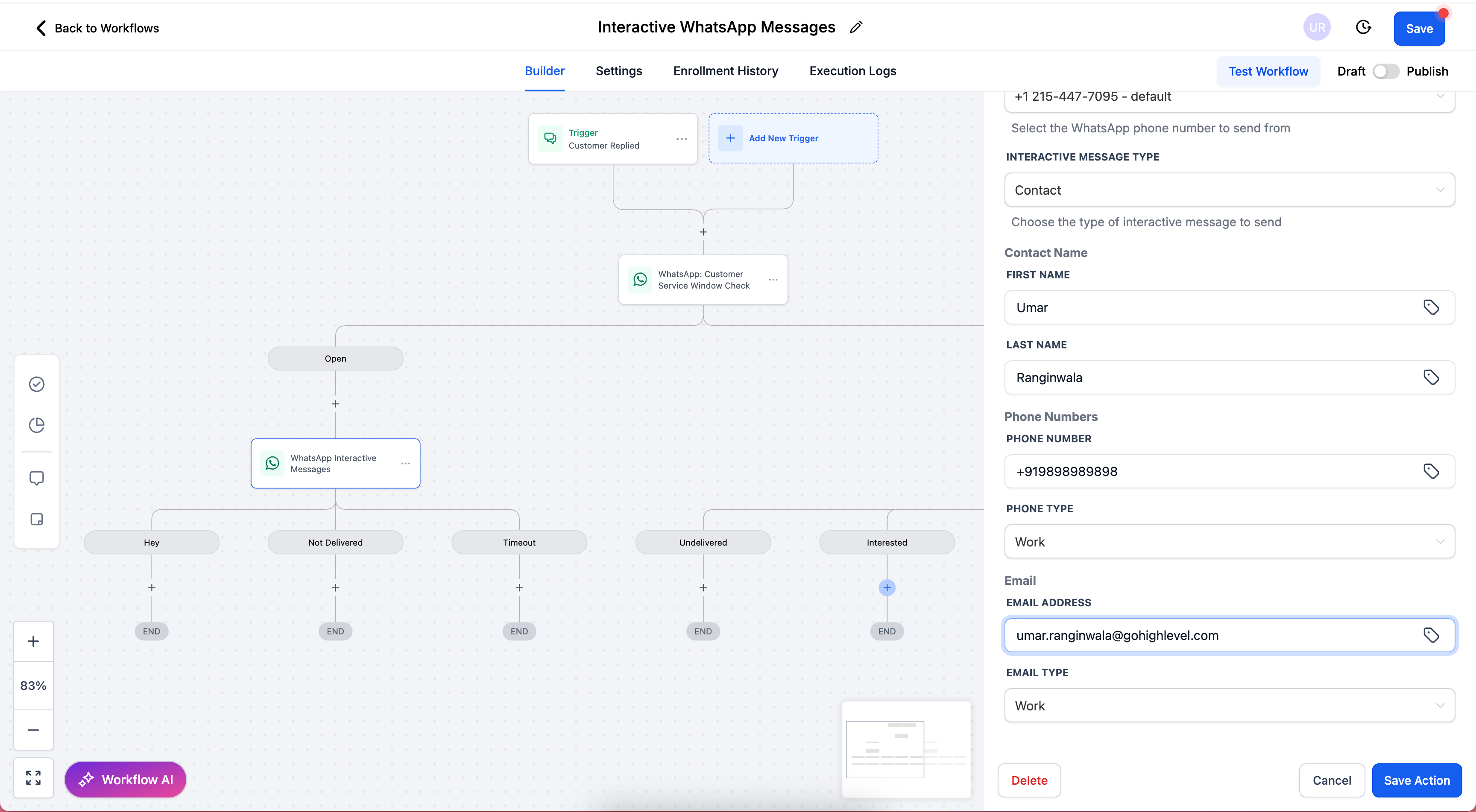
<p>**Contact** – Share contact cards with First/Last Name, Phone Number + Type, and Email (optional).</p>
<div class="line">
    <img alt="image" loading="lazy" src="https://canny-assets.io/images/aef5c93ad05b2a592393bd8b06c82475.png" class="tappable"/>
</div>

<p>**List Messages** – Structured menus with multiple choices.</p>
<p>**Dynamic Website Link Messages** – Interactive CTAs that open trackable links.</p>

<p>**Workflow Branching**</p>
<p>Interactive replies can now trigger workflow branches, enabling chatbot-like flows without manual message parsing.</p>
<div class="line">
    <img alt="Screenshot 2025-08-25 at 7" loading="lazy" src="https://canny-assets.io/images/90b11a14faeb428faa32cc327e55f199.png" class="tappable"/>
</div>

<p>In Automations, add the action **WhatsApp Interactive Messages**.</p>
<p>Select the **FROM PHONE NUMBER**.</p>
<p>Choose your **INTERACTIVE MESSAGE TYPE** (Quick Reply Buttons, Location, or Contact).</p>
<p>Complete the required fields:</p>
<p>**Quick Reply Buttons** → header, body, footer, button titles, timeout.</p>
<p>**Location** → name, address, latitude, longitude.</p>
<p>**Contact** → name, phone number & type, email (optional).</p>
<p>Save and test with a sample contact to confirm the message renders in WhatsApp.</p>
<p>📖 For detailed setup instructions, see: **Interactive WhatsApp Messages Support Article**</p>
<div class="line">
    <img alt="image" loading="lazy" src="https://canny-assets.io/images/bcdc4a5070b0c5ca44b506423cfccdb9.png" class="tappable"/>
</div>
<div class="line">
    <div class="heading">
        <p>🔑 **Prerequisite: Customer Service Window**</p>
    </div>
</div>

<p>Interactive WhatsApp Messages can only be sent if the 24-hour Customer Service Window is open. This window opens when a customer sends your business a WhatsApp message.</p>
<p>You can send unlimited Interactive WhatsApp Messages at no cost. All interactive replies (button taps, location opens, contact saves) are free.</p>
<p>If the window is closed, you must first send a Marketing or Utility Template to reopen it.</p>
<p>📖 Learn more: **WhatsApp Customer Service Window Check**</p>

<p>All Interactive WhatsApp Messages are free during an active 24-hour Customer Service Window. There are no charges for interactive message types or customer replies once the window is open.</p>

<p>Richer, more structured customer interactions.</p>
<p>Guided journeys with buttons, location cards, and contact cards.</p>
<p>Unlimited free interactive messages within the service window.</p>
<p>Workflow automation with branching based on interactive replies.</p>
<div class="line">
    <img alt="Screenshot 2025-08-25 at 7" loading="lazy" src="https://canny-assets.io/images/a14050211a4af5ebb51992cb8b830e04.png" class="tappable"/>
</div>

<p>WhatsApp currently supports only:</p>
<p>Up to 3 reply buttons per message, or</p>
<p>1 location card, or</p>
<p>1 contact card per message.</p>
<p>Support for **List Messages** with structured menus.</p>
<p>Support for **Dynamic Website Link** messages (trackable CTAs).</p>