
• Shopping Cart Shopping Cart
    0Shopping Cart
Clixio
  • Features
  • Pricing
  • FAQ
  • Blog
  • Log in
  • Free Trial
  • Menu Menu

Invoices: Link opportunities and view them in the Payments tab

May 22, 2025/in What's New?

Seamless Auto-Linking:

Every invoice you create from an Opportunity’s Payments tab (or via workflow) is instantly and automatically linked back to that Opportunity—ensuring you always know which deal it belongs to.

On-Screen Linking Option in Payments:

In the Payments tab, switch to Invoices and click on Create Invoice. Simply check the Link Opportunity box and select the deal before sending.

Fully Automated via Workflows:

Incorporate a Send Invoice action into any Opportunity-triggered workflow (e.g. Status or Stage change). The system will automatically create, send, and link the invoice to that Opportunity.

  • Open an Opportunity → select Payments → Actions menu → Create Invoice
Screenshot 2025-05-22 at 13
  • You’ll land on the invoice screen with the Opportunity already linked.
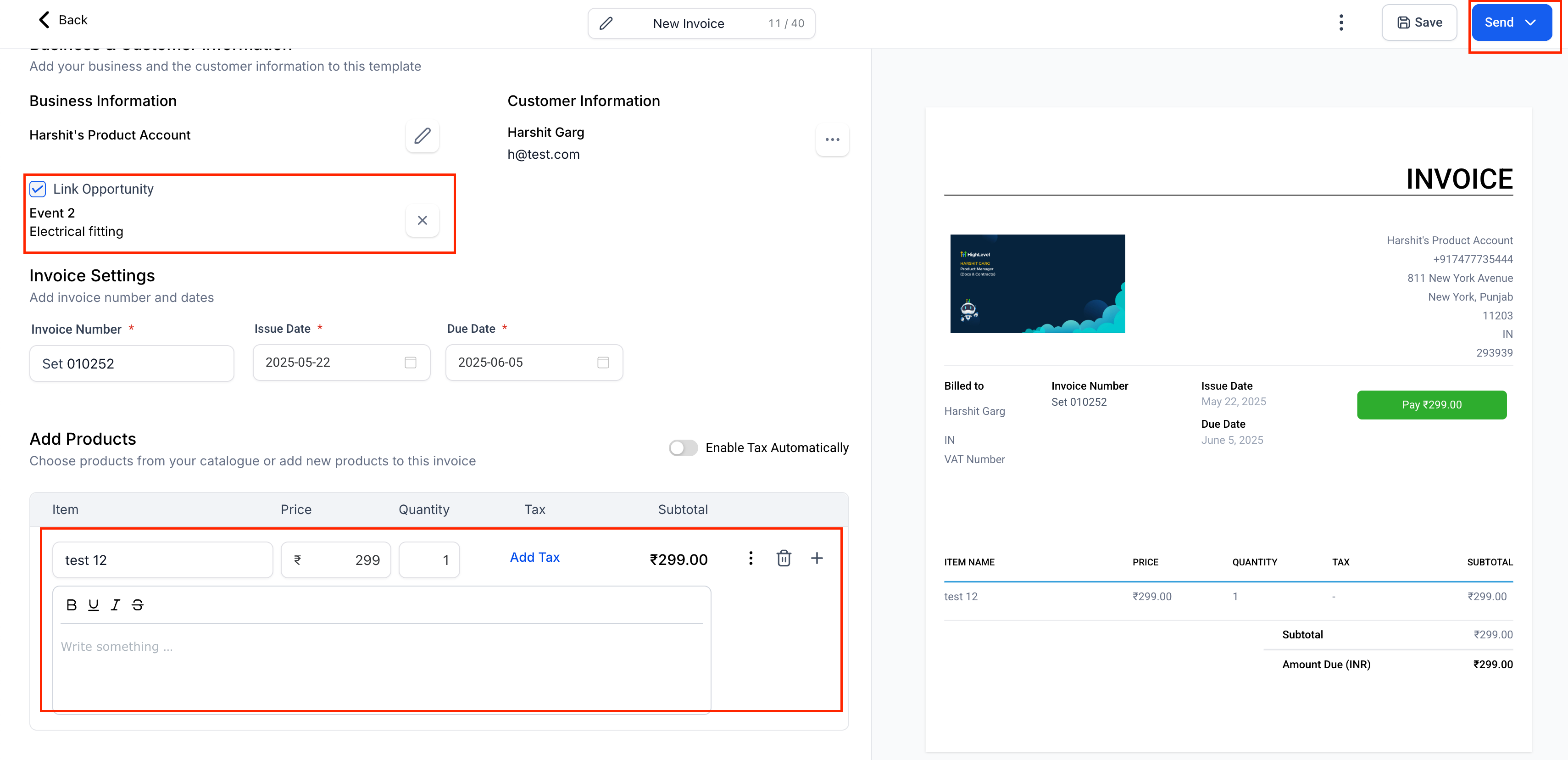
Screenshot 2025-05-22 at 13
  • Inside the Payments tab, choose Invoices from the dropdown → Create Invoice.
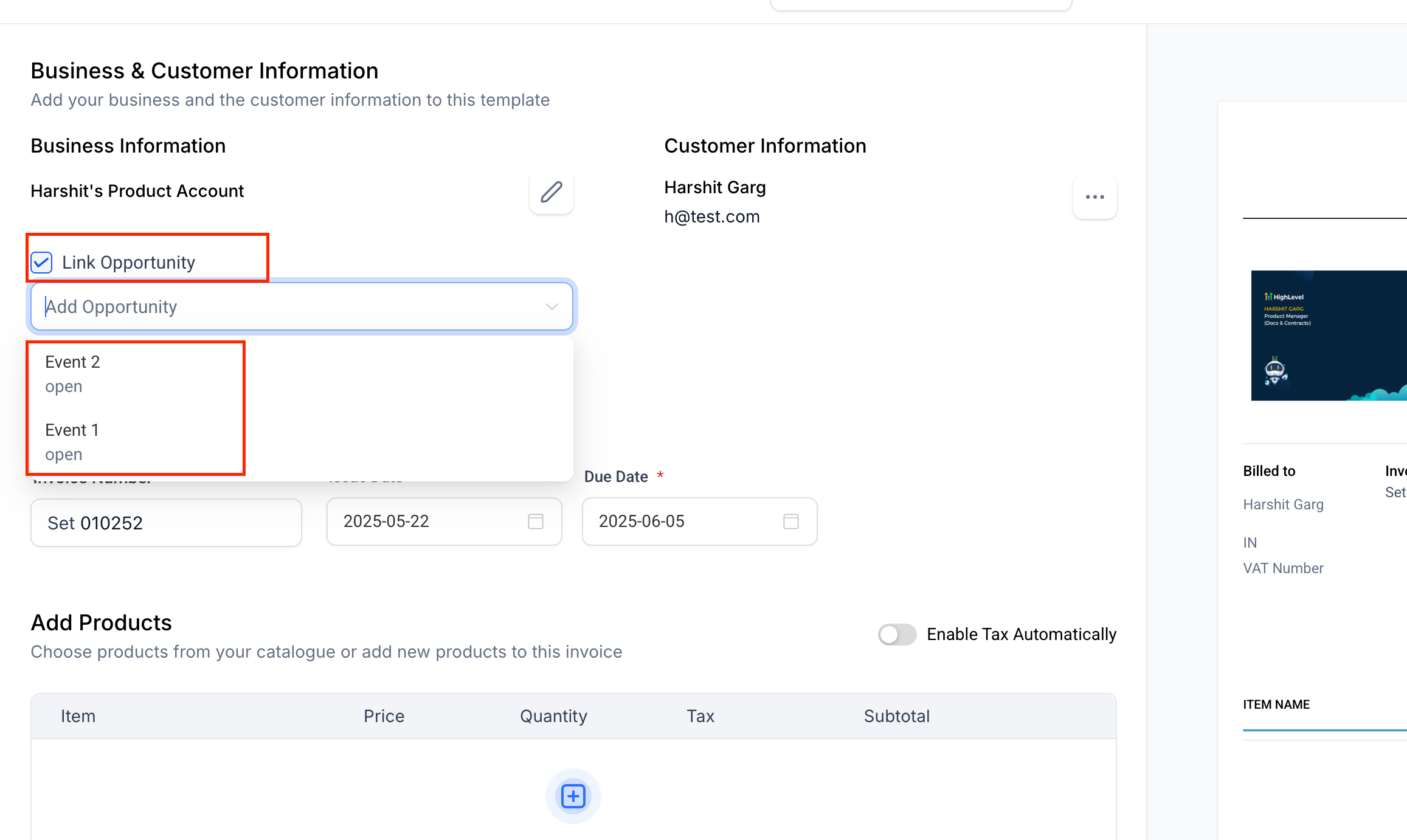
Screenshot 2025-05-22 at 13
  • In the invoice builder, check the Link Opportunity box, select the deal, then Save or Send.
  • Build a workflow triggered by an Opportunity event (e.g. Status Changed, Stage Changed).
  • Add the Send Invoice action.
  • When the workflow runs, the invoice is created, sent, and linked—no extra steps needed.

View your invoices in the Opportunity’s Payments tab.

Screenshot 2025-05-22 at 13
  • Streamline billing right alongside your deals—issue, view, and track all your invoices using opportunities.
https://clixio.io/wp-content/uploads/2023/08/clixio-logo-dark.png 0 0 Clixio.io https://clixio.io/wp-content/uploads/2023/08/clixio-logo-dark.png Clixio.io2025-05-22 18:54:002025-05-22 18:54:00Invoices: Link opportunities and view them in the Payments tab

RSS Latest Feature Updates

  • Export email marketing data 🚀 March 6, 2026
  • Fixed: ‘Assign to User’ Now Skips Inactive Users March 6, 2026
  • Standard Builder: Now with Sticky Notes 2.0 March 6, 2026
  • AI Builder: Post Generation To Do List March 6, 2026
  • Ad Manager – Meta lead gen: Website & hybrid conversion locations March 6, 2026
  • 🔕 No External Update Emails for “Showed” & “No Show” Status Changes March 6, 2026
  • AI Powered Field Tooltips | Clixio Changelog March 3, 2026
  • Assign User Action: Now Assign to IVR Responder March 3, 2026
  • Assign User Action: Now Assign to IVR Responder with Custom Variables March 3, 2026
  • Connect Call (IVR) Action: Now Supports Call Whisper March 3, 2026
Clixio - Marketing and sales automation

Marketing & sales automation built for Australian service businesses. One platform, one flat rate, genuinely easy to use.

Product
Features Pricing How it works Latest updates
Company
Blog FAQ Get support Account transfers
Legal
Privacy Policy Terms & Conditions
© Clixio. All rights reserved. Made with ♡ in Australia.
Scroll to top Scroll to top Scroll to top