
Version History Improvements: View & Restore Versions Across Builders
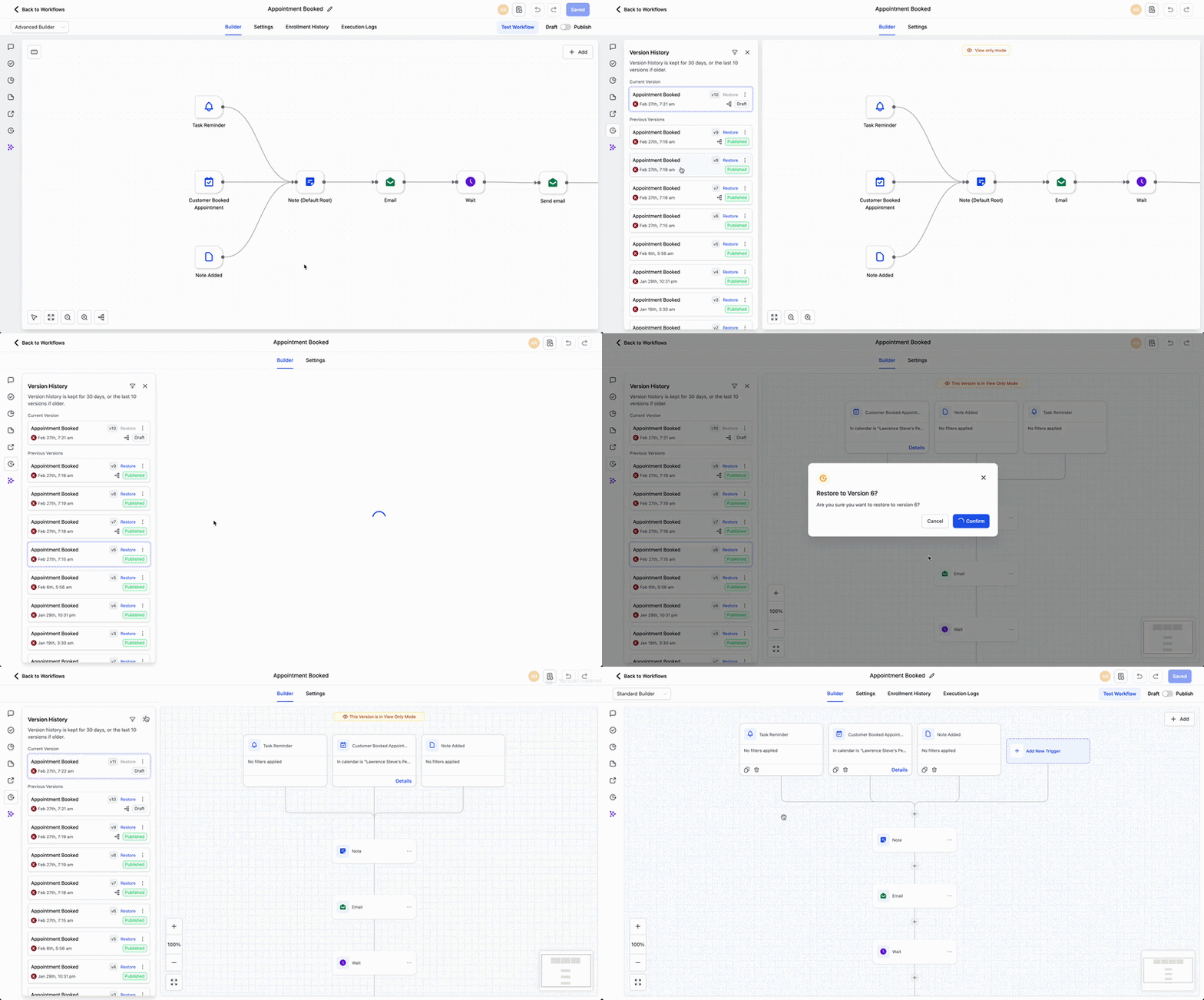
We’ve improved the Version History feature in the Workflow Builder. You can now view and restore workflow versions created in either the Standard or Advanced Builder, with the system automatically opening the correct builder for that version.
Each saved version now retains information about which builder it was created in. When you click ‘Restore’, the system will automatically switch to the appropriate builder and load that exact version, ensuring nothing gets lost or misaligned.
Steps to Restore a Workflow Version:
- Open a workflow and navigate to Version History.
- Select the version you wish to view or restore.
- Click ‘Restore’ – we’ll automatically switch to the correct builder.
Users who worked across both builders previously found it difficult to preview or restore older versions without losing context or structure. This update removes that friction and ensures every version is restored exactly as it was built.
For example, if you created a workflow in the Standard Builder last month and then updated it in the Advanced Builder, you can now restore the original Standard Builder version, which will automatically switch back to the Standard Builder to align with it.
Key Features:
- Applies to workflows that have versions in both the Standard and Advanced Builders.
- The restored version will always open in the builder it was originally created in.
- No manual switching of builders is required during the restore process.
