
‘Sell on Marketplace’ for Snapshots
We’ve introduced a new in-flow ‘Sell on Marketplace’ feature for Snapshots. You can now list a snapshot on the Marketplace directly from Account Snapshots, eliminating the need to jump to the Developer Portal, copy links, or frequently toggle between screens.
What’s special about this release?
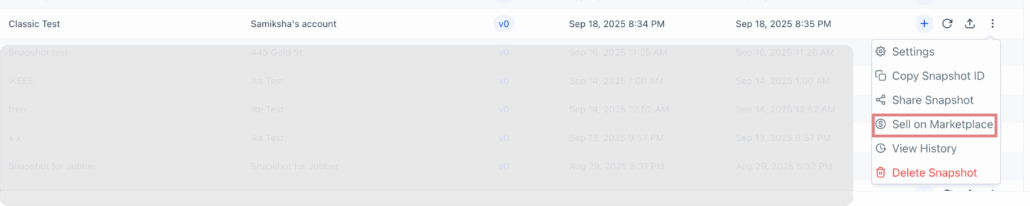
This update provides a streamlined entry point within your existing workflow: Account Snapshots → ⋯ → Sell on Marketplace. This action launches an active developer session with a pre-filled modal that captures the App Name, auto-configures the necessary listing settings for Snapshots, and presents the marketplace link immediately. It removes the need for copy/paste steps and minimises context switching.
- New “Sell on Marketplace” action (Account Snapshots → three-dot menu)
- Opens a guided modal in an active developer session
- You provide the App Name; we pre-set the Snapshot listing configuration
- We generate and display the Marketplace link immediately
Find it under Account Snapshots → three-dot menu → ‘Sell on Marketplace’

- Before: Get link via Share Snapshot → copy → switch to Developer Portal → create app → configure listing → enable Snapshot module → paste link
- Now: One in-flow action that handles app setup, listing configuration, and delivers the link, with no manual back-and-forth
💡 Why is this necessary?
Selling Snapshots should be quick and error-free. By reducing unnecessary clicks and eliminating the need to switch between portals, we lessen friction, minimise misconfigurations, and speed up the listing process, allowing creators to focus on delivering value instead of performing busywork.