• Shopping Cart Shopping Cart
    0Shopping Cart
Clixio
  • Features
  • Pricing
  • FAQ
  • Blog
  • Log in
  • Free Trial
  • Menu Menu

Product Selection per Store for E-Commerce Stores

January 30, 2025/in What's New? E-Commerce

Introduction
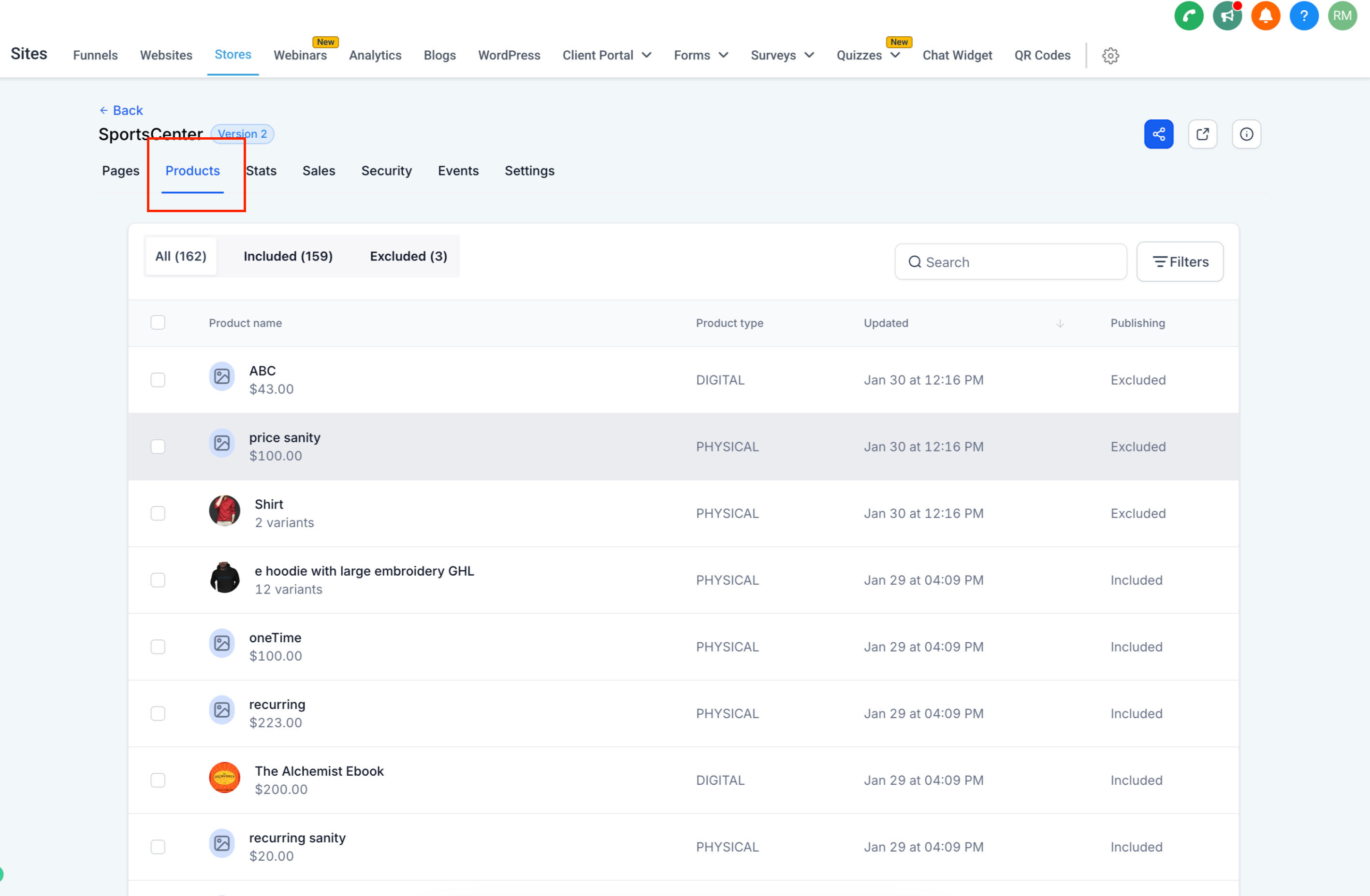
We’re excited to introduce a new feature that gives store owners full control over product visibility across multiple stores within a sub-account. With this enhancement, users can now include or exclude products from specific stores, making inventory management more flexible and efficient.

"Include in Online Store" Toggle condition:

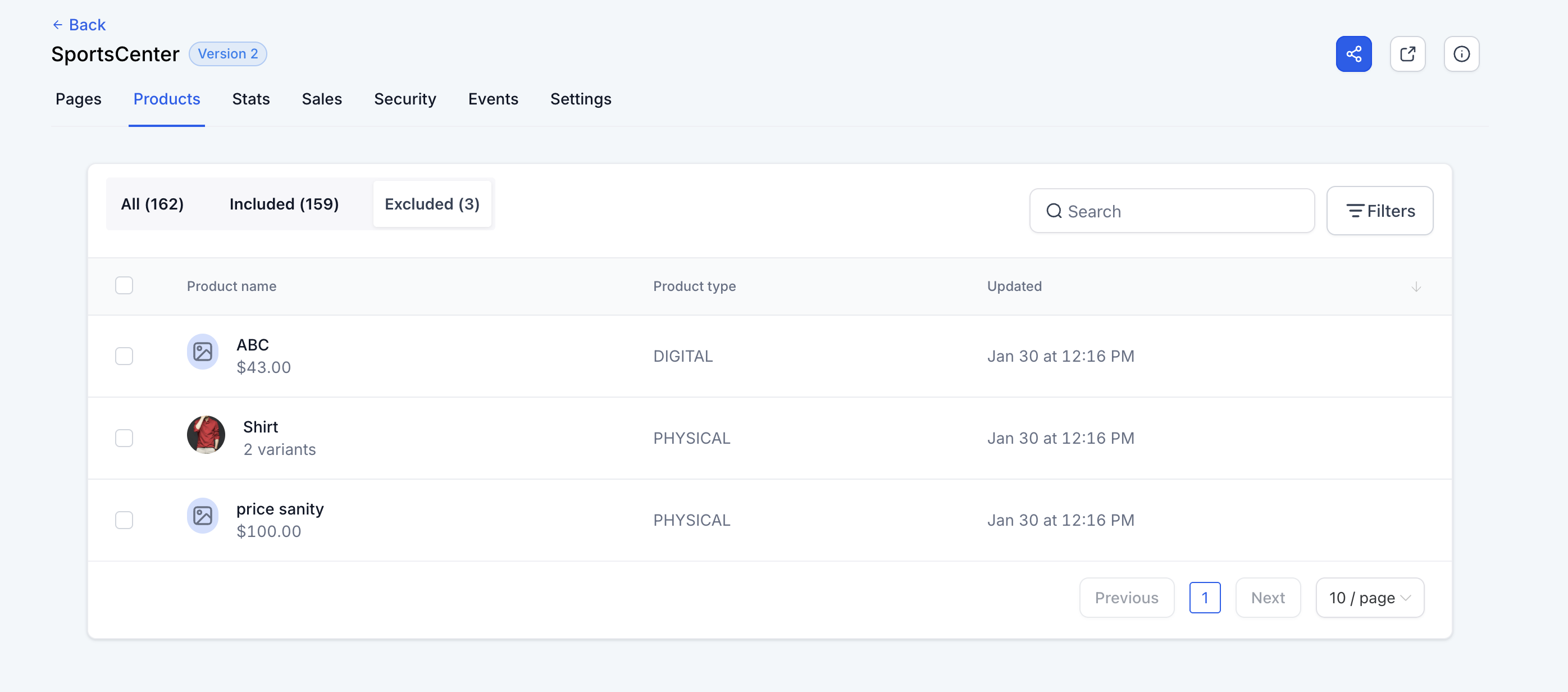
  • Enabled: The product will be available for inclusion or exclusion in the Products section of all stores.
  • Disabled: The product will not appear in the Stores → Products section for any store.

Product Listing Behavior:

  • When a new store is created, products with the "Include in Online Store" toggle enabled will be automatically listed.
  • Newly created products with the toggle enabled will be listed by default in all stores.

Bulk Actions for Product Visibility:

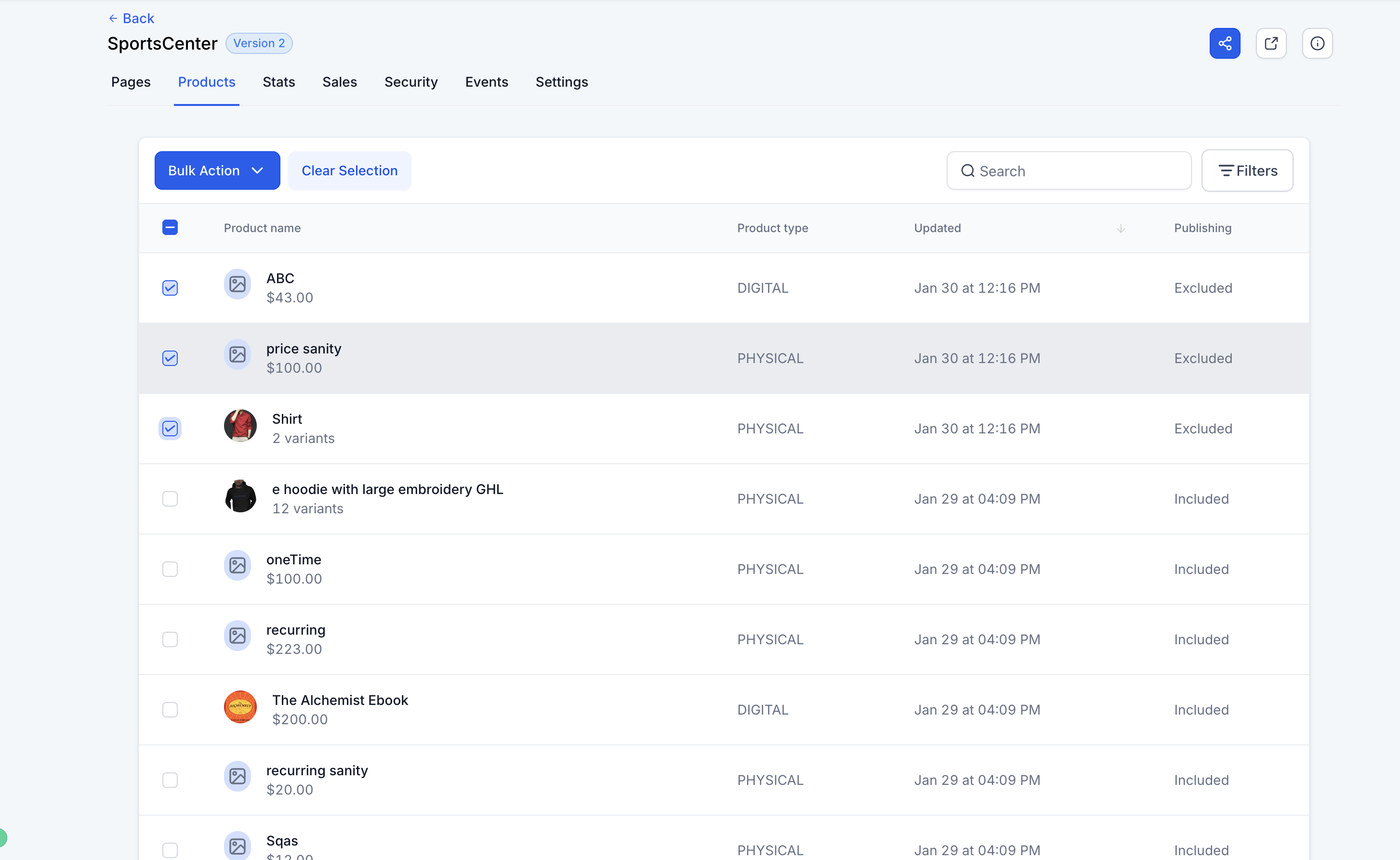
  • Select multiple products to bulk include or exclude them across stores.

Search & Filter Options:

Book a demo
See Clixio working
for your business, live.

30 minute call with our team. Personalised to your industry, no hard sell.

Book your free demo
14 day free trial · Cancel anytime
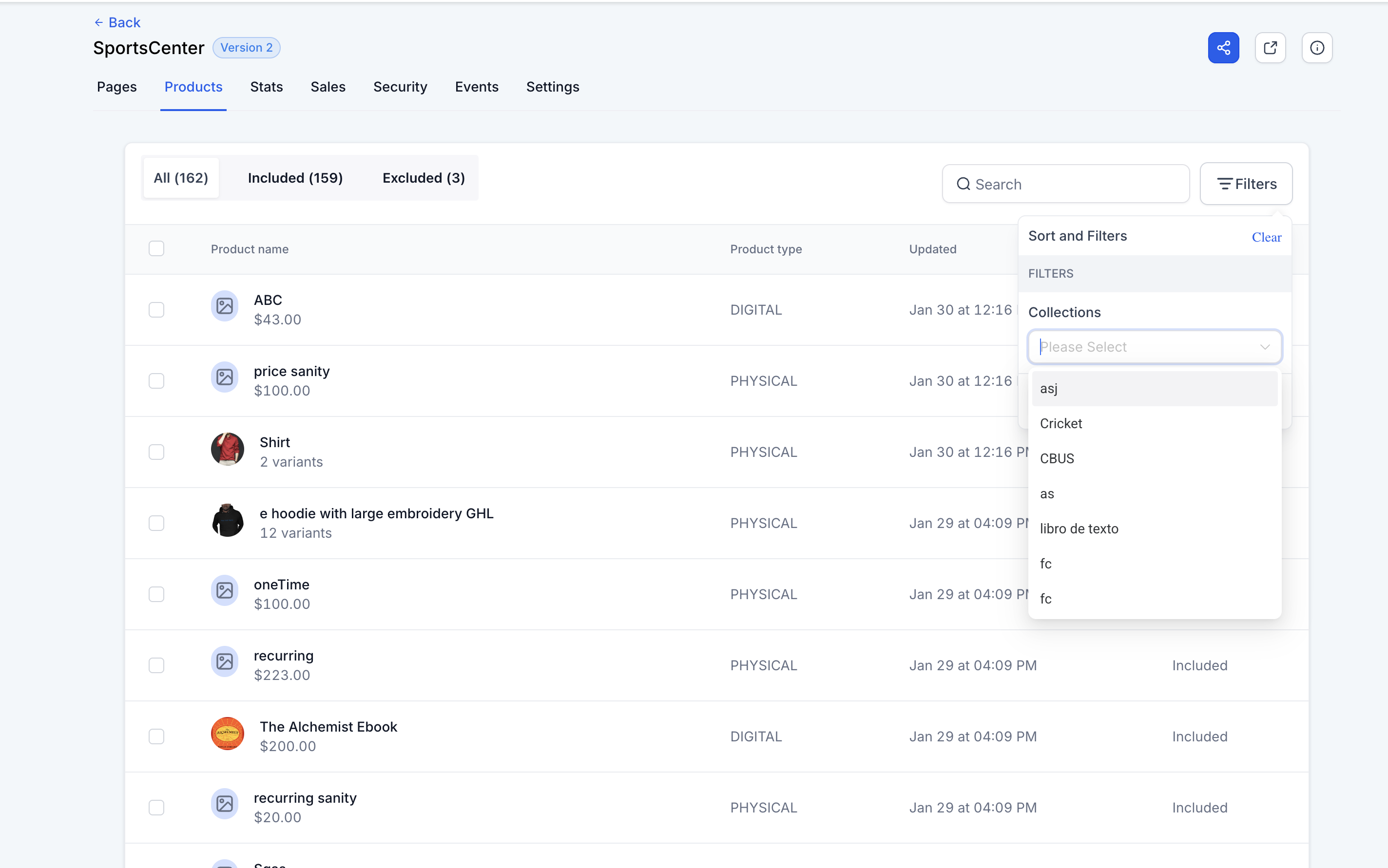
  • Search by Product Name to quickly find products.
  • Filter by Collections to manage visibility efficiently.

Steps for Managing Product Visibility:

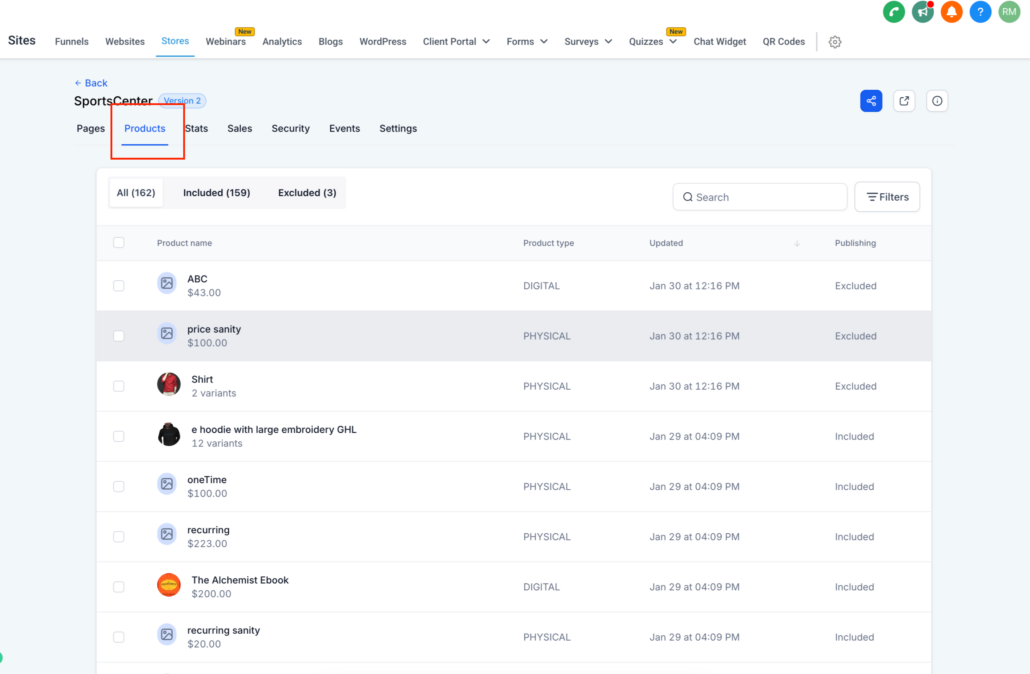
  1. Go to: Stores > Select Store > Products section.
  2. Use bulk actions to include or exclude multiple products at once.
  3. Search & filter products based on product names or filter based on Collections.
  4. Changes are automatically saved—no extra steps needed.
  • If "Include in Online Store" is disabled, the product will not appear for inclusion/exclusion in any store.
  • When a new store is created, only products with "Include in Online Store" enabled will be available.
  • New stores inherit product visibility based on the "Include in Online Store" setting.
  • Store owners can visit the product pages for editing by clicking on specific products in this section.

Products section in Store Pages:
Screenshot 2025-01-30 at 4
image
image
image

https://clixio.io/wp-content/uploads/2025/01/e684d2bff6fb8a179594e8ae06f7b2e4.png 1854 2834 Clixio.io https://clixio.io/wp-content/uploads/2023/08/clixio-logo-dark.png Clixio.io2025-01-30 20:36:002025-01-30 20:36:00Product Selection per Store for E-Commerce Stores

RSS Latest Feature Updates

  • 🔕 No External Update Emails for “Showed” & “No Show” Status Changes March 6, 2026
  • AI Powered Field Tooltips | Clixio Changelog March 3, 2026
  • Assign User Action: Now Assign to IVR Responder March 3, 2026
  • Assign User Action: Now Assign to IVR Responder with Custom Variables March 3, 2026
  • Connect Call (IVR) Action: Now Supports Call Whisper March 3, 2026
  • Fixed: If/Else branching for UTM Campaign (Last Attribution) March 3, 2026
  • Company Variables Now Available in Workflows March 3, 2026
  • Trigger Descriptions in Workflow Builder March 3, 2026
  • Add & Track Product Cost Price and Margin March 3, 2026
  • 🗓️ Smarter Booking Periods with Listing-Level Time Selection Control for Rentals March 3, 2026
Clixio - Marketing and sales automation

Marketing & sales automation built for Australian service businesses. One platform, one flat rate, genuinely easy to use.

Product
Features Pricing How it works Latest updates
Company
Blog FAQ Get support Account transfers
Legal
Privacy Policy Terms & Conditions
© Clixio. All rights reserved. Made with ♡ in Australia.
Scroll to top Scroll to top Scroll to top