
Opportunities & Pipelines – Restore Deleted Pipelines via Audit Logs
Admins can now restore deleted pipelines — including all their associated stages and opportunities — directly from the
Audit Logs
page. This enhancement provides improved control, traceability, and recovery options when working with pipeline data.
-
Restore Pipelines via Audit Logs
A new “Restore” action is available in the Audit Logs for any deleted pipeline. This feature allows users to swiftly recover pipelines along with their structure and associated data.
-
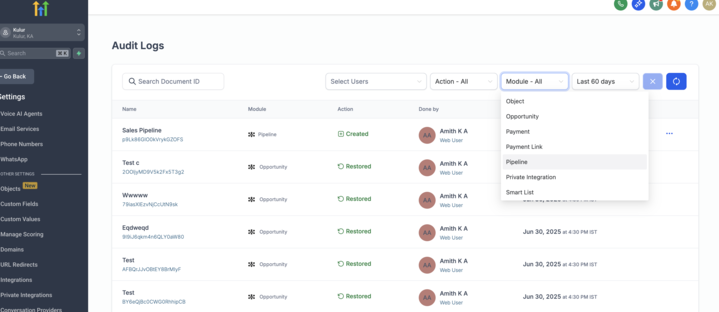
Pipeline Filter in Module Dropdown
The Module filter in Audit Logs now includes “Pipeline” for easier access and quicker filtering of relevant actions.
- Navigate to
Settings > Audit Logs
- From the
Module
dropdown, select
Pipeline
- Locate a deleted pipeline entry
- Click the
ellipsis (⋯)
menu next to the deleted pipeline
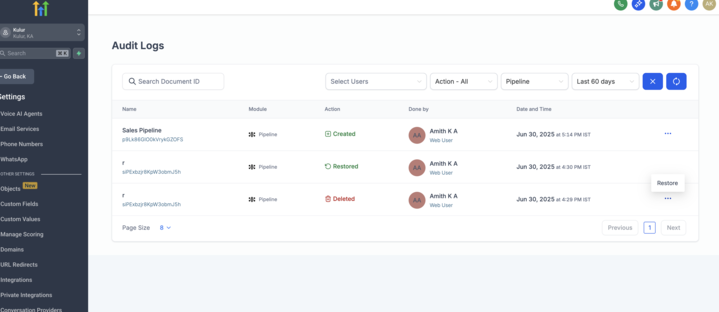
- Select
Restore
and confirm in the modal
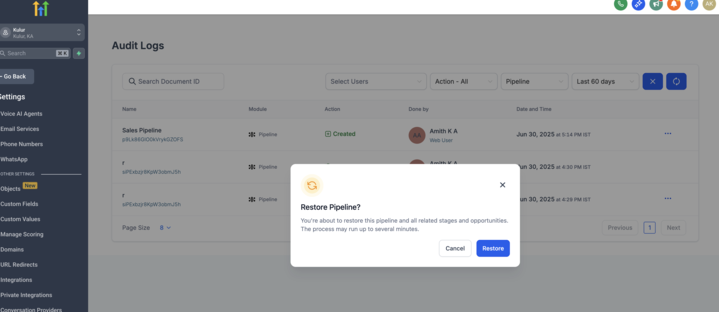
The pipeline will be restored along with its stages and opportunities.
- Prevents the loss of critical pipeline configurations due to accidental deletion
- Helps admins maintain oversight over historical actions and enables quick recovery from mistakes
- Enhances auditability and trust when managing pipeline lifecycle operations