
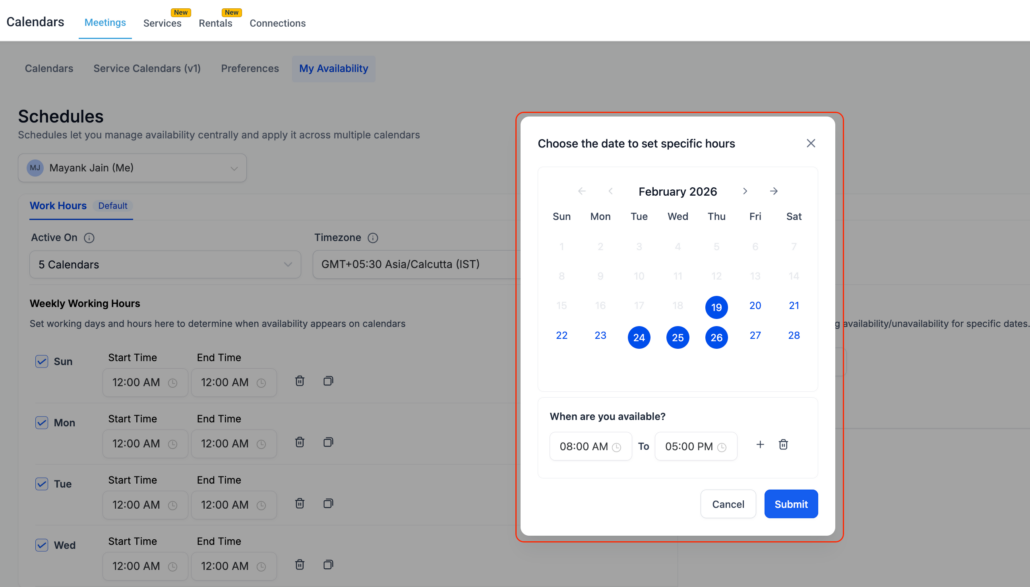
✨ Multi-Date Selection for Date-Specific Hours (Meetings & Rentals)
**Managing Date-Specific Availability Just Got Easier**
Introducing Meetings and Rentals (Private Beta).
<p>Previously, you could only add date-specific hours for one date at a time, making it cumbersome and repetitive to configure availability across multiple days.</p>

<div class="line">
  **Select Multiple Dates at Once**
</div>

<p>You can now choose multiple dates simultaneously and apply the same availability hours in one go.</p>

<p>You can now:</p>
<ul>
  <li>Select <p>multiple dates</p> from the date picker when adding date-specific hours</li>
</ul>

<div class="line">
  <img alt="Adding Date Specific Hours for Meetings" loading="lazy" src="https://canny-assets.io/images/313d3926be99c326883407d5060b6eb1.png" class="tappable"/>
</div>

<ul>
  <li>Set the start time and end time once</li>
  <li>Apply the configuration in bulk across all selected dates</li>
  <li>View grouped date ranges for cleaner organisation</li>
</ul>

<div class="line">
  <img alt="Meetings Date Specific Hours Added" loading="lazy" src="https://canny-assets.io/images/a0fda9b7a8da4da92221faffa71ea2e0.png" class="tappable"/>
</div>

<div class="line">
  **How Date Grouping Works**
</div>

<div class="line">
  When you select multiple dates, the system automatically groups <p>consecutive dates</p> together for easier management.
</div>

<ul>
  <li>Consecutive dates are grouped into a single block</li>
  <li>Non-consecutive dates are split into separate blocks</li>
</ul>

<div class="line">
  If you select <p>Jan 2, 3, 4, 5, 8</p> and <p>9</p>:
</div>

<ul>
  <li><p>Jan 2–5</p> will appear as one grouped entry</li>
  <li><p>Jan 8–9</p> will appear as another grouped entry</li>
</ul>

<p>Each group can be edited or deleted independently later.</p>

<ul>
  <li>⏱️ Saves time by eliminating repetitive, date-by-date setup</li>
  <li>🧩 Keeps availability clean and organised with smart grouping</li>
  <li>✏️ Makes bulk edits simple and manageable</li>
  <li>📆 Perfect for holidays, special schedules, or short-term changes</li>
</ul>

<div class="line">
  <img alt="Adding Date Specific Hours for Rentals" loading="lazy" src="https://canny-assets.io/images/b4ecdbbf79dcf091d397edf555f32259.png" class="tappable"/>
</div>

<div class="line">
  <img alt="Rentals Date Specific Hours Added" loading="lazy" src="https://canny-assets.io/images/7d7dba0e766135cdff408d31154e271d.png" class="tappable"/>
</div>