

Mobile App – Docs & Files in Contacts
You’ve been waiting for a better way to manage documents — and it’s here. Introducing Docs and Files, a brand-new tab at the contact level that brings all your important files together, right where you need them.
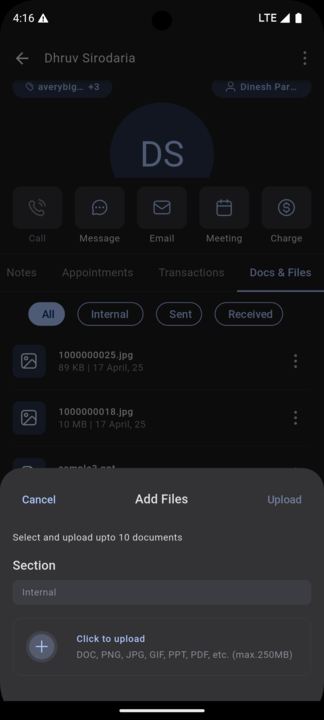
Whether you’re sending contracts, sharing estimates, attaching invoices, or tracking signed agreements, the Docs and Files tab consolidates everything. You can upload up to 10 files at once (up to 250 MB) in popular formats like PDF, DOC, JPG, PNG, PPT, and more — directly under each contact. Documents are automatically sorted into folders such as Internal, Sent, Received, and even Custom Fields, ensuring your files are always easy to locate.
This update moves us a step closer to a truly unified contact experience — where your communications, tasks, and documents coexist seamlessly.
⸻
📁 Docs and Files Tab — Now Available
You will now notice a new tab called Docs and Files when you open any contact. Inside, you’ll find:
• Internal: For manually uploaded files.
• Sent: Files auto-saved from your outgoing conversations.
• Received: Files received via conversations.
• Custom Fields: Auto-organised documents linked to specific fields (nested under Internal).
📄 Supported File Types
DOCX, PDF, JPG, PNG, PPT, GIF — up to 10 files per upload.
⸻
📲 How to Use It?
1. Open any Contact.
2. Swipe to the Docs and Files tab.
3. Tap Upload to add your documents.
4. Browse by folder or preview files with a single tap.
It’s your contact’s digital filing cabinet — organised, streamlined, and designed for the way you work.


Availability:
Clixio v3.97.3 and above
LeadConnector v3.97.3 and above
White Labelled apps – Update to be requested