
Missed Call WhatsApp Back | Clixio Changelog
Missed calls often translate to missed revenue. To bridge this gap, we are excited to introduce **Missed Call WhatsApp Back** — a straightforward, integrated solution to automatically follow up with customers on WhatsApp when a business misses a call.
<p>Businesses can now quickly acknowledge missed calls via WhatsApp, where customers are significantly more likely to read and respond, rather than relying on complex workflows or SMS-only responses.</p>

<div class="line">
    <img alt="Screenshot 2025-12-26 at 2" loading="lazy" src="https://canny-assets.io/images/2ae5298c4c9b5569bcafe6d7febc0681.png" class="tappable"/>
</div>

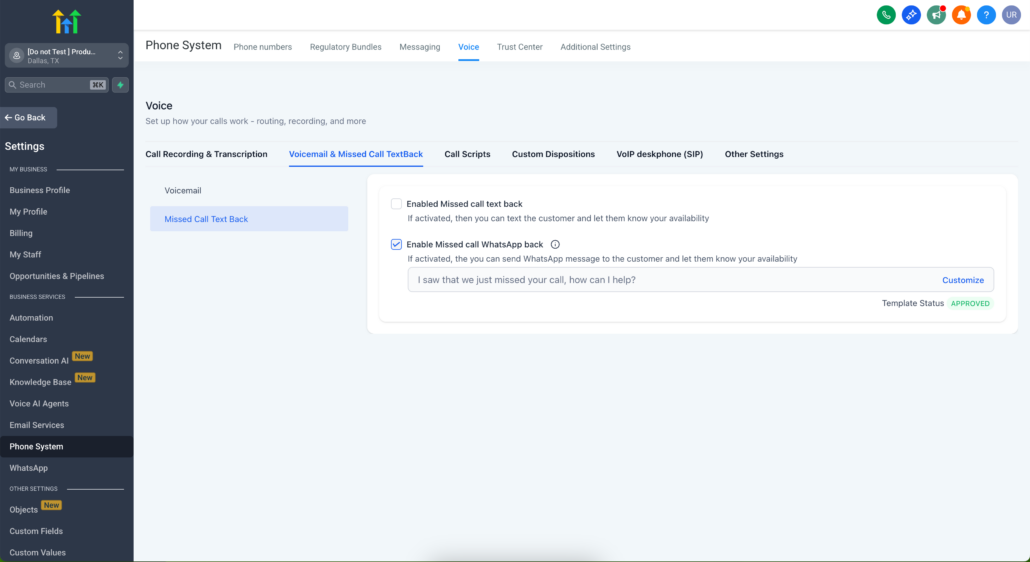
<p>With **Missed Call WhatsApp Back**, your business automatically sends a WhatsApp message to customers when a call goes unanswered, ensuring that every missed call still leads to a conversation — all without any workflows, manual follow-ups, or additional setup.</p>

<ol start="1">
    <li>✅ **Automatic WhatsApp follow-up on missed calls**: When enabled, a WhatsApp message is automatically sent to the caller as soon as a call is missed.</li>
    <li>✅ **New setting added**: A new toggle is now available under:</li>
    <li>Settings → Phone System → Voice → Missed Call Text Back.</li>
    <li>From here, businesses can enable WhatsApp follow-ups with a single click.</li>
    <li>✅ **Pre-approved WhatsApp template (ready to use)**: The feature comes with a pre-filled, approved WhatsApp template:</li>
</ol>

<div class="line">“Hi this is {{location.name}}, I noticed that we just missed your call. How may I assist you?”</div>

<p>This means you can go live immediately — no waiting for template approvals.</p>

<div class="line">
    <div class="heading">
        <p>✏️ **Fully customisable message**</p>
    </div>
</div>

<p>Businesses can customise the message to align with their brand and use case, including support for personalisation variables such as:</p>

<p>{agent_name}</p>
<p>{booking_link}</p>
<p>{business_hours}</p>

<p>Note: Customisation is done directly within the **Missed Call WhatsApp Back** setting, not from the WhatsApp → Templates page.</p>

<div class="line">
    <img alt="Screenshot 2025-12-26 at 2" loading="lazy" src="https://canny-assets.io/images/4890d1848e8f65c74af8804ecefc70f9.png" class="tappable"/>
</div>

<div class="line">
    <div class="heading">
        <p>📱 **Sent from your default WhatsApp number**</p>
    </div>
</div>

<p>The WhatsApp message is always sent from your default WhatsApp number, ensuring a consistent and trusted customer experience.</p>

<div class="line">
    <p>🔁 **Works alongside existing workflows**</p>
</div>

<p>This feature complements any workflows you have already set up for missed calls. If you utilise workflows to send WhatsApp messages or trigger automations, they will continue to operate as expected.</p>

<div class="line">
    <div class="heading">
        <p>**Why Businesses Should Use This Feature**</p>
    </div>
</div>

<ol start="1">
    <li>**Never lose another missed call**: Missed calls can occur during peak hours, after business hours, or when teams are understaffed. This feature ensures that customers are acknowledged instantly — even when no one is available to answer the phone.</li>
</ol>

<ol start="2">
    <li>**Meet customers where they already are**: Customers are much more likely to open and respond to WhatsApp messages rather than SMS or voicemails. Following up on WhatsApp significantly boosts engagement and response rates.</li>
</ol>

<ol start="3">
    <li>**No workflows. No complexity.**: Unlike solutions that rely on workflows, this feature requires no automation setup, goes live in minutes, and works seamlessly with an approved template.</li>
</ol>

<ol start="4">
    <li>**Faster responses = higher conversions**: A swift WhatsApp message reassures the customer that their call was important, helping to keep them engaged and increasing the odds of continuing the conversation.</li>
</ol>

<p>For example, a clinic misses calls during lunch hours. Instead of losing potential appointments, callers instantly receive:</p>

<p>“Hi this is Downtown Health Clinic. We just missed your call — would you like to book an appointment?”</p>

<p>Patients can reply on WhatsApp and schedule directly without needing to call back.</p>

<p>If an agent misses a call while showing a property, the caller receives:</p>

<p>“Hi this is Prime Realty. Sorry we missed your call — would you like to schedule a viewing?”</p>

<p>This keeps the lead engaged, rather than seeking out another agent.</p>

<p>For customers who call after hours, they promptly receive:</p>

<p>“Hi this is AutoCare Garage. We missed your call — our hours are 9am–6pm. Would you like to book a service?”</p>

<p>The customer can book directly via WhatsApp.</p>

<div class="line">
    <div class="heading">
        <p>**How This Helps Your Business**</p>
    </div>
</div>

<p>📞 Instant engagement with missed callers on WhatsApp</p>
<p>⚡ Zero setup friction — no workflows required</p>
<p>🧠 Smarter follow-ups using personalisation and context</p>
<p>💼 Reduced manual work for teams</p>
<p>📈 Higher conversion rates from missed opportunities</p>

<p>**Retention & Customer Experience Impact**</p>
<p>🔁 Ensures no customer feels ignored</p>
<p>⭐ Improves response time and perceived professionalism</p>
<p>💬 Aligns with modern customer behaviour — WhatsApp messages are read and acted upon faster than SMS</p>

<div class="line">
    <div class="heading">
        <p>**How to Access the Feature**</p>
    </div>
</div>

<ol start="1">
    <li>Go to Settings</li>
    <li>Navigate to Phone System → Voice</li>
    <li>Open Missed Call Text Back</li>
    <li>Enable Missed Call WhatsApp Back</li>
    <li>Customise your message (optional)</li>
    <li>Save — and you’re live 🎉</li>
</ol>