
🚀 Custom ChatGPT Connector + OAuth Support
Connect your GoClixio account with ChatGPT — powered by Clixio MCP!
We’ve just launched a Custom Connector capability that allows you to securely link your Clixio account with your ChatGPT account. This integration enables you to query your business data (Contacts, Calendar Events, and more) directly from ChatGPT — all powered by the Clixio MCP.
This update brings:
- 🔗 Seamless integration between Clixio and ChatGPT
- 🔒 OAuth-based authentication for secure connection
- ⚙️ Real-time data access for smarter business conversations inside ChatGPT
Once connected, you can ask ChatGPT:
- “Get me the list of all contacts in my account.”
- “Are there any open opportunities?”
- “Show upcoming appointments for tomorrow.”
ChatGPT will fetch data through MCP and summarise it instantly.
How to Connect in 5 Simple Steps
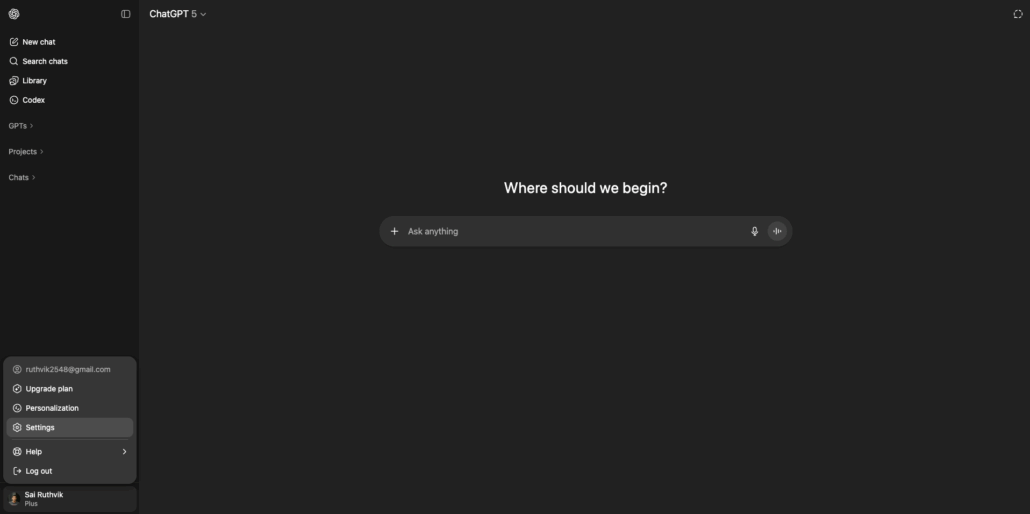
Step 1: Enable Developer Mode in ChatGPT
- Log in to your ChatGPT account (Plus, Pro, or Team plan).
- Go to Settings → Apps and Connectors → Advanced Settings.
- Enable the toggle for Developer Mode.
Step 2: Create the Custom Connector
- Navigate to Settings → Apps and Connectors → + Create New Connector.
Step 3: Authorise via OAuth
- Log in via OAuth.
- You’ll be redirected to the LeadConnector Marketplace.
- Review the app details, then click Next to proceed and select the sub-account you wish to connect.
- Note: Connect to the desired sub-account to ensure correct data access scopes.
Step 4: Verify the Connection
- Your new connector will appear under Settings → Apps and Connectors.
- Open a new ChatGPT chat → click “+” in the input box → choose “More” → select your connector.
- Start chatting with your Clixio data instantly.
Security & Compliance
Notice: This connector shares the data above with OpenAI through your ChatGPT account. By connecting, you acknowledge the risk of sharing data with OpenAI. Users with specific compliance requirements, such as HIPAA, should verify that their ChatGPT plan meets their needs.
- Only scoped business data (Contacts, Opportunities, Calendar Events, Conversations) is accessed.
- Clixio MCP doesn’t store or retain conversation data.
- OAuth ensures each connection is private and revocable at any time.
