
Automate Badge Issuance in Workflows (Using “Issue Certificate” Action)
- **Badges are a lightweight, visual way to recognise**
milestones, progress, and engagement.
While we’re actively working on a dedicated “Issue Badge” action, you can start issuing badges right now using the existing “Issue Certificate” workflow action.
Yes — badges are issued through the same action as certificates!
- **You can combine any of the supported workflow triggers** with the existing “Issue Certificate” action to send a badge automatically to your customers.
✅ Just select a badge template instead of a certificate template when using the “Issue Certificate” action.
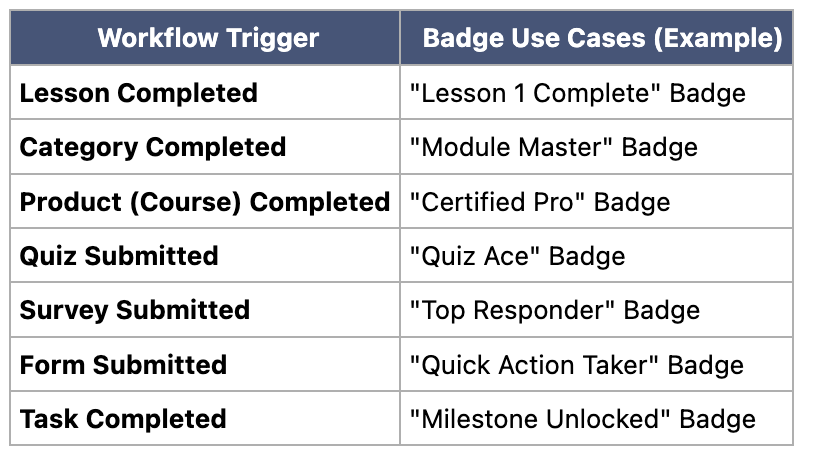
Most Used Triggers + Use Cases
You can find these triggers inside your Workflow Trigger menu, under “Courses,” “Contact,” and “Form Activities.”
- Go to
Automation > Workflows
-
Create from Scratch
or open an existing workflow.
- Add a
Trigger
from the list above.
- Add an
Action
→ select
Issue Certificate
.
- Choose a
Badge template
instead of a Certificate template.
Note: Badges are fully visual and lightweight — perfect for micro-recognition. They’ll be sent as downloadable images to your customers.
dedicated “Issue Badge” action
to make this even clearer and easier to use.
Until then, the “Issue Certificate” action
supports both badges and certificates seamlessly.