
Add Messaging & Social Channels to Your Google Business Profile (GBP)
Locations can now attach messaging options (WhatsApp, Text/SMS) and social channels (Facebook, Instagram, LinkedIn, YouTube, TikTok, X, Pinterest) to their Google Business Profile pages. This provides customers with more familiar ways to reach you, creating additional pathways for engagement and lead capture.
<div class="line">
**1)** <p>Link WhatsApp & Text (SMS) with GBP</p>
</div>
<ul>
<li>Add WhatsApp and Text contact numbers directly in the GBP connection flow.</li>
<li>One-click selection of CRM-integrated numbers from a dropdown menu.</li>
<li>If a non-Clixio number is entered, a warning will be displayed: automations and syncs are not available for numbers that are not integrated with CRM.</li>
</ul>
<div class="line">
**2)** <p>Social Channels Integration with GBP</p>: Connect social profiles to your GBP page: Facebook, Instagram, LinkedIn, YouTube, TikTok, X, Pinterest.
</div>
<ul>
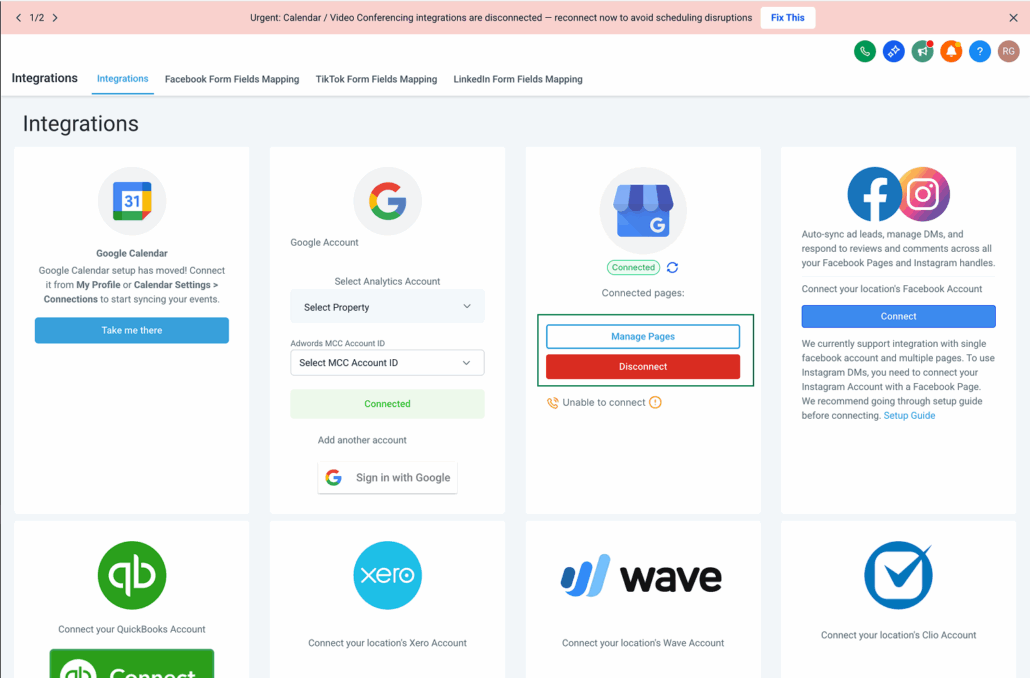
<li>Navigate to Integrations: Sub-account view → Settings → Integration → Google Business Profile card.</li>
</ul>
<div class="line">
<img alt="GBP Home" loading="lazy" src="https://canny-assets.io/images/407ec529e6ae0ad26c83955828ca6280.png" class="tappable"/>
</div>
<ul>
<li>Select your GBP page(s): Click Connect/Manage to view all GBP pages associated with the connected Google account.</li>
</ul>
<div class="line">
<img alt="GBP Page selection" loading="lazy" src="https://canny-assets.io/images/a54b445cc3a0a28c584f994acd3fc1cd.png" class="tappable"/>
</div>
<ol start="1">
<li>WhatsApp & Text: Choose a CRM number from the dropdown, or enter a different number (a warning will be shown if it's not CRM-connected).</li>
<li>Social: Click Connect/Manage channels to add or edit social links.</li>
</ol>
<div class="line">
<img alt="Modal_GBP" loading="lazy" src="https://canny-assets.io/images/a7c7c260bffd8b51233d1db8b48df91d.png" class="tappable"/>
</div>
<ul>
<li>Review & Save: Confirm connected channels. You can update or remove them at any time from the same screen.</li>
</ul>
<p>Notes:</p>
<ol start="1">
<li>Messages can only be synced and automation set up if CRM-connected numbers or social channels are linked to GBP.</li>
<li>If both WhatsApp and Text message numbers are added, Google prioritises the Text message number and displays it in search results. (WhatsApp will only be displayed if the Text number is not added.)</li>
<li>A support document is available in the "Know More" CTA on the input modal. There may be a delay in details being updated as Google verifies and approves all information before linking.</li>
</ol>