
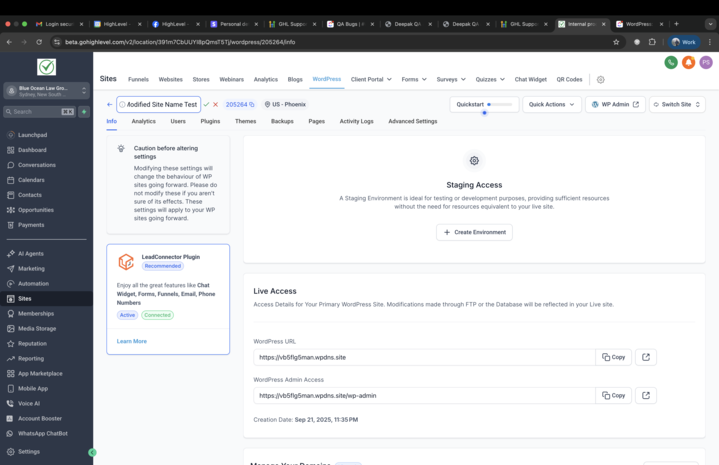
Ability to Edit WordPress Site Name
You can now rename a WordPress site directly from the site info screen in the hosting dashboard.
This feature has been one of the most requested—it’s a small change with a big impact!
- 📝
Inline Editing:
Click the pencil icon next to the site name to edit.
- 💡
Tooltip Guidance:
Clearly indicates that this change does not affect SEO or the actual site title.
- 🔄
Instant Updates:
Changes are saved and reflected in real-time.
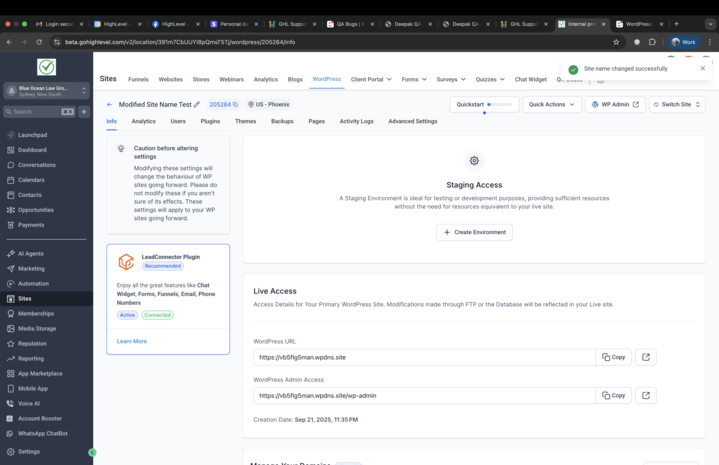
- Personalise how sites appear in your dashboard.
- Avoid confusion between internal labels and public-facing metadata.
- Improve clarity and usability for agencies managing multiple sites.
🗑️
Delete Site Modal Enhancements
We’ve upgraded the Delete Site confirmation modal to make deletions safer and more transparent.
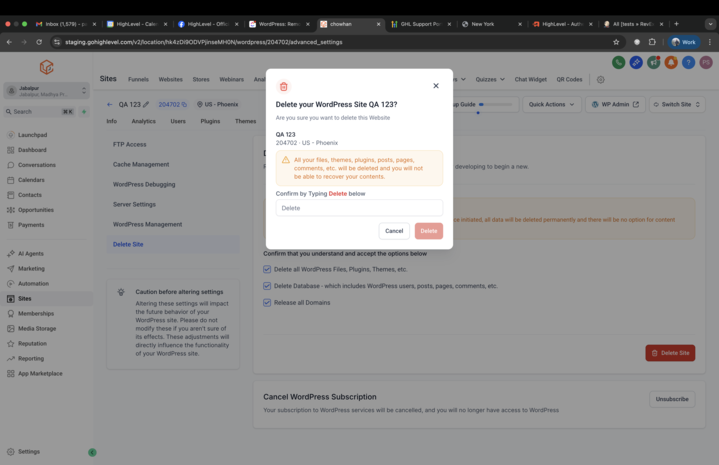
This modal displays the site name, WordPress ID, and server location before confirmation.
- Reduces the risk of accidental deletions.
- Provides users with confidence and clarity before taking irreversible actions.
To learn more about WordPress Hosting, and how you can resell it to your clients, click here. Have suggestions for WordPress Hosting? Simply post your ideas on our Ideas Board, and we will prioritise your suggestions!
